GetCompress
GetCompress: A fast, lightweight desktop app for secure batch compression of videos, images, GIFs, and PDFs.
GetCompress is a powerful offline desktop application designed for efficient batch file compression. Supporting over 107 formats, including MP4, PNG, and PDF, it helps users reduce file sizes by up to 90% without significant quality loss. It is ideal for creators and developers seeking secure, local compression.
2026-06-30
--K
GetCompress Product Information
GetCompress: The Ultimate Desktop Solution for Fast Batch Compression
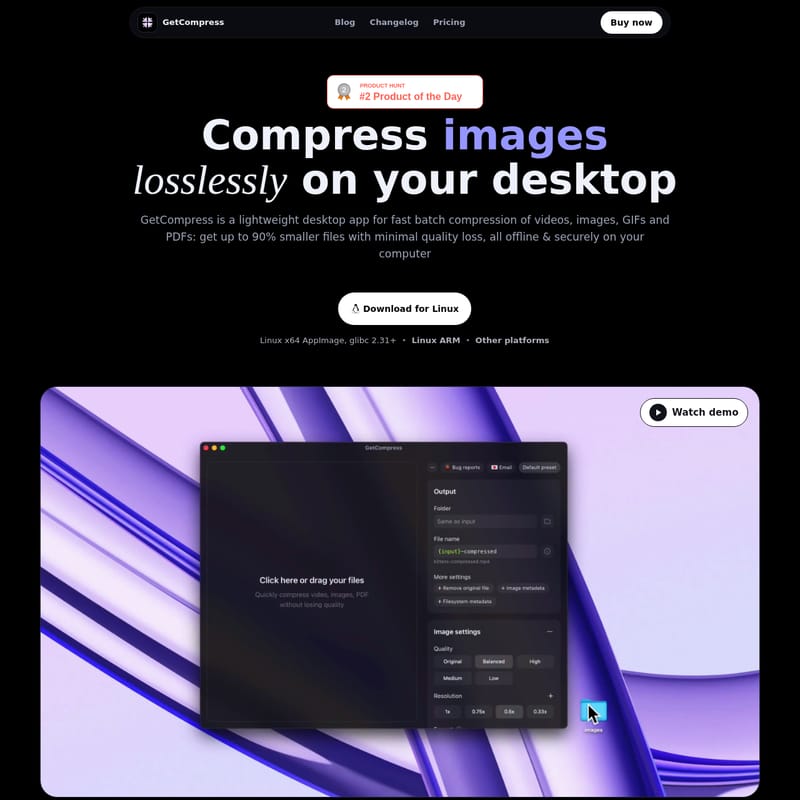
In an era where high-resolution media is the standard, managing large file sizes can be a significant bottleneck for creators, developers, and professionals. GetCompress is a lightweight desktop application designed to solve this problem by providing fast, batch compression for videos, images, GIFs, and PDFs. By using advanced compression algorithms, GetCompress allows users to achieve up to 90% smaller files with minimal quality loss, all while working entirely offline and securely on your computer.
What’s GetCompress?
GetCompress is a comprehensive compression tool built for power users who need a reliable, local alternative to online converters. Unlike web-based tools that require uploading sensitive data to external servers, GetCompress works directly on your device (macOS, Windows, or Linux). It is designed to be "blazing fast," lightweight, and intuitive, making it the perfect companion for anyone who sends large files daily.
Whether you are dealing with a 22GB library of video clips or a handful of image-heavy PDFs, GetCompress streamlines the optimization process. It supports over 107 distinct formats, ensuring that no matter what file type your team uses, you can compress it effectively. From standard JPEGs and MP4s to specialized formats like AVIF, HEIC, and RAW ProRes, GetCompress handles it all with ease.
Key Features of GetCompress
GetCompress is packed with features that prioritize both performance and quality of life for the user. Below are the standout features that make it a leader in the desktop compression space.
1. Blazing Fast Batch Processing
Efficiency is at the core of GetCompress. You can drop dozens of files at once and let the app handle the heavy lifting. This batch processing capability is essential for users who manage large volumes of media, such as videographers or social media managers.
2. Massive Format Support (107+ Formats)
One of the most impressive aspects of GetCompress is its versatility. It supports 107+ formats, including:
- Images: HEIC, WebP, JPEG, PNG, AVIF, PSD, and more.
- Videos: MP4, MOV, RAW ProRes, WebM, and others.
- Documents & Animations: PDFs and GIFs.
3. Professional Automation Tools
For those who want to automate their routine, GetCompress offers advanced tools:
- Folder Monitoring: Choose a folder, and every new file that lands there is automatically compressed.
- Clipboard Compression: Copy a media file to your clipboard, and the app replaces it with a lighter version instantly.
- Auto-copy Output: Once compression is finished, the output file is automatically copied back to your clipboard, ready for pasting into Slack, email, or a browser.
4. Full Control & Reusable Presets
You don't have to settle for a "one size fits all" approach. GetCompress allows you to save favorite presets and manage specific details such as quality, dimensions, and target file size. You can adjust these settings per preset or per individual file.
5. Developer & Power User Integrations
GetCompress is built to fit into modern tech stacks. It includes:
- MCP Server: Connect AI assistants and integrate local compression into automated workflows.
- Raycast & Siri Shortcuts: Call deeplinks or use your favorite launcher to trigger compression tasks.
- Open-source Extensions: Power users can bring their own CLI tools and wrap them with JS snippets while enjoying the polished GetCompress UI.
Use Cases
GetCompress is a versatile tool that serves various professional needs:
For Content Creators
Creators can compress video recordings and exports for faster uploads to platforms like YouTube or social media. One user reported shrinking a 22GB library of MP4 clips down to just 4GB using the "Balanced" preset, saving massive amounts of storage space.
For Designers
Designers can optimize screenshots, photos, and design exports for web use, email attachments, and handoffs. The app ensures that high-quality designs don't result in bloated file sizes that slow down websites or clog up inboxes.
For Developers and QA
Developers can integrate GetCompress into their local workflows via the MCP server or CLI tools. It is perfect for optimizing assets before deployment or compressing screen recordings for bug reports.
For Marketers
Marketers often deal with image-heavy PDFs, presentations, and scans. GetCompress helps shrink these files to meet strict file size limits for email marketing or client portals without sacrificing the professional look of the materials.
How to Use GetCompress
Using GetCompress is designed to be a friction-less experience with "no extra clicks."
- Drag and Drop: Simply drag a file from your Finder (macOS), Explorer (Windows), or directly from apps like Slack or CleanShot.
- Mini Drop Zone: Use the dedicated mini drop zone to drop a file in and immediately drag the compressed version straight back out to its destination.
- Context Menu: On macOS, you can compress files directly from the Finder context menu for an even faster workflow.
- Trim and Preview: Before exporting, you can preview images, videos, and PDFs. For videos and GIFs, you can trim the duration or inspect animations frame by frame.
- Keyboard Shortcuts: Utilize customizable keyboard shortcuts to trigger compression tasks without touching your mouse.
FAQ
What is GetCompress? GetCompress is a lightweight desktop application for fast, batch compression of videos, images, GIFs, and PDFs. It allows for up to 90% size reduction with minimal quality loss.
My data is sensitive; will it be secure and safe? Yes. GetCompress works entirely offline on your computer. Your files are never uploaded to a server, ensuring maximum privacy and security.
What files does GetCompress convert and compress? It supports over 107 formats, including HEIC, WebP, JPEG, PNG, AVIF, PSD, MP4, MOV, RAW ProRes, WebM, GIF, and PDF.
Does GetCompress make media quality worse? How much does it reduce file size? GetCompress uses advanced algorithms to maintain high quality while reducing file size by up to 90%. Users have full control over quality settings to find the perfect balance for their needs.
Does GetCompress work on macOS, Windows, and Linux? Yes. It is supported on macOS 10.15 Catalina or newer, Windows 10 or 11, and Linux (including x64 AppImage and ARM architectures).
What is the refund policy? GetCompress offers a 14-day money-back guarantee if you are not satisfied with the product.
"This actually is one of the tools I needed so I don’t have to search every time I need to compress something." — Keni (@Keniisu)
With a one-time payment for a Lifetime License, GetCompress offers a powerful, subscription-free way to manage your media assets efficiently and securely.