Gemini Omini Video
Gemini Omni Video: A High-Performance AI Text to Video and Image to Video Creation Platform
Gemini Omni Video is an advanced AI video generator powered by the Google Veo 3.1 model, offering seamless text-to-video and image-to-video capabilities. Designed for creators, marketers, and filmmakers, Gemini Omni Video enables high-quality video production with 4K resolution, synchronized audio, and diverse artistic styles. With over 50 million creations to date, it provides a cost-effective solution for social clips, product videos, and cinematic storytelling through a flexible, credit-based pricing model.
2026-05-22
--K

Gemini Omini Video Product Information
Gemini Omni Video: The Ultimate AI Text to Video and Image to Video Generator
In the rapidly evolving world of digital content, Gemini Omni Video stands out as a leading AI-powered solution for creators who need to produce high-quality visual content at scale. Whether you are a social media influencer, a marketing professional, or a filmmaker, Gemini Omni Video provides the tools necessary to create at the speed of thought. By leveraging cutting-edge models like the Veo 3.1 Lite, this platform transforms simple text prompts and static images into dynamic, cinematic videos with synchronized audio.
Currently, Gemini Omni Video is offering a limited release promotion with 50% off all yearly plans, making it the perfect time for creators to integrate this powerful AI video generator into their workflow.
What is Gemini Omni Video?
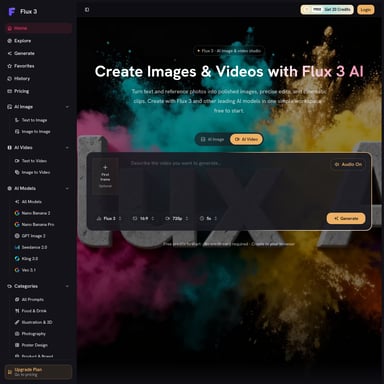
Gemini Omni Video is a comprehensive AI video generation platform designed for both text-to-video and image-to-video workflows. It serves as a digital studio where users can input natural language descriptions or upload reference images to generate short video clips with realistic motion, professional lighting, and intricate visual detail.
Powered by the Google Veo 3.1 model—specifically the Veo 3.1 Lite variant, which is optimized for high-volume, cost-effective generation—Gemini Omni Video has already empowered over 2 million active creators to produce more than 50 million images and videos. With over 100,000 creations daily, it is a trusted tool for those looking to draft social clips, campaign visuals, product videos, and visual stories without the overhead of a traditional video shoot.
Key Features of Gemini Omni Video
Gemini Omni Video focuses on practical controls and prompt-led generation to help teams move from an initial idea to a usable clip quickly. Below are the core features that define the platform:
1. Text to Video Creation
Describe a scene in natural language, and Gemini Omni Video will generate a short video featuring complex motion and lighting. This is ideal for turning scene ideas, scripts, and storyboards into tangible clips.
2. Image to Video Animation
Users can upload up to five reference images and describe how they should move. Gemini Omni Video then animates these static assets into short AI videos, maintaining visual consistency across the motion.
3. Advanced Model: Veo 3.1 Lite
The platform utilizes Google Veo 3.1, the most cost-effective variant for high-volume generation, ensuring that you get professional results without excessive credit costs.
4. High-Resolution Output
Depending on your project needs, Gemini Omni Video supports multiple resolutions, including:
- 720p (Standard HD)
- 1080p (Full HD)
- 4K (Ultra High Definition)
- 8K (Available in the Max plan)
5. Flexible Aspect Ratios and Formats
To cater to different platforms like YouTube, TikTok, and Instagram, Gemini Omni Video offers various aspect ratio presets:
- 16:9 (Landscape for cinematic and desktop use)
- 9:16 (Portrait for mobile and social stories)
- Auto (Smart adjustment based on content)
6. Creative Style Controls
Match the tone of your project perfectly by choosing from a variety of visual looks:
- Cinematic
- Anime
- Realistic
- Artistic
- Minimalist
7. Synchronized Native Audio
One of the standout features of Gemini Omni Video is the inclusion of built-in, synchronized native audio, which completes the cinematic experience and saves time in post-production.
How to Use Gemini Omni Video
Creating professional-grade content with Gemini Omni Video is a straightforward process designed for a fast workflow. Follow these steps to generate your first clip:
- Select Your Input Mode: Choose between "Text to Video" to start with a prompt or "Image to Video" to use your own reference files.
- Input Your Content: Enter a detailed prompt (up to 20,000 characters) or upload your reference images. You can also use the "Generate with AI" tool to refine your prompt.
- Configure Settings: Select your preferred resolution (720p to 4K) and aspect ratio (16:9, 9:16, or Auto).
- Choose Your Style: Apply style controls such as cinematic or realistic to define the visual aesthetic.
- Generate: Click "Create Video." The system will display the required credits (e.g., 20 credits) before starting.
- Review and Export: Preview your generated clip in the "Results" or "History" section. Once satisfied, download or share the result directly.
Use Cases for Gemini Omni Video
Creators worldwide use Gemini Omni Video for a wide range of professional and creative applications:
- Social Media Content: Draft quick clips for Instagram, TikTok, and YouTube.
- Marketing Campaigns: Develop campaign concepts and visuals 10x faster than traditional methods.
- E-commerce: Create high-end product videos with synced audio that would otherwise cost thousands of dollars.
- Education and Training: Generate explainer videos and educational content.
- Entertainment: Produce game trailers, music visuals, and multi-shot storytelling with character consistency.
- Production Planning: Use the tool as a video ideation studio for concept reviews and storyboarding.
Pricing and Plans
Gemini Omni Video offers a transparent pricing structure to suit everyone from hobbyists to large-scale agencies. Save 50% by choosing annual billing.
Free Plan
- Cost: $0
- Includes: 5 credits per day (login required), standard quality output, basic AI models, HD & 4K resolution, and community support.
Basic Plan
- Cost: Approximately $19.50/month (billed yearly)
- Includes: 400 credits/month, standard AI models, HD resolution, and priority queue.
Pro Plan (Popular Choice)
- Cost: Approximately $39.50/month (billed yearly)
- Includes: 1,000 credits/month, access to all AI models, HD & 4K resolution, priority queue, and dedicated support.
Max Plan
- Cost: Approximately $74.50/month (billed yearly)
- Includes: 2,300 credits/month, access to all AI models, 4K & 8K resolution, priority queue, and dedicated support.
FAQ (Frequently Asked Questions)
What is Gemini Omni Video?
Gemini Omni Video is an AI video generator designed for text-to-video and image-to-video creation. It allows you to write a prompt or upload up to five reference images to generate short clips with synchronized native audio.
Can I create Image to Video clips?
Yes. You can upload a reference image, describe the desired motion, and animate it into a short AI video using the Gemini Omni Video workflow.
What styles does Gemini Omni Video support?
The platform supports a variety of styles including cinematic, anime, realistic, artistic, and minimalist looks to match your project's tone.
What aspect ratios and resolutions are available?
Gemini Omni Video offers 16:9, 9:16, and Auto aspect ratios. Resolution options include 720p, 1080p, 4K, and 8K depending on your chosen subscription plan.
How do I get better video results?
For the best results in Gemini Omni Video, use descriptive prompts, utilize the "Generate with AI" prompt helper, and provide clear reference images if using the image-to-video feature.
"Gemini Omni Video is like having a video ideation studio on demand. The output is ready for concept reviews and production planning." — Michael Brown, Filmmaker
Start your journey with Gemini Omni Video today and turn your thoughts into cinematic reality.