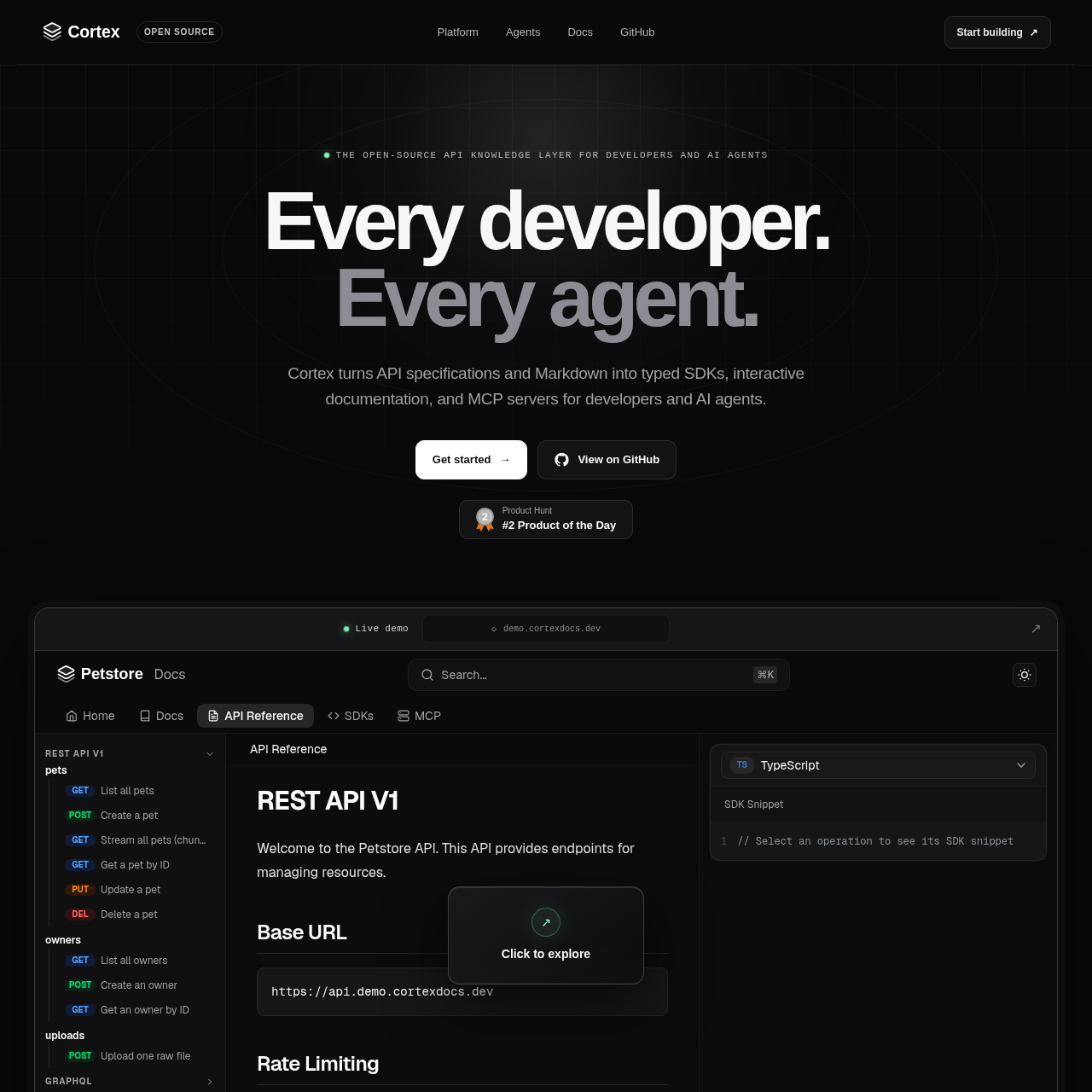
Cortex is an open-source toolchain that converts API specifications and Markdown into interactive documentation, typed SDKs across eleven languages, and Model Context Protocol servers for AI agents.
Code & ITAggregating multiple API protocols into…Validating API contracts before…Generating typed client libraries in…Creating self-hostable interactive…
Listed on AIToolly
What Is Cortex? Product Overview
What the product does and how it is positioned
Cortex serves as an API interface generator designed to bridge human developers and automated agents. Governed by a single configuration file, the system ingests multiple contract formats including OpenAPI, AsyncAPI, GraphQL, gRPC, and OpenRPC, verifying schema validity before generating project assets.
Through a unified command-line workflow, Cortex outputs an interactive documentation site with live testing capabilities, native SDKs across eleven distinct programming languages, and an MCP server that packages API endpoints as typed tools for agentic integration.
What Can You Use Cortex For?
Source-supported ways to use the product
Multi-Protocol API Documentation
Engineering teams managing REST, realtime, GraphQL, or RPC interfaces can generate a unified, self-hosted documentation site with searchable references and interactive request tools.
AI Agent Integration via MCP
Developers can generate Model Context Protocol servers to provide AI agents with typed tool schemas, embedded specifications, and client instructions directly from their API contracts.
Cross-Language Client Generation
API providers can compile client libraries in eleven programming languages featuring built-in retries, authentication, and streaming.
How to Use Cortex
The documented workflow, where available
1
Define Project Configuration
Specify input sources such as OpenAPI, AsyncAPI, GraphQL, gRPC, or OpenRPC files alongside MCP package settings in a configuration file.
2
Execute Generation
Run the generation command to validate source contracts and compile interactive documentation, client SDKs, and the MCP server.
3
Deploy Outputs
Deploy the interactive documentation site to a Node-compatible host, publish client libraries to language package registries, and connect the MCP server to AI agents.
MCP Tool Generation for Agentic Workflows
Cortex translates API contracts into typed Model Context Protocol servers tailored for autonomous development agents. Each operation defined in the source specifications maps directly to a typed tool schema, eliminating ambiguity during automated tool selection.
Alongside tool definitions, the server bundles source specifications, documentation guides, and client library references. This structure gives connected agents grounded context to identify relevant endpoints, install appropriate SDK packages, and generate typed integration code.
Maps API operations directly into typed MCP tool schemas
Packages source specifications and documentation alongside agent tools
Enables automated discovery of SDK packages and typed request structures
Unified Multi-Protocol Code and Documentation Generation
Cortex unifies multiple API architectural styles into a single pipeline. Teams can combine REST, WebSocket, GraphQL, gRPC, and JSON-RPC definitions within one configuration, which Cortex validates prior to asset compilation.
The engine generates idiomatic client libraries in eleven languages, including TypeScript, Python, Go, Java, and Rust, incorporating standard network handling such as timeouts, retries, authentication, and streaming. Developers can also export and override Eta templates to alter generated outputs.
Validates contracts across five API protocol standards before generation
Produces idiomatic client SDKs in eleven programming languages
Allows full code customization through overrideable Eta templates
What to Test Before Choosing Cortex
Checks to run with your own material and workflow
Verify that your API specifications use supported formats such as OpenAPI, AsyncAPI, GraphQL, gRPC, or OpenRPC.
Confirm that your hosting infrastructure can run Node to host the generated interactive documentation site.
Review the generated client code across your required programming languages to ensure naming conventions and network handling align with internal standards.
Check that your AI agent environments support the Model Context Protocol to utilize the generated MCP server.
Answers based on the source-checked product record
What API specification formats does Cortex accept?+
Cortex accepts OpenAPI, AsyncAPI, GraphQL, gRPC, and OpenRPC specifications, as well as Markdown documentation files, configured in a central project configuration file.
Which programming languages are supported for generated SDKs?+
Cortex generates typed client libraries in eleven languages: TypeScript, Python, Go, Java, Kotlin, Ruby, PHP, C#, Rust, C++, and C.
What does Cortex generate for AI agents?+
Cortex generates a Model Context Protocol server that exposes API operations as typed tools, embedding API contracts, documentation, and SDK references to provide context for AI agents.
Can developers customize the code generation output?+
Yes, developers can export and override any of the underlying Eta templates to modify the structure and implementation of generated SDKs and documentation.
Where can the generated interactive documentation be hosted?+
The generated interactive documentation site can be self-hosted and deployed to any hosting environment where Node runs.
More Code & IT AI tools
Explore other recently added tools in the same category.