CelebMakerAI
Kinguin AI Video and Image Generation Platform for Character Creation and Face Swapping
Kinguin is a comprehensive AI-powered creative suite designed for generating high-quality images, videos, and digital characters. The platform features advanced tools such as Face Swap, Dance Cloner, and Undress & Edit, allowing users to transform static photos into dynamic 5 to 10-second videos. With options for both Safe and Adult content, Kinguin provides a marketplace for characters and opportunities to earn money while offering 5 free credits for new users to start creating instantly.
2026-02-13
223.8K
CelebMakerAI Product Information
Discover the Creative Power of Kinguin: The Ultimate AI Video and Image Platform
In the rapidly evolving landscape of digital content creation, Kinguin emerges as a powerful and versatile suite of AI tools designed for creators, artists, and enthusiasts. Whether you are looking to Generate Images, produce high-quality AI Videos, or explore the world of digital CHARACTERS, Kinguin provides a seamless, user-friendly interface to bring your imagination to life. From advanced Face Swap technology to the innovative Dance Cloner, the platform is engineered to push the boundaries of AI-driven media.
What's Kinguin?
Kinguin is an all-in-one AI creative hub that specializes in the transformation of static concepts into dynamic digital assets. At its core, Kinguin allows users to Create Character profiles, engage with a thriving Marketplace, and even Earn Money through their creations. The platform is built on advanced algorithms that facilitate tasks such as the Undress & Edit feature, Face Swap maneuvers, and full-scale AI Videos production. With a focus on accessibility, Kinguin offers 5 Free Credits to new users, allowing anyone to Try Free and experience the future of AI content generation.
Features of Kinguin
Kinguin is packed with a diverse array of features that cater to various creative needs. Each tool is designed to be intuitive yet powerful, ensuring professional-grade results.
AI Videos and Dance Cloner
One of the standout capabilities of Kinguin is the ability to generate AI Videos from simple images. With the Dance Cloner, users can take a static figure and animate it with realistic movements.
Image Transformation: Face Swap and Undress & Edit
Kinguin offers specialized editing tools that allow for deep customization:
- Face Swap: Seamlessly replace faces in images with high precision.
- Undress & Edit: Modify and refine images with sophisticated editing capabilities.
- Generate Images: Create brand new visuals from scratch using AI prompts.
Marketplace and Character Creation
The platform features a robust Marketplace where users can browse, share, and utilize different CHARACTERS. You can Create Character assets that are unique to your vision and potentially Earn Money by participating in the Kinguin ecosystem.
Video Content Control
Kinguin provides flexibility in the type of content you create, offering distinct categories:
- Safe Content: Focused on themes like bikinis, lingerie, dancing, and teasing.
- Adult Content: For 18+ explicit sexual content, ensuring clear boundaries for different user needs.
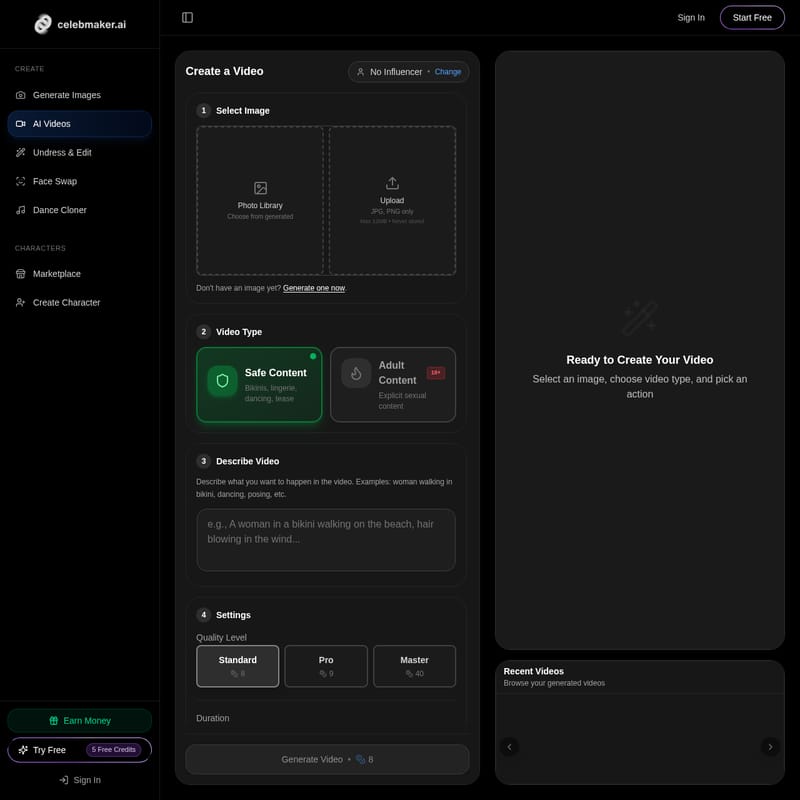
How to Use Kinguin to Create a Video
Creating high-quality AI Videos on Kinguin is a straightforward process. Follow these steps to generate your first project:
- Select Image: Start by choosing your base visual. You can pick from your Photo Library, Choose from generated images within the platform, or Upload your own file. Kinguin supports JPG and PNG formats (Max 12MB). Rest assured, uploaded images are never stored.
- Choose Video Type: Select whether your project falls under Safe Content (Bikinis, lingerie, dancing) or Adult Content (18+ Explicit sexual content).
- Describe Video: Use the text box to Describe what you want to happen in the video. For example, you might type "woman walking in bikini" or "dancing and posing."
- Adjust Settings:
- Quality Level: Choose between Standard (8 credits), Pro (9 credits), or Master (40 credits).
- Duration: Select the length of your video, either 5 seconds or 10 seconds (+8 credits).
- Generate Video: Click the generate button to process your creation. You can later Browse your generated videos in the Recent Videos section.
Use Case Scenarios
Kinguin is designed for a wide variety of applications, ranging from social media content to professional digital artistry.
- Social Media Influencers: Use the Dance Cloner and AI Videos to create engaging content without needing a physical studio.
- Digital Artists: Utilize Face Swap and Create Character tools to build unique personas for stories or gaming.
- Content Monetizers: Leverage the Marketplace to Earn Money by sharing your high-quality AI-generated characters.
- Casual Creators: Take advantage of the 5 Free Credits to experiment with Generate Images and see the power of AI firsthand.
FAQ
Q: Is there a way to try Kinguin for free? A: Yes! New users can Try Free and receive 5 Free Credits upon signing in to explore the platform's features.
Q: What image formats does Kinguin support? A: You can upload JPG and PNG files. The maximum file size is 12MB, and Kinguin ensures that your uploaded images are never stored.
Q: Can I make money on Kinguin? A: Yes, the platform includes a Marketplace where you can Create Character assets and Earn Money.
Q: What are the video quality options? A: Kinguin offers three quality tiers: Standard, Pro, and Master, each with different credit requirements to suit your project's needs.
Q: How long can the AI Videos be? A: You can generate videos that are either 5 seconds or 10 seconds in duration.
By combining cutting-edge technology with a user-centric marketplace, Kinguin stands as a premier destination for anyone looking to master AI Videos, Face Swap technology, and digital Character creation.