Akiflow
Akiflow: The All-in-One AI Productivity Suite for Seamless Task and Calendar Management
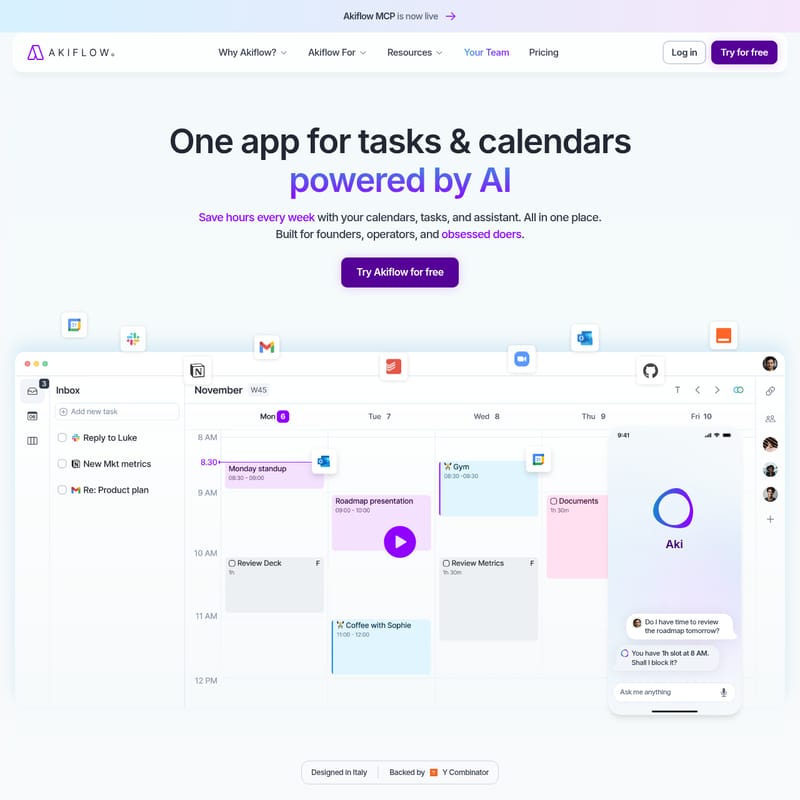
Akiflow is a comprehensive AI-powered productivity suite that integrates your calendar, tasks, and inbox into a single workflow. Designed for founders and high-performers, it features the Aki AI assistant to automate scheduling and organization.
2026-07-02
254.8K
Akiflow Product Information
Akiflow: The All-in-One AI Productivity Suite for High-Performers
In an era of digital distraction, managing your schedule requires more than just a simple to-do list. Akiflow is the all-in-one productivity suite designed to bring your calendar, tasks, and inbox into one seamless flow. With the recent announcement that Akiflow MCP is now live, this platform continues to push the boundaries of how founders, operators, and "obsessed doers" manage their professional lives. Backed by Y Combinator and designed in Italy, Akiflow is already trusted by over 100,000 ambitious professionals worldwide who want to save hours every week using advanced AI automation.
What’s Akiflow?
Akiflow is a centralized productivity hub that combines a robust task manager, a high-performance calendar, and an intelligent AI assistant named Aki. Unlike traditional tools that fragment your workflow across multiple tabs, Akiflow acts as the single source of truth for your entire day. It is built specifically for those who need to manage complex schedules, including founders, C-levels, developers, and marketers.
By unifying your work and personal life into one interface, the Akiflow productivity suite ensures that every meeting and every task has its place. The platform focuses on a science-based methodology to help users move beyond busywork and into deep, focused execution. Whether you are using the desktop app with lightning-fast shortcuts or the mobile version on iOS and Android, Akiflow keeps you in control of your time.
Key Features of Akiflow
1. The Unified Calendar and Time-Blocking
Akiflow offers a calendar that works as hard as you do. It allows you to time-block your day automatically, ensuring that your tasks are not just listed but scheduled.
- Work & Personal Sync: Keep your professional commitments and personal life in perfect harmony with a 2-way sync.
- Smart Time Slots: The system identifies slots that work around your existing meetings to suggest the best times for task execution.
- Team Scheduling on Autopilot: Coordinate with your team effortlessly without the back-and-forth of traditional scheduling tools.
2. Task Manager for Mindful Planning
The Akiflow task manager is designed for more than just checking boxes; it is built for mindful planning.
- Flexible Views: Organize your life into "Someday," "This Month," "This Week," or "Today."
- Universal Capture: Use natural language to capture tasks from anywhere at the speed of thought.
- Daily Rituals: Start and end your day with structured rituals that help you review and prioritize your workload.
3. The Universal Inbox and Integrations
Stop jumping between apps. Akiflow’s Universal Inbox captures all your work from your favorite tools.
- Native Integrations: Connect with over 10 native integrations including Slack and Email.
- Seamless Automation: Use Zapier and IFTTT to connect thousands of other tools.
- One-Click Conversion: Turn Slack messages into tasks or emails into actionable items with a single click.
4. Aki: Your AI Sidekick
Meet Aki, the always-on AI assistant built directly into the Akiflow ecosystem. Aki handles the busywork so you can focus on high-impact goals.
- Voice Commands: Talk to your schedule. Simply say what you need, and Aki gets it done.
- On-Demand Assistance: Ask Aki to block time for a roadmap review or check if you have time for a specific meeting tomorrow.
- Phone Calls: Aki can even make phone calls to your contacts to coordinate details.
- AI Nudges: Stay goal-aligned with intelligent nudges that keep you moving through your daily agenda.
5. Advanced Productivity Toolbox
Akiflow is packed with features for power users, including:
- Focus Mode & Focus Time: Eliminate distractions and dedicate your energy to your most important tasks.
- Offline Mode: Keep working even when you are disconnected from the internet.
- Cmd+K Command Bar: Navigate the entire app and perform actions instantly using keyboard shortcuts.
- Privacy & Security: Built with privacy at its core to protect your most sensitive schedule data.
Use Case Scenarios
For Founders and C-Levels
Founders use the Akiflow productivity suite to manage the chaos of scaling a company. By using Aki to auto-schedule meetings and time-block critical strategic work, founders ensure that high-level priorities never get sidelined by minor administrative tasks.
For Developers and Designers
Creatives and engineers require long stretches of uninterrupted time. Akiflow’s Focus Mode and automated time-blocking allow developers to protect their "Deep Work" periods while ensuring that sprint reviews and team check-ins are still accounted for.
For Sales and Marketing Professionals
Marketers and sales teams often deal with a high volume of incoming requests via Slack and Email. The Universal Inbox allows them to turn a lead's inquiry into a task instantly, ensuring no follow-up is missed. The Aki AI assistant can even help manage the scheduling of sales calls across different time zones.
How to Use Akiflow
To get the most out of Akiflow, follow these steps to integrate the platform into your daily workflow:
- Sync Your Tools: Start by connecting your existing calendars and work apps. Utilize the 10+ native integrations or connect via Zapier to bring all your tasks into the Universal Inbox.
- Daily Rituals: Every morning, use the "Daily Ritual" feature to review your tasks. Move items from your inbox into your calendar to create a concrete plan.
- Capture via Cmd+K: Whenever a new task comes to mind, use the Cmd+K shortcut (or the iOS/Android app) to capture it instantly using natural language.
- Engage Aki: Use voice commands or the chat interface to ask Aki to reschedule meetings, block time for specific projects, or give you a daily briefing.
- Focus and Execute: Activate Focus Mode when it is time to work on a task. Akiflow will keep you updated with reminders to ensure you stay on track with your agenda.
FAQ
Q: What makes Akiflow different from a standard calendar? A: Unlike a standard calendar, Akiflow integrates a full task manager and an AI assistant. It allows for time-blocking, meaning your to-do list and your schedule are the same thing, preventing you from overcommitting.
Q: Is there a mobile version of Akiflow? A: Yes, Akiflow is available on both iOS and Android, featuring a Voice Mode and AI Chat to capture tasks on the go.
Q: Can I use Akiflow with my team? A: Absolutely. Akiflow is built for professionals and teams, featuring team scheduling on autopilot to make collaboration seamless.
Q: How does the AI (Aki) help with scheduling? A: Aki can auto-schedule tasks based on your availability, handle recurring tasks, and even call your contacts. It provides daily briefings and reminders to ensure your plans actually get done.
Q: Does Akiflow support offline work? A: Yes, Akiflow features an Offline Mode, allowing you to manage your tasks and schedule even without an active internet connection.
Q: How can I try Akiflow? A: You can start with a 7-day free trial to experience the full power of the AI productivity suite. You can cancel at any time.