Microsoft Paint and Photos Found Embedding Invisible Server-Issued GUID Watermarks in Locally Generated AI Images
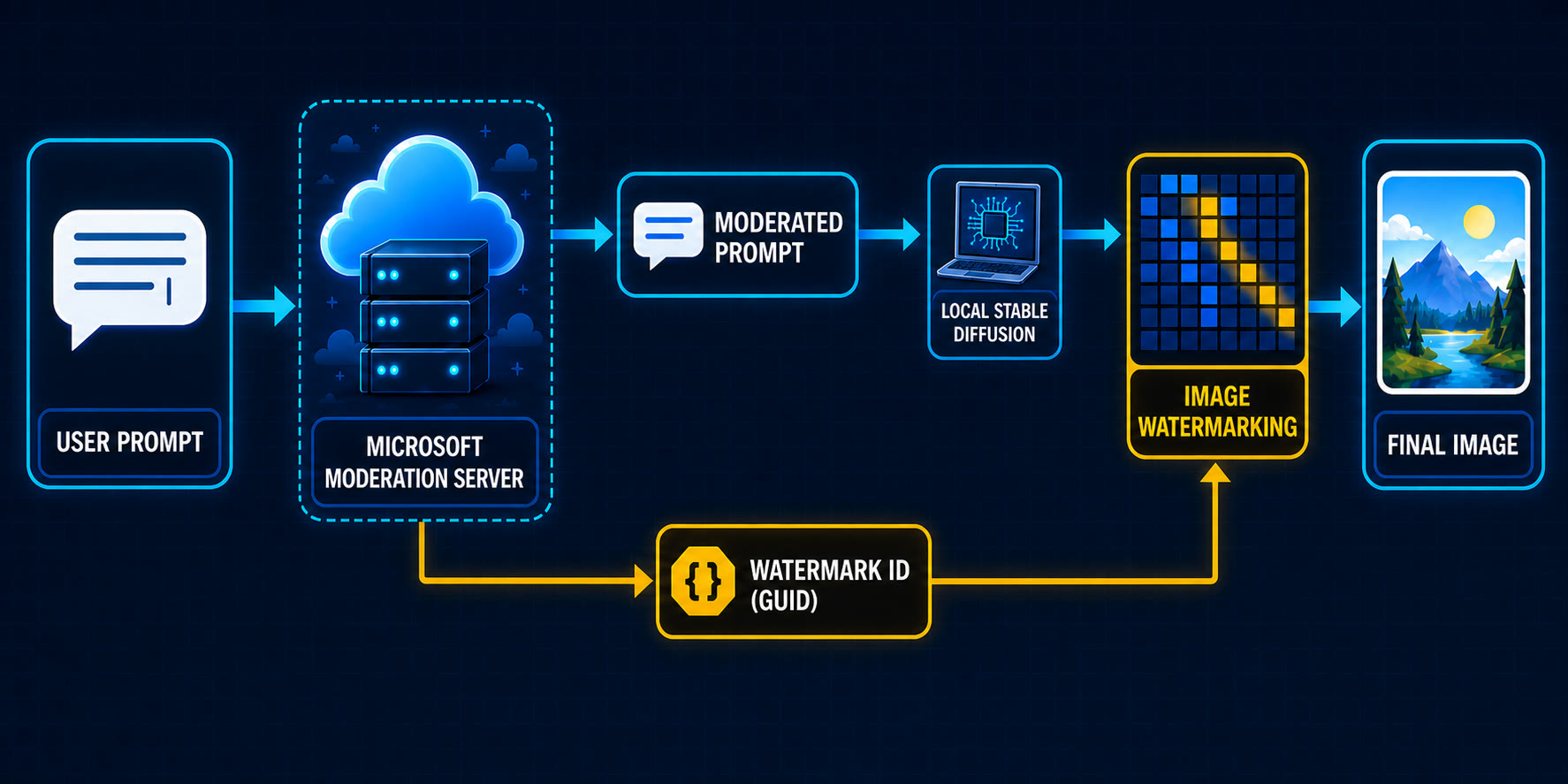
A recent reverse engineering investigation has uncovered that Microsoft Paint and Photos embed invisible, server-issued Global Unique Identifiers (GUIDs) into images generated locally via AI. While these applications utilize local ONNX models on Copilot+ PCs for image creation, the prompt moderation process remains tethered to remote servers. During this moderation phase, a GUID is generated and subsequently woven into the image pixels as a persistent, invisible watermark. This tracking mechanism operates independently of user-controlled visible watermark settings. Furthermore, Microsoft enforces the use of C2PA-compliant file formats, such as PNG and JPEG, to ensure that attribution metadata remains intact. The discovery highlights a sophisticated hybrid approach to AI content tracking where local execution is coupled with centralized oversight and persistent identification.
Key Takeaways
- Hybrid AI Workflow: Microsoft Paint and Photos use local ONNX models for image generation on Copilot+ PCs, but prompt moderation is handled by remote servers.
- Invisible GUID Embedding: A server-issued Global Unique Identifier (GUID) is embedded directly into the pixels of locally generated images as an invisible watermark.
- Independent Tracking: The invisible watermark is distinct from the visible watermark toggle and cannot be disabled through standard user settings.
- C2PA Compliance: Microsoft utilizes C2PA metadata for AI attribution and restricts saving to formats that preserve this data, including PNG, JPEG, GIF, and .paint.
- Reverse Engineering Insights: Local models are stored as .onnxe files and protected by a simple XOR encryption using the string "Microsoft_2023".
In-Depth Analysis
The Architecture of Local AI Generation in Windows
Recent analysis of Microsoft Paint (version 11.2605.71.0) and the Windows Photos app has revealed a complex architecture for "local" AI image generation. Contrary to the assumption that these features might rely entirely on cloud APIs, Microsoft has shipped several local models within the Windows environment, specifically targeting Copilot+ PCs. These models are stored within the WindowsApps directory and utilize the .onnxe extension.
The research identified four primary model files: seg.onnxe (23.1 MB), inseg_enc.onnxe (28.0 MB), inseg_dec.onnxe (16.5 MB), and mager.onnxe (302.4 MB). Technical analysis shows that these files are standard ONNX models that have been obfuscated using a simple XOR operation with the hardcoded string "Microsoft_2023". This local infrastructure allows the heavy lifting of image synthesis to occur on the user's hardware, theoretically offering performance and privacy benefits. However, the process is not entirely autonomous, as it maintains a critical link to Microsoft's cloud infrastructure for moderation and identification purposes.
The Hidden Watermarking and Moderation Loop
Despite the local nature of the image generation, the workflow begins with a remote call. When a user enters a prompt, the Paint or Photos app sends that text to a Microsoft server for moderation. This step is designed to ensure the prompt complies with safety guidelines. However, the server's response includes more than just an approval or a moderated version of the prompt; it also returns a unique GUID.
This GUID is the core of Microsoft's invisible tracking system. Once the local AI model generates the image, the application embeds this server-issued GUID into the actual pixels of the output. This process is described as an "invisible watermark," which remains present even if the user has opted to turn off the visible AI watermark in the application settings. This creates a persistent link between the locally generated file and the server-side moderation event, allowing for the identification of the origin and the specific session that produced the image.
Metadata Persistence and Format Restrictions
To complement the pixel-level invisible watermark, Microsoft also integrates C2PA (Coalition for Content Provenance and Authenticity) metadata into the AI-generated images. This metadata provides a standardized way to track the history and origin of digital content. To ensure this attribution is not easily stripped away, Microsoft has implemented strict limitations on how these images can be saved.
Users are restricted to saving AI-generated content in formats that are known to preserve C2PA metadata, specifically PNG, JPEG, GIF, and the proprietary .paint format. By forcing the use of these containers, Microsoft ensures that the digital "paper trail"—consisting of both the invisible pixel-level GUID and the structured C2PA metadata—remains attached to the file as it is shared or moved across different platforms. This multi-layered approach to attribution highlights a significant effort to maintain control and traceability over AI-generated content, even when produced on a user's local machine.
Industry Impact
Redefining "Local" AI Privacy
The discovery that locally generated images are tagged with server-issued identifiers challenges the traditional understanding of local AI as a more private alternative to cloud-based services. While the image data itself may be processed on-device, the requirement for remote moderation and the subsequent embedding of tracking IDs means that Microsoft maintains a record of the generation event. This hybrid model sets a precedent for how major software vendors might balance the benefits of edge computing with the perceived need for centralized oversight and content traceability.
Standards for AI Attribution
Microsoft's aggressive implementation of C2PA metadata and invisible watermarking signals a shift toward mandatory attribution in the AI industry. By restricting file formats to those that support these standards, Microsoft is effectively forcing the adoption of content provenance tools. This could influence other software developers to implement similar restrictions, leading to a more regulated ecosystem for AI-generated media where "anonymous" generation becomes increasingly difficult for the average user.
Frequently Asked Questions
Question: Can I disable the invisible GUID watermark in Microsoft Paint settings?
No. The research indicates that the invisible watermark is embedded into the pixels of the image automatically and is not controlled by the "visible watermark" toggle found in the application's settings. It is a separate, persistent tracking mechanism.
Question: Does Microsoft Paint generate images entirely on my computer?
The image generation itself is performed locally using ONNX models on compatible hardware like Copilot+ PCs. However, the process is not fully offline, as the prompt must be sent to a remote server for moderation before the local generation begins.
Question: Why does Microsoft restrict AI images to PNG, JPEG, and GIF formats?
These formats are used because they support the preservation of C2PA metadata. Microsoft limits saving to these formats to ensure that the attribution and provenance information associated with the AI-generated image remains intact.