Video Forms
VForms: Create Interactive Video Forms and Embed Questionnaires Directly Inside YouTube Videos
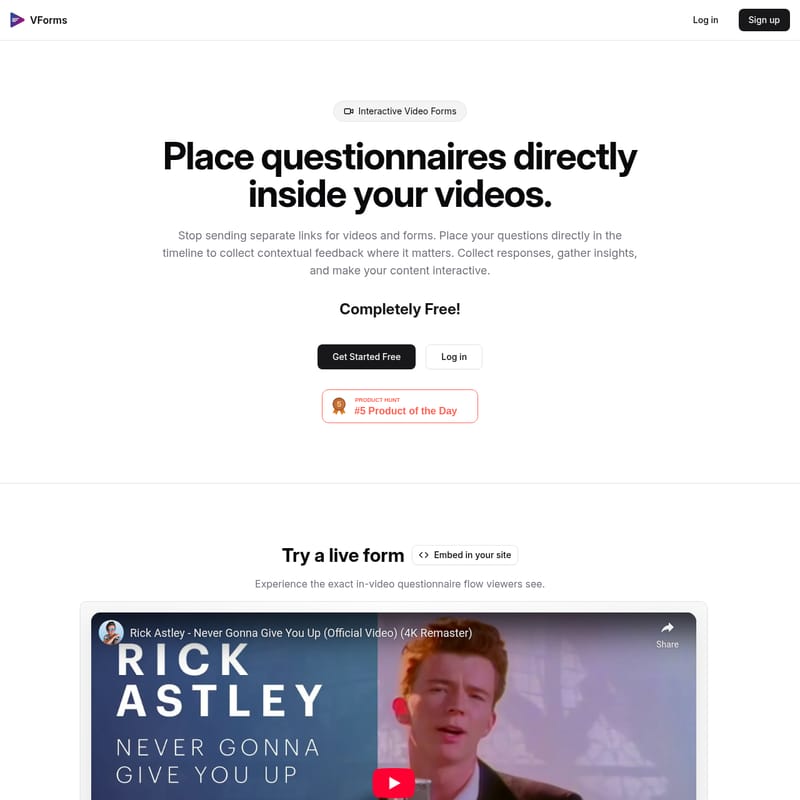
VForms is an innovative platform designed to transform standard videos into interactive experiences. By allowing users to place questionnaires and input fields directly within the video timeline, VForms eliminates the need for separate links and external survey tools. This approach captures contextual feedback in real-time as viewers watch, significantly reducing friction and improving data quality. The tool supports YouTube integration, skip logic for personalized viewer paths, and easy embedding via iframe snippets. Whether you are seeking product feedback or conducting research, VForms provides a streamlined, free solution to make your video content truly interactive.
2026-02-12
0.3K
Video Forms Product Information
VForms: The Ultimate Guide to Interactive Video Forms
In the modern digital landscape, capturing audience attention is only half the battle; the real challenge lies in gathering meaningful engagement. VForms offers a revolutionary solution by allowing creators to place interactive video forms and questionnaires directly inside their videos. By bridging the gap between viewing and responding, VForms ensures that you no longer have to send separate links for videos and forms.
What's VForms?
VForms is a specialized platform designed to create interactive video forms by integrating questions directly into the video timeline. Traditionally, if a creator wanted feedback on a specific segment of a video, they would have to link to an external tool like a Google Form. VForms changes this dynamic entirely.
At its core, VForms allows you to collect contextual feedback where it matters most. It is a tool that transforms passive viewing into an active dialogue. Best of all, VForms is completely free, making it accessible for independent creators, educators, and businesses alike who want to make their content interactive without a financial barrier.
Key Features of VForms
Direct Timeline Integration
With VForms, you can place your questions at specific timestamps. This ensures that the questionnaire appears exactly when the viewer is most engaged with the relevant content, leading to more accurate and thoughtful responses.
Seamless YouTube Support
The platform allows you to simply paste any YouTube URL to begin building your interactive video form. There is no need for complex video hosting or expensive technical setups.
Advanced Skip Logic
One of the most powerful features of VForms is the implementation of skip logic. You can use viewer responses to automatically skip to specific parts of the video. This creates a personalized experience where the content adapts based on the user's input.
Multiple Input Types
To ensure you gather the right data, VForms supports various input types. Whether you need a simple multiple-choice answer or more detailed feedback, the tool provides the flexibility required for professional data collection.
Easy Embedding Options
Sharing your interactive video form is simple. VForms provides an iframe snippet that you can paste into any page builder or HTML template. This allows the video form to live directly on your own website while maintaining a professional look and feel.
How to Use VForms
Creating your first interactive video form with VForms is a straightforward process designed for efficiency. Follow these three simple steps to get started:
- Add a YouTube Video: Start by pasting any YouTube URL into the VForms dashboard. This serves as the foundation for your interactive experience.
- Add Questions: Navigate through the video timeline and place questions at specific timestamps. You can choose from various input types to match your goals.
- Collect Responses: Once your form is built, share the link or embed it on your site. You can then analyze the responses you receive in real-time.
Use Case: Why Choose VForms?
Why should you switch from traditional surveys to interactive video forms? The benefits are centered around user experience and data integrity.
- Contextual Feedback: Instead of asking a viewer to remember what happened at the 2-minute mark of a video they finished ten minutes ago, VForms asks them while they are watching. This results in higher precision in the feedback received.
- Higher Quality Data: By eliminating the friction of switching between browser tabs or different apps, you reduce the bounce rate of your surveys. Viewers are more likely to complete a form if it is integrated into the video they are already watching.
- Product Testing and Feedback: As noted by the creators, VForms is perfect for product videos. If you want feedback on a specific feature shown in a video, you can trigger a question the moment that feature is explained.
"I had a product video I wanted feedback on, and I had to embed the video link in a Google Form. I thought: why not put the questions directly within the video itself?"
FAQ
Q: Is VForms really free? A: Yes, VForms is completely free to use. You can get started, create your forms, and collect responses without any cost.
Q: How do I put VForms on my own website? A: You can use the provided iframe embed code. Simply copy the snippet and paste it into your page builder or HTML template to display the interactive video form on your site.
Q: Can I use videos from platforms other than YouTube? A: Currently, the platform emphasizes the ability to paste any YouTube URL to start building your form.
Q: Does VForms support mobile viewing? A: Yes, VForms is designed to be accessible and provides an exact in-video questionnaire flow that viewers can experience across devices.
Q: What is skip logic in VForms? A: Skip logic allows the video to jump to different segments based on how a viewer answers a specific question, creating a non-linear, interactive storytelling or educational experience.