Lunair
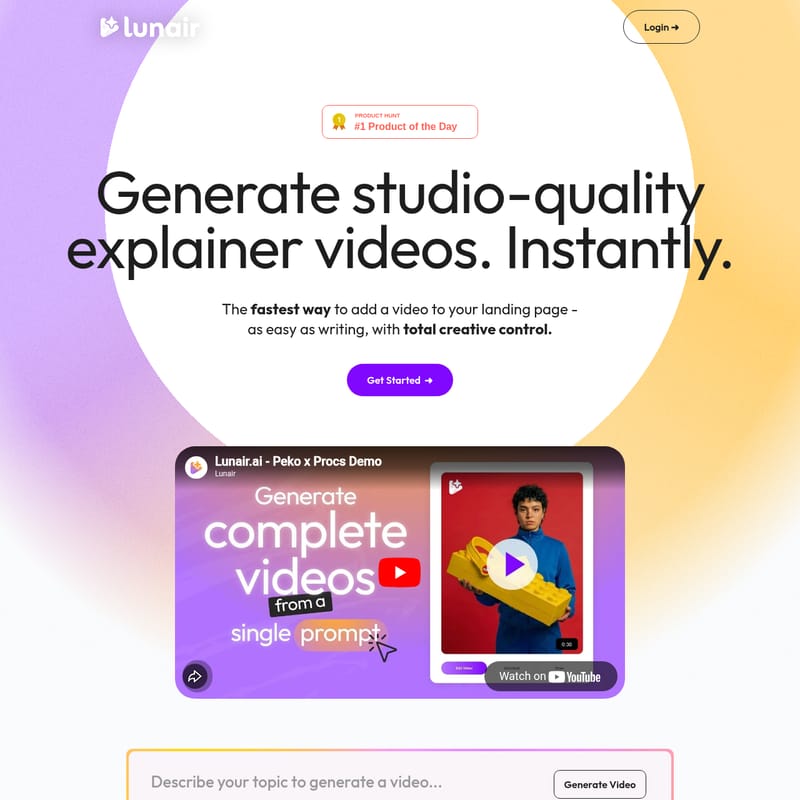
Lunair AI: Generate Studio-Quality Explainer Videos Instantly from a Single Text Prompt
Lunair AI is an innovative video generation platform that transforms text prompts into professional explainer videos. It automates scripting, storyboarding, branding, and animation, offering users total creative control through a simple chat interface. With features like custom voiceovers, brand-consistent graphics, and instant AI-driven iterations, Lunair AI provides a fast and cost-effective solution for creators and teams to produce high-quality video content without manual editing or complex software.
2026-02-17
--K
Lunair Product Information
Lunair AI: The Ultimate Studio-Quality Explainer Video Generator
In the digital age, video content is king, yet the process of creating professional-grade videos remains a bottleneck for many creators and businesses. Lunair AI changes the landscape by offering the fastest way to add a high-quality video to your landing page. As easy as writing a simple text prompt, Lunair AI allows you to generate studio-quality explainer videos instantly, providing total creative control without the traditional complexities of video production.
What's Lunair AI?
Lunair AI is an advanced AI-powered video production platform designed to transform your stories and ideas into complete, professional-quality videos. Unlike traditional video editors, Lunair AI handles the heavy lifting of scripting, storyboarding, and animation. It is a comprehensive tool where your vision is translated into a polished final product with voice, music, and motion, all initiated by a single prompt. Whether you need to sell a product, pitch an idea, or engage an audience, Lunair AI bridges the gap between a raw concept and a cinematic result.
Key Features of Lunair AI
One-Step Creation and Scripting
With Lunair AI, you don't need to be a professional writer. Your story is instantly transformed into an engaging script tailored to your audience. The One-Step Creation feature means you can generate a complete video from just one prompt, allowing the AI to handle the narrative flow from start to finish.
Automatic Storyboarding
Visualize your script immediately with an automatically generated, scene-by-scene storyboard. This feature allows you to see the structure of your video in seconds, ensuring the visual narrative aligns perfectly with your script before the final animation phase.
Brand-Consistent Graphics
Maintain a professional look across all your content with Design Freedom. Lunair AI seamlessly applies your brand’s specific colors and logo to every scene. This ensures that the generated graphics are always consistent with your brand identity, regardless of the complexity of the video.
Edit Through Chat
One of the most powerful features of Lunair AI is the ability to Edit Through Chat. You can type your requests naturally—such as changing a color or swapping an object—and watch every aspect of your video update instantly. This eliminates the need for manual tweaking and complex timeline editing.
Professional Animation and Voiceovers
Lunair AI provides more than just visuals. It generates a complete video with professional-quality motion, synchronized voiceovers, and background music. You can pick the perfect voice to match your message and brand tone, ensuring your explainer video sounds as good as it looks.
How to Use Lunair AI
Creating a video with Lunair AI follows a streamlined, three-stage process: Draft, Iterate, and Animate.
Step 1: Draft
Start by entering your prompt. Lunair AI will generate your entire storyboard in seconds. During this phase, your logo, palette, and style are established. This prompt-to-storyboard transition provides a solid foundation with unlimited creative design and no template limits.
Step 2: Iterate
Use the chat interface to brainstorm ideas and swiftly change scenes. If you need to adjust the vision, simply drop an idea into the chat. You can swap objects, tweak colors, or alter layouts just by typing. This stage ensures the video matches your vision exactly before finalization.
Step 3: Animate
With a single click, transform your storyboard into a full-motion video. Lunair AI automatically syncs the voiceover and soundtrack. Once generated, your video is ready to be exported or shared instantly, requiring no extra steps or technical setup.
Use Cases for Lunair AI
- Landing Pages: Quickly create engaging explainer videos to increase conversion rates on your website.
- Product Sales: Use a single prompt to generate a persuasive sales video that highlights your product's best features.
- Idea Pitching: Transform a conceptual pitch into a visual storyboard and video to win over stakeholders.
- Content Creation: Regular creators can use the subscription model to produce a steady stream of brand-consistent video content for social media.
- Enterprise Branding: Large teams can utilize custom styles and branding to maintain a unified voice across global departments.
Pricing Plans
Lunair AI offers flexible pricing based on the number of video seconds you need:
- Top-Up (Single Projects): $38.70 one-time purchase. Includes 30 total seconds, 20 scene edits, and 2 asset uploads. Note: Standard rate with watermark and public video status.
- Creators (Monthly Subscription): $29.70/month ($9 base + $0.69 per second). Includes 30 seconds added monthly, unlimited scene edits, unlimited asset uploads, no watermark, and private videos.
- Teams (Enterprise): Custom pricing for large teams. Includes access to unreleased features, dedicated support, and custom branding/styles.
FAQ
Q: Do my seconds expire? A: For Top-Up plans, seconds never expire. For the Creators plan, seconds do not expire as long as you remain subscribed.
Q: Can I edit a video after it's generated? A: Yes, Lunair AI allows for scene edits. The number of edits depends on your plan (20 for Top-Up, unlimited for Creators).
Q: Is there a limit to the number of videos I can download? A: Both the Top-Up and Creators plans offer unlimited video downloads.
Q: How does the AI handle branding? A: Lunair AI applies your logo and color palette across all scenes automatically to ensure a consistent, professional look that matches your brand identity.