UXPin Forge
UXPin Forge: Generate Production-Ready UI with Real React Components and Design Systems
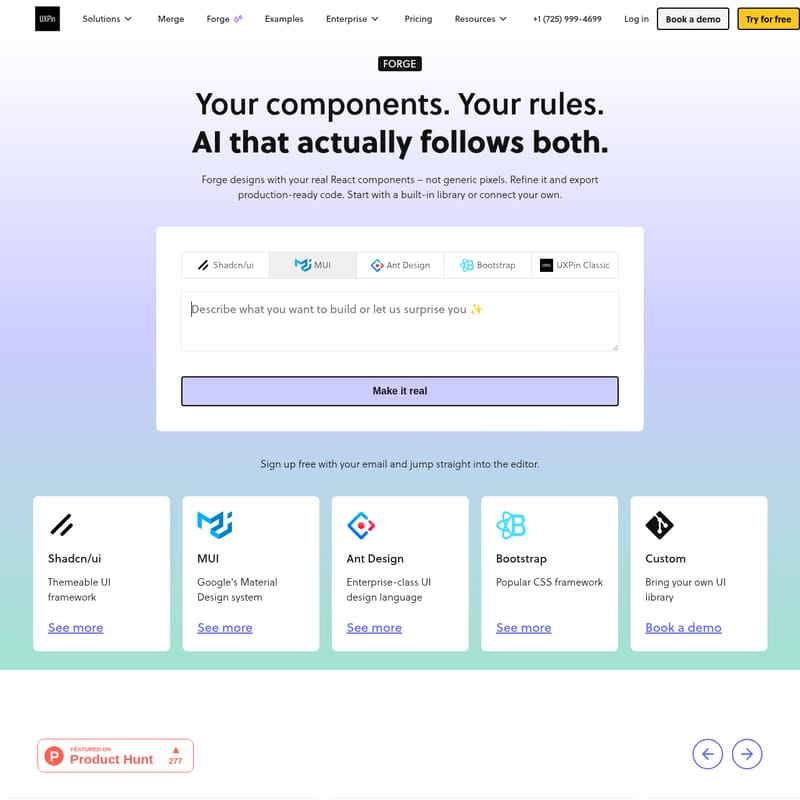
UXPin Forge is an AI-powered design tool that generates, edits, and refines UI using real React components. It bridges the gap between design and production by exporting production-ready JSX code.
2026-05-01
181.0K
UXPin Forge Product Information
UXPin Forge: Generating Production-Ready UI with Real React Components
In the evolving landscape of digital product development, the gap between static design and production-ready code has long been a challenge for enterprise teams. UXPin Forge emerges as a revolutionary solution, acting as an AI system within the UXPin ecosystem that generates, edits, and reviews UI using your actual production components. Unlike traditional design tools that rely on vector-based shapes, UXPin Forge leverages real React components, ensuring that what you design is exactly what developers can ship.
What is UXPin Forge?
UXPin Forge is an AI-driven interface generation tool designed to follow your specific design system rules. It allows users to forge designs with real React components rather than generic pixels. Whether you are using a popular open-source library or a custom-built enterprise design system, UXPin Forge interprets your prompts to create layouts that are backed by production-ready code.
As Kenji Sano, a user who switched to the platform, notes:
"Figma's AI generates more vectors. UXPin's AI generates with our real code. That's a fundamental architectural difference and it's why we switched."
By prioritizing real code over static representations, UXPin Forge ensures that the design process is not just about visuals, but about building functional, interactive prototypes that behave like the final product.
Key Features of UXPin Forge
Real Components, Not Shapes
One of the standout features of UXPin Forge is its ability to use your production React components. Every element generated includes real props, variants, and states. This eliminates the need for developers to rebuild UI from scratch, as the output is already aligned with the codebase.
Built-in and Custom Libraries
UXPin Forge supports a variety of building blocks to jumpstart your design process:
- Built-in Libraries: Start immediately with popular, interactive frameworks such as MUI, shadcn/ui, Ant Design, and Bootstrap. These are fully responsive and based on real code.
- Custom Design Systems: Via Git integration, you can connect your own React component library. Forge will then generate UI based on your unique design system rules.
- Templates: Access ready-made layouts for forms, dashboards, and app screens that are fully customizable without the need for rebuilding.
AI That Follows Your Rules
Teams can define plain-text design system guidelines that constrain all UXPin Forge output. This ensures that the AI respects your specific patterns and tokens across all projects. If your library has gaps, the AI is smart enough to generate UI that still follows your established design language.
Advanced AI Models and Compliance
UXPin Forge provides flexibility by supporting multiple AI models, including Claude Sonnet, Claude Opus, Claude Haiku, and various GPT models (GPT Standard and GPT Mini). For enterprise compliance and billing control, teams can even bring their own API keys from OpenAI or Anthropic.
Image-to-UI Technology
To speed up early-stage work, UXPin Forge includes an Image-to-UI feature. You can upload a rough wireframe, a screenshot, or a hand-drawn sketch, and the AI will recreate the UI using your actual components, saving you from starting every project from a blank canvas.
How to Use UXPin Forge
Transitioning from a prompt to production is a seamless process within UXPin Forge. Follow these steps to bring your ideas to life:
- Pick Your Components: Choose a built-in library (like MUI or shadcn/ui) or connect your enterprise design system via Git.
- Prompt or Design Manually: Describe the UI you need in plain English or upload a screenshot for context. You can also manually drag and drop real components onto the canvas.
- Refine Visually: Adjust layouts, tweak props, and add interactions. Because you are using code-backed components, the prototype behaves exactly like a real application.
- Iterate with AI: Use follow-up prompts to modify the design. UXPin Forge remembers context, allowing you to refine the same design through conversational iteration.
- Export and Ship: Once satisfied, export production-ready JSX. You can copy the code to your clipboard, open it in CodeSandbox, or export it directly into your project.
Use Cases for UXPin Forge
For Designers
Designers use UXPin Forge to bridge the gap between static design and real interaction. It allows for the creation of high-fidelity prototypes with logic and states, eliminating the need for long explanatory notes for developers.
For Developers
Developers benefit from UXPin Forge because it generates production-ready code that references the same library they use daily. This reduces the "translation" step from design to code and minimizes manual rebuilds.
For DesignOps
DesignOps teams utilize UXPin Forge to maintain consistency and scalability. By syncing a central component library via Git, they ensure that every designer is working with the most up-to-date, approved components.
For User Testing
Because UXPin Forge prototypes use real code, they provide a much more accurate user testing experience. Testers interact with real states and components, leading to better feedback and more reliable data.
How Forge Compares
| Feature | UXPin Forge | Figma AI | Lovable / Bolt | v0 | | :--- | :--- | :--- | :--- | :--- | | Output | Real React Components | Static Vectors | Generic Components | shadcn-specific code | | Custom Systems | Supports Git Integration | Visual match only | Hard to maintain scale | Optimized for specific stack | | Handoff | Production-ready JSX | Rebuild required | Manual adjustments | Code-centric only |
Frequently Asked Questions (FAQ)
What is Forge?
UXPin Forge is the AI system within UXPin that generates, edits, and reviews UI using real React components from your library. The final output is production-ready JSX that can be shipped directly.
What component libraries does Forge support?
It supports built-in libraries like MUI, shadcn/ui, Ant Design, and Bootstrap. Additionally, any React component library synced via Git integration is supported.
How is Forge different from Figma’s AI?
Figma’s AI generates vectors, which are visual representations that engineers must rebuild from scratch. UXPin Forge generates UI using your actual React components with real props, meaning there is no translation step required for developers.
Can I control how strictly the AI follows my design system?
Yes. Teams can define plain-text design system guidelines that persist across the project. UXPin Forge prioritizes the components connected to your project and generates UI following your established patterns and tokens.
Can I switch between AI and manual design?
Absolutely. You can use UXPin Forge to generate a starting point and then switch to manual design tools for fine-tuning, adding interactions, or defining states. You can switch back to AI at any time to continue iterating.