Wonder
Wonder: The AI Design Tool to Generate, Iterate, and Ship Production-Ready Code Instantly
Wonder is a cutting-edge design tool that bridges the gap between initial ideation and final production. By utilizing advanced AI models like Claude Opus 4.6, Wonder allows users to generate high-fidelity designs, make precise edits, and maintain code context all on a single canvas. Every design created in Wonder is backed by real code, specifically React and Tailwind, eliminating the traditional handoff process. Whether you are using the Wonder MCP to connect with coding agents like Cursor and Claude Code, or leveraging the built-in toolkit to generate layouts and shaders, Wonder empowers designers and developers to own the full production loop.
2026-05-02
--K
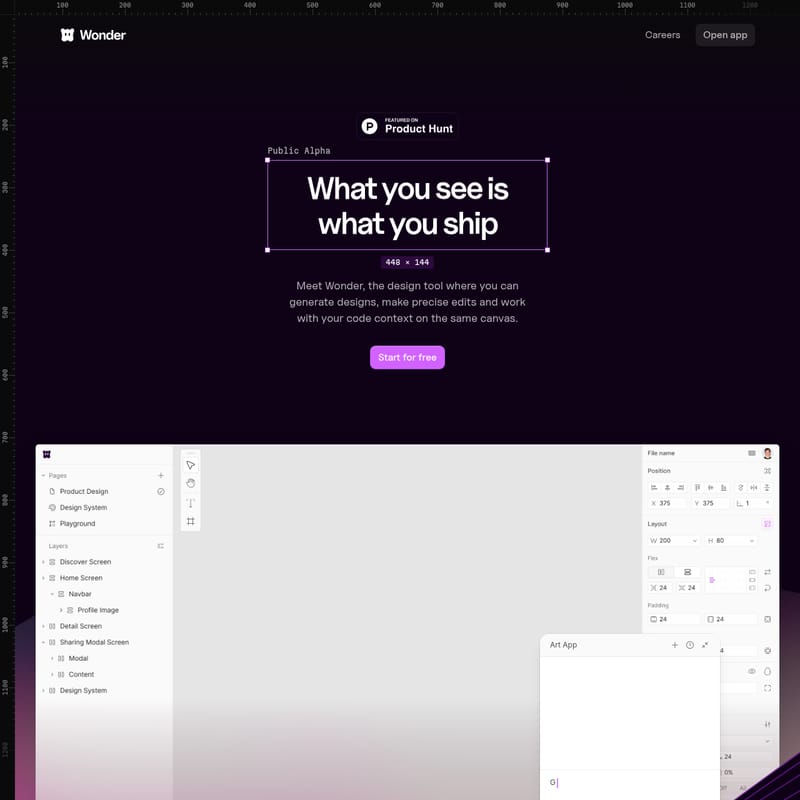
Wonder Product Information
Wonder: The Future of AI-Driven Design and Production
In the modern development landscape, the friction between design and deployment has often been a bottleneck. Wonder emerges as the definitive solution to this challenge, offering a design tool where you can generate designs, make precise edits, and work with your code context on the same canvas. Currently in its Public Alpha phase, Wonder is designed for those who believe that "what you see is what you ship."
Wonder is not just a layout tool; it is an intelligent environment powered by Claude Opus 4.6. By integrating AI directly into the design process, Wonder allows teams to move from idea to production faster than ever before. With Wonder, designers are no longer just creating static mockups; they are crafting the exact code that will eventually be shipped to production.
What’s Wonder?
Wonder is a revolutionary design tool that combines the creative freedom of a canvas with the technical precision of a code editor. It is built on the philosophy that design should be intuitive and directly connected to the final product. By using Wonder, you can design with an AI agent, chat with it to make refinements, and see your visions come to life as real code.
Developed by Aquila Labs, Wonder is proudly supported by the latest advancements in AI, ensuring that every element you place on the canvas is functional and ready for deployment. The tool focuses on reducing the time from 0 to 1, allowing users to start new flows and projects with simple prompts and iterative feedback. With Wonder, the design format maps 1:1 to code, meaning designers can finally own the full loop of product development.
Core Features of Wonder
Wonder is packed with features designed to streamline the workflow for both designers and developers. Below are the key pillars that make Wonder a unique force in the industry:
Design and Move to Production Faster
Wonder is built to accelerate the transition from concept to code. By designing with an agent, you can start new flows and create complex design projects in seconds. This reduces the time spent on manual adjustments and allows you to focus on the creative direction.
Built on Code, Ready for Production
Unlike traditional design tools that require a "handoff" to developers, every design in Wonder is real code. You can simply copy React + Tailwind snippets and ship them immediately. This ensures that the final product looks exactly as intended without any loss in translation during the development phase.
Iterative AI Design
In Wonder, every design informs the next. You can build on previous iterations to explore new options without losing your flow state. The AI agent understands the context of your project, making it easier to surface new design options and refine existing ones through natural conversation.
The Wonder Toolkit
Wonder provides a suite of familiar yet powerful tools that work together seamlessly on the canvas:
- Ideate on Canvas: Create variants, make flows, and change styles effortlessly.
- Layout Generation: Automatically generate structured layouts based on your requirements.
- Spacing and Themes: Adjust spacing, change themes, and edit copy with precision.
- Asset Generation: No more placeholder assets. Generate images directly on the canvas by describing what you need.
- Interactive Visuals: Use shaders to 10x the quality of your designs and create stunning, interactive visual experiences.
Code and Canvas Connection
Wonder connects directly to your coding environment. By using the Wonder MCP (Model Context Protocol), you can link Wonder to coding agents like Claude Code, Cursor, and Codex. This 1:1 mapping allows you to start from what is already built, iterate freely, and ship straight back to production.
How to Use Wonder
Getting started with Wonder is simple, whether you are a solo designer or part of a fast-moving team. Follow these steps to integrate Wonder into your workflow:
- Start Your Project: Open the Wonder app and use the AI agent to generate your initial layout or flow. You can use prompts to describe the vision you have for your interface.
- Iterate and Refine: Use the Wonder Toolkit to adjust spacing, swap images, and create variants. You can chat with the AI to make specific edits like "change the theme to dark mode" or "add more padding to the buttons."
- Enhance with Assets: Use the built-in image generation tool to create custom visuals. Add shaders to create interactive elements that elevate the design quality.
- Connect to Code Agents: Utilize the Wonder MCP to connect the canvas to your preferred code editor, such as Cursor or Claude Code. This allows you to sync your design changes with your actual codebase.
- Push to Production: Once satisfied, export your design as React + Tailwind code. You can copy the code directly or send it to your agent for immediate deployment.
Use Case Scenarios
Wonder is versatile enough to support various stages of the product lifecycle:
- Rapid Prototyping: Quickly turn an idea into a functional, code-backed prototype to test user flows.
- Design Systems: Build and maintain a library of components that map 1:1 to your production environment.
- Full-Stack Design: Designers who want to take control of the frontend implementation can use Wonder to ship code without needing deep programming knowledge.
- Marketing and Landing Pages: Use the layout generation and shader features to create high-impact landing pages that are ready to go live in minutes.
Pricing and Plans
Wonder offers a variety of plans to suit different needs, from individual explorers to power users shipping daily.
- Free Plan ($0/month): Perfect for experimenting and exploring. Includes 300 credits/mo, code export, image generation, and standard generation queue support via Discord.
- Pro Plan ($20/month): Designed for teams shipping with Wonder. Includes 3,000 credits/mo, unlimited MCP tool calls, unlimited projects, and priority generation queue.
- Pro+ Plan ($60/month): For designers who move fast and ship often. Includes 12,000 credits/mo, early access to new features, and private support channels.
- Max Plan ($200/month): For power users and professional designers. Includes 60,000 credits/mo, prioritized feature requests, and product development support.
FAQ
Q: What code languages does Wonder support for export?
A: Wonder currently supports React + Tailwind export, ensuring that your designs are ready for modern web development frameworks.
Q: How do credits work in Wonder?
A: Credits are used for AI generations, including layout creation and image generation. Different plans offer different monthly credit limits, ranging from 300 to 60,000 credits.
Q: Can I connect Wonder to my existing code editor?
A: Yes! Through the Wonder MCP, you can connect the Wonder canvas to agents like Cursor, Claude Code, and Codex for a unified design-to-code workflow.
Q: Is there support for custom assets?
A: Absolutely. Wonder includes built-in image generation so you can create custom assets on the fly, and you can also use shaders to create interactive visuals.
Q: What is the mission of the Wonder team?
A: The mission of Aquila Labs is to make design intuitive by allowing anyone to turn their vision into life through a tool where designs are backed by real components on a shared canvas.