Toolspend
ToolSpend: Real-Time AI Cost Tracking and Optimization Dashboard for LLM Usage and Budgeting
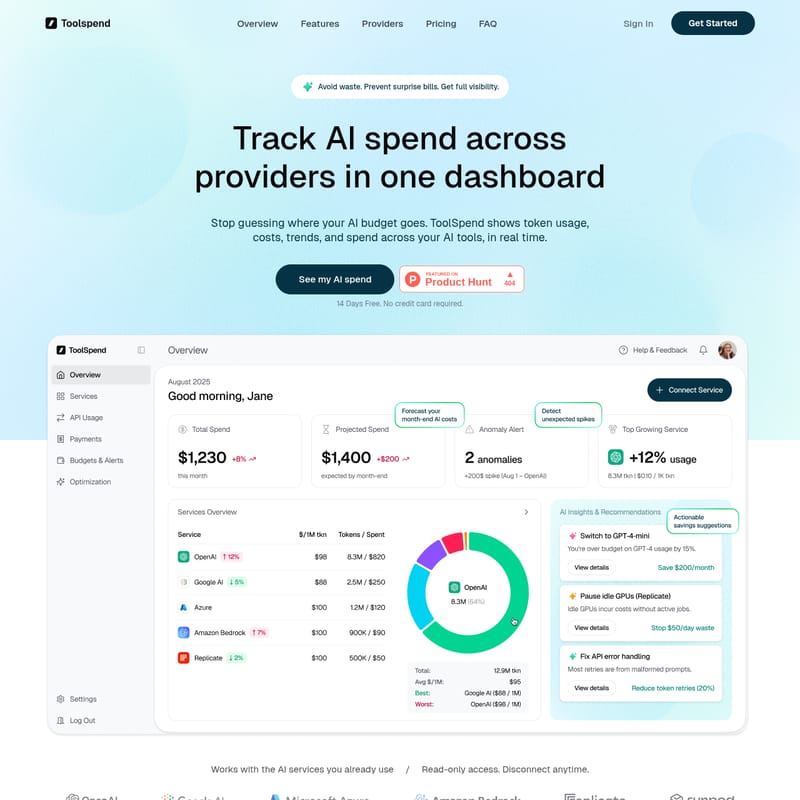
ToolSpend is a comprehensive AI spend management platform designed to provide full visibility into token usage and costs across multiple AI providers. By centralizing data from OpenAI, Google AI, Azure, and Amazon Bedrock into a single dashboard, ToolSpend eliminates the guesswork of AI budgeting. It offers real-time monitoring, month-end cost forecasting, and anomaly alerts to detect runaway jobs or broken prompts before they impact your bottom line. Built for founders, developers, and finance teams, ToolSpend provides actionable AI insights to reduce waste, such as identifying opportunities to switch to cheaper models or pausing idle GPUs. With read-only access and SOC 2 Type II compliance, the platform ensures data security while delivering 99.9% cost accuracy. ToolSpend helps production teams transition from spreadsheets to automated reporting, ensuring AI costs grow slower than revenue.
2026-02-18
0.3K
Toolspend Product Information
ToolSpend: The Ultimate Dashboard for AI Spend Management and Cost Optimization
In the rapidly evolving landscape of artificial intelligence, managing costs across multiple platforms can quickly become a logistical nightmare. ToolSpend emerges as the premier solution for companies looking to avoid waste, prevent surprise bills, and gain full visibility into their AI expenditures. By tracking AI spend across all major providers in one centralized dashboard, ToolSpend empowers teams to stop guessing and start optimizing their AI budget in real time.
What's ToolSpend?
ToolSpend is a specialized monitoring and optimization platform designed specifically for tracking LLM (Large Language Model) costs. It serves as a unified command center where users can view token usage, costs, and trends across various AI tools. Whether you are a founder monitoring the bottom line or a developer tracking production usage, ToolSpend provides the clear numbers and actionable insights needed to manage high-volume AI operations efficiently.
By providing read-only access to your service accounts, ToolSpend ensures that you can monitor your AI spend without compromising the security of your primary infrastructure. It is built for production teams who require 99.9% accuracy in their cost reporting, moving away from manual spreadsheets and toward automated, real-time intelligence.
Features of ToolSpend
ToolSpend is packed with features designed to provide total control over your AI financial ecosystem. These features focus on visibility, forecasting, and proactive management of resources.
Visibility and Provider Integration
- Unified Dashboard: See every provider, team, and project in one place.
- Multi-Provider Support: Track usage across OpenAI, Google AI, Azure, Amazon Bedrock, and more.
- Granular Tracking: Understand exactly which provider or project is driving your AI spend.
Forecasting and Projections
- Month-End Forecasts: ToolSpend projects your total bill early in the cycle based on current usage patterns.
- Budget Control: Keep your team's spending within predefined limits by knowing exactly where you will end the month.
Anomaly Alerts and Detection
- Real-Time Alerts: Receive notifications within seconds when usage spikes occur.
- Identify Inefficiencies: Quickly find retry storms, broken prompts, or runaway jobs before they compound into massive costs.
AI-Driven Insights to Reduce Waste
- Model Optimization: Get recommendations on switching to cheaper models where they can do the job just as effectively.
- Compute Management: Detect and pause idle GPUs or unused compute resources.
- Error Monitoring: Identify high API retry rates and request errors that lead to wasted tokens.
Comprehensive Reporting
- Comparison Tables: Compare providers based on cost per 1M tokens.
- Distribution Charts: Visualize your budget split between OpenAI, Google AI, Azure, and other vendors.
- Export-Ready Views: Generate clean reporting for stakeholders without manual data entry.
Use Case Scenarios
ToolSpend is engineered to serve different departments within a growing company, ensuring everyone has the data they need to succeed.
For Founders
Founders use ToolSpend to ensure that AI spend grows slower than total revenue. It provides the high-level overview needed to forecast month-end costs and spot early spikes that could threaten the company's burn rate.
For Developers
Developers rely on ToolSpend to track what an application actually consumes in production. By comparing providers by cost per 1M tokens and measuring usage trends after new releases, developers can catch "retry storms" and optimize prompt engineering to save on tokens.
For Finance Teams
Finance professionals utilize ToolSpend to get clean reporting for all vendors in one place. It eliminates the need to chase down various invoices and provides automated budgeting and anomaly alerts to keep the company's financial health in check.
How to Use ToolSpend
Getting started with ToolSpend is a streamlined process designed to provide value within minutes.
- Sign Up: Create your workspace and invite your team members to collaborate.
- Connect Your Services: Choose your AI providers and connect them using read-only access. This ensures ToolSpend can see your usage without having permission to modify your services.
- See Your AI Spend in Mins: Immediately view your total spend, future forecasts, and any existing anomalies in your usage patterns.
FAQ
How accurate are the cost numbers? ToolSpend provides real-time tracking with up to 99.9% accuracy by pulling data directly from your API providers and updating costs continuously.
Which AI providers do you support? We support all major AI providers including OpenAI, Google AI, Microsoft Azure, Amazon Bedrock, Anthropic, Replicate, and more. We regularly add new providers to our ecosystem.
Is my data secure? Yes. We use read-only API access and never store your private API keys. All data is encrypted both in transit and at rest, and we are SOC 2 Type II compliant.
Can I try before I buy? Absolutely. You can start with a 14-day free trial to explore all features. No credit card is required to begin tracking your AI spend.
How does the free trial work? You get full access to all features for 14 days. This allows you to connect up to 3 services and track up to 100K tokens to experience complete visibility into your AI costs.