Termsy
Termsy: AI-Powered Terms of Service and Privacy Policy Scanner Extension
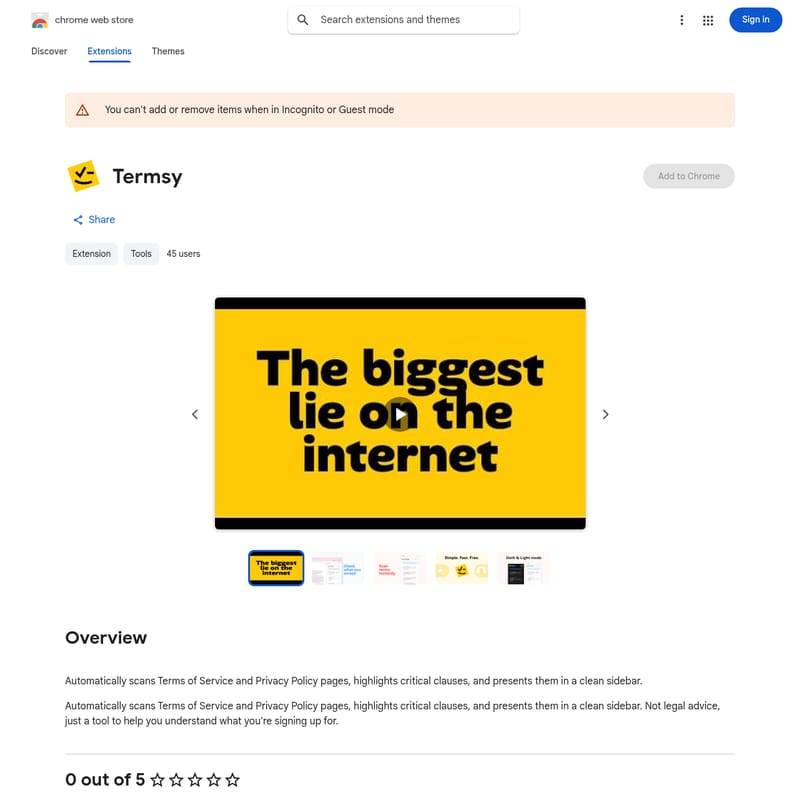
Termsy is a powerful Chrome extension that automatically scans Terms of Service and Privacy Policy pages to highlight critical clauses. It simplifies complex legal documents by presenting key insights in a clean sidebar, helping users understand what they are signing up for without reading through thousands of words of fine print.
2026-02-17
84940200.0K
Termsy Product Information
Termsy: Your Automated Privacy Policy and Terms of Service Scanner
In the digital age, we encounter legal agreements every time we sign up for a new service. Most users simply click "Accept" without understanding the implications. Termsy is a specialized browser extension designed to bridge this gap by automatically scanning complex legal documents to provide clarity and transparency.
What's Termsy?
Termsy is a productivity and privacy tool available for the Chrome browser that streamlines the way users interact with legal text. It is an extension that automatically scans Terms of Service and Privacy Policy pages to identify and highlight critical clauses. Instead of forcing you to read through pages of dense legalese, Termsy extracts the most important information and presents it in a clean sidebar for easy consumption.
It is important to note that Termsy is a tool designed to help you understand agreements and does not constitute legal advice. It serves as an informative assistant to ensure you are better informed about the digital contracts you enter into.
Features of Termsy
Termsy comes packed with features designed to improve user transparency and digital safety. Below are the core functionalities offered by this extension:
Automated Legal Scanning
The primary feature of Termsy is its ability to perform an automated scan of any Terms of Service or Privacy Policy page you visit. You no longer need to manually search for hidden clauses.
Critical Clause Highlighting
Not all text in a legal document is of equal importance. Termsy specifically targets and highlights critical clauses that could impact your privacy, data ownership, or user rights.
Sidebar Interface
To ensure a seamless browsing experience, all findings are displayed in a clean sidebar. This allows you to view the original document while simultaneously reading the summarized highlights provided by the Termsy extension.
Developer Transparency
Offered by Gopigraphy and developer Arun Gopidas, Termsy adheres to European Union trader definitions and maintains a commitment to compliance with EU laws. This ensures a level of professional accountability for the tool.
Privacy-First Data Handling
Termsy has disclosed its data collection practices, noting that it handles:
- Website content (to perform the scan)
- Authentication information
- Personally identifiable information
According to the developer's declaration, your data is not being sold to third parties and is not used for purposes unrelated to the core functionality of the extension.
Use Case: Why You Need Termsy
There are several scenarios where Termsy becomes an essential part of your browsing toolkit:
- Signing Up for New Apps: Before creating an account on a new social media platform or productivity tool, use Termsy to see how they handle your personal data.
- E-commerce Transactions: Understand the return policies and data sharing practices of online retailers by scanning their terms before making a purchase.
- Updating Subscriptions: When a service notifies you that their terms have changed, use Termsy to quickly identify what the new changes actually mean for you.
- General Privacy Awareness: For users who are conscious about their digital footprint, Termsy provides a quick way to vet the reliability of websites they visit frequently.
How to Use Termsy
Getting started with Termsy is straightforward and integrates directly into your Chrome browsing experience:
- Installation: Visit the Chrome Web Store and search for Termsy. Click "Add to Chrome" to install the extension.
- Navigate to a Legal Page: Open any website's "Terms of Service" or "Privacy Policy" page.
- Automatic Scanning: The extension will automatically scan the page content.
- Review Results: Open the Termsy sidebar to see the highlighted critical clauses and summarized information regarding the document you are viewing.
Note: Termsy cannot be added or modified while browsing in Incognito or Guest mode.
FAQ
Is Termsy a replacement for legal counsel?
No. As stated in the product overview, Termsy is a tool to help you understand what you are signing up for, but it is not legal advice.
Does Termsy sell my data to third parties?
No. The developer declares that data is not being sold to third parties outside of approved use cases and is not used to determine creditworthiness or for lending purposes.
What kind of information does Termsy highlight?
Termsy focuses on critical clauses within Terms of Service and Privacy Policy pages that are most relevant to the user's rights and data privacy.
Who developed Termsy?
Termsy is offered by Gopigraphy and developed by Arun Gopidas, based in Kerala, India. The developer is identified as a trader per EU definitions.
What is the size of the extension?
Termsy is a lightweight extension, with a file size of approximately 44.29KiB.
Disclaimer: Always ensure you review the most recent version of the extension (currently 0.0.2) and check the developer's privacy policy for the most up-to-date information regarding data usage.