Pica
Better Font Management for MacOS: A Native and Free Solution by Josh Puckett
Optimize your workflow with better font management for MacOS. This native and free tool by Josh Puckett features one-click activation, watch folders, and full OpenType support for desktop users.
2026-04-28
18.0K
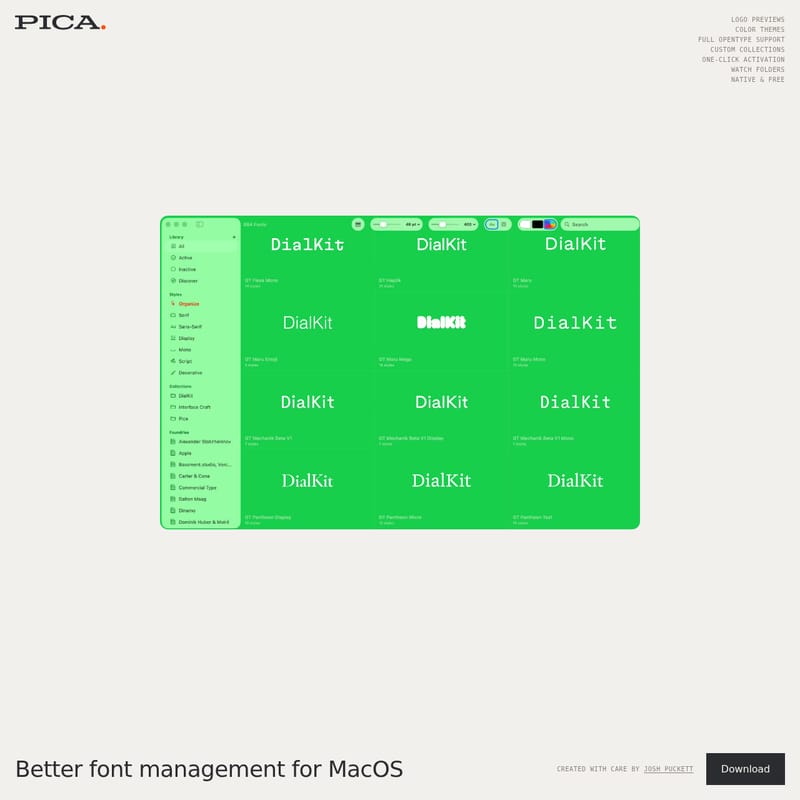
Pica Product Information
Better Font Management for MacOS
In the world of digital design and typography, achieving better font management for MacOS is essential for maintaining a streamlined and productive workflow. This specific tool, which is Native & Free, has been created with care by Josh Puckett to address the specific needs of designers who require precision and ease of use. By focusing on a desktop-first experience, this utility ensures that your typography remains organized and accessible at all times.
What’s Better Font Management for MacOS?
Better font management for MacOS is a specialized application designed to simplify the way users interact with their typeface libraries. Unlike generic solutions, this tool is built to be Native & Free, ensuring that it integrates perfectly with the MacOS environment. Developed by Josh Puckett, the software prioritizes performance and user experience, providing a lightweight yet powerful alternative to standard font handlers. It is specifically built for those who need a more intuitive way to handle their creative assets directly on their Desktop.
Features
To provide the best possible experience, the application includes a robust suite of features designed to enhance better font management for MacOS. Every element, from the visual interface to the background processes, is optimized for speed and reliability.
One-Click Activation
One of the standout capabilities for better font management for MacOS is the one-click activation feature. This allows users to toggle fonts on and off instantly without navigating through complex menus. One-click activation is a game-changer for designers who need to test multiple typefaces in real-time.
Watch Folders
Automation is key to better font management for MacOS. With watch folders, the application automatically monitors your selected directories for new font files. When you add a new file to a folder, the software recognizes it immediately, ensuring your library is always up to date without manual intervention.
Custom Collections
Organization is at the heart of better font management for MacOS. The Custom Collections feature enables users to group fonts by project, style, or preference. By utilizing Custom Collections, you can keep your workspace tidy and find exactly what you need in seconds.
Logo Previews
For branding specialists, better font management for MacOS offers logo previews. This feature allows you to see how a specific font looks within a logo context before you even commit to it, making the selection process significantly more efficient.
Full OpenType Support
Advanced typography requires technical excellence. This tool provides Full OpenType support, ensuring that all ligatures, stylistic alternates, and special characters are handled correctly. Full OpenType support is vital for professional-grade better font management for MacOS.
Color Themes
Personalization is built into the interface through various Color themes. Whether you prefer a dark or light aesthetic, the Color themes ensure that your environment for better font management for MacOS is visually comfortable and matches your creative style.
Use Case
There are several scenarios where better font management for MacOS becomes an indispensable part of a professional toolkit:
- Professional Graphic Design: Designers can use Custom Collections to organize typefaces for specific client projects, ensuring a clear distinction between various branding assets.
- Logo Development: By utilizing logo previews, creators can quickly iterate through different typographic options, streamlining the brand identity process.
- Automated Asset Management: Large studios can leverage watch folders to ensure that any font shared across a network or local folder is instantly available for one-click activation.
- High-End Typography: Those working with complex fonts can rely on Full OpenType support to access the full range of features offered by modern type foundries.
"Achieving better font management for MacOS is about more than just storing files; it is about creating a seamless bridge between your creativity and your tools. This native & free application, created with care by Josh Puckett, is designed to be that bridge."
How to Use
Getting started with better font management for MacOS is a straightforward process designed for the Desktop user.
- Download on Desktop: Begin by securing the application through the Download on Desktop link.
- Setup Watch Folders: Point the application to your existing font directories to enable automatic syncing.
- Organize with Custom Collections: Create your first collection to start categorizing your library.
- Activate with One-Click: Simply click to activate the fonts you need for your current project.
FAQ
Q: Is this software truly free? A: Yes, it is Native & Free, providing a high-quality experience without any cost.
Q: Who developed this tool? A: It was created with care by Josh Puckett to provide better font management for MacOS.
Q: Does it support advanced font features? A: Absolutely. It offers Full OpenType support for all your professional typography needs.
Q: Can I change the look of the app? A: Yes, the software includes various Color themes to suit your visual preference.
Q: How do I add new fonts? A: You can use watch folders to automatically import new fonts or use the one-click activation system to manage them once they are in your directory.
Q: Is there a mobile version? A: Currently, the focus is on providing a superior experience through a Download on Desktop for MacOS users.
By choosing this tool, you are investing in a future of better font management for MacOS, backed by the thoughtful design of Josh Puckett. Whether you need logo previews, watch folders, or Custom Collections, this native & free solution is built to handle it all on your Desktop.