PatentFig AI
AIToolly product video
See PatentFig AI in motion
PatentFig AI: The World's First AI-Native Patent Drawing Platform for Filing-Ready Figures
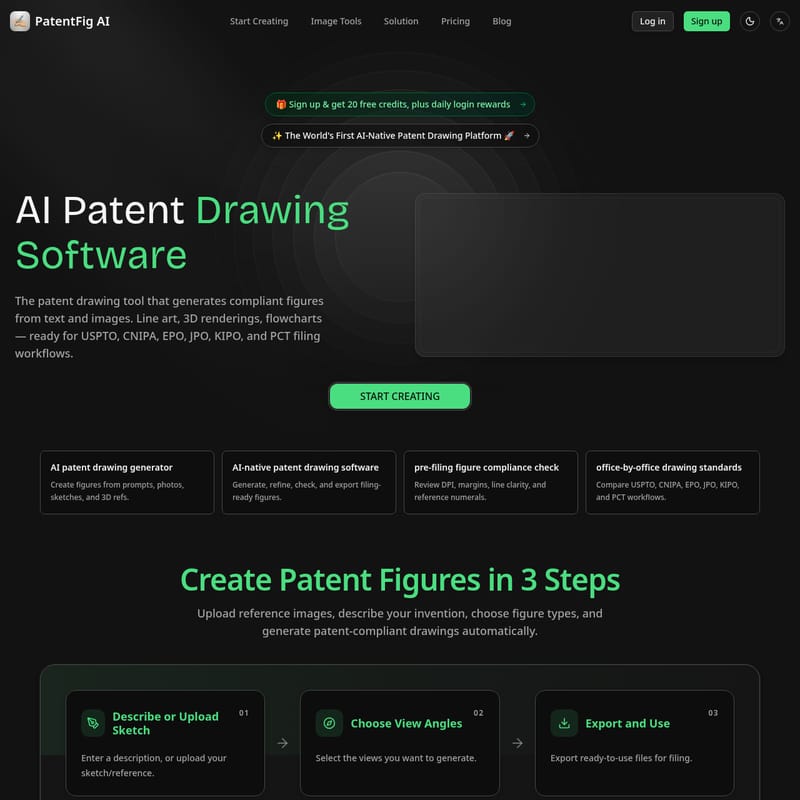
PatentFig AI is a revolutionary AI-native patent drawing software designed for patent professionals and inventors. It transforms text, sketches, and photos into compliant patent figures for the USPTO, EPO, CNIPA, and more. Featuring Chat-to-Modify edits, multi-view consistency, and pre-filing compliance checks, PatentFig AI accelerates the drafting process by generating professional line art, flowcharts, and 3D renderings instantly.
2026-05-17
8.0K
PatentFig AI Product Information
PatentFig AI: The World's First AI-Native Patent Drawing Platform
In the complex world of intellectual property, the quality of visual documentation can be just as critical as the written claims. PatentFig AI emerges as the world's first AI-native patent drawing platform, specifically engineered to bridge the gap between initial invention concepts and filing-ready illustrations. This advanced AI patent drawing software empowers patent attorneys, agents, and inventors to generate compliant figures from simple text prompts, photos, or sketches, significantly reducing the time and cost associated with traditional drafting cycles.
What is PatentFig AI?
PatentFig AI is a specialized patent drawing tool that leverages artificial intelligence to create high-quality, professional illustrations tailored for official patent filings. Whether you are preparing documents for the USPTO, CNIPA, EPO, JPO, KIPO, or PCT, this software ensures your figures meet strict regulatory standards.
By utilizing an AI-native approach, PatentFig AI does more than just generate images; it understands the specific requirements of patent law, such as line clarity, reference numerals, and multi-view consistency. It serves as a comprehensive workspace where users can generate, refine, check, and export figures that are ready for immediate office submission.
Core Capabilities of PatentFig AI
The versatility of this AI patent drawing generator makes it an essential tool for any IP professional. Its core capabilities cover the full spectrum of patent illustration needs:
Patent Line Art Generation
PatentFig AI can automatically generate clean, labeled line drawings from product photos or 3D models. The AI intelligently adds reference numerals and leader lines, following standard patent office conventions to ensure every part of the invention is clearly identified.
3D Rendering & Multi-View Consistency
Creating a consistent set of figures from different angles—front, rear, top, and perspective—is often the most time-consuming part of drafting. PatentFig AI ensures that all views in a set belong together, maintaining structural integrity across various orientations.
Flowcharts & Block Diagrams
For software and process patents, the software provides tools to generate logical flowcharts and block diagrams. Users can describe the logic in plain language, and the AI translates that into a clean, structured diagram, avoiding the need for manual drawing on a blank canvas.
Key Features of the Patent Drawing Software
PatentFig AI is packed with features designed to streamline the workflow of patent professionals and reduce avoidable errors in figure preparation.
- Chat-to-Modify: This innovative feature allows users to edit figures using natural language. Commands like "make the arrow thicker" or "add a cross-section view" enable instant adjustments without restarting the generation process.
- Multi-Modal Input: The software accepts a wide range of inputs, including reference photos, hand-drawn sketches, CAD screenshots, or even simple text descriptions.
- Pre-Filing Figure Compliance Check: Before exporting, the tool reviews figures for DPI, margins, line clarity, and the placement of reference numerals to ensure they meet office-by-office standards.
- Version Control: Each generation is tracked with a version timeline (V1, V2, etc.), allowing users to compare edits and revert to previous versions at any time.
- Multi-Office Support: Easily switch between formatting workflows for the USPTO (USA), CNIPA (China), EPO (Europe), JPO (Japan), KIPO (Korea), and PCT/WIPO. One source figure set can be adapted for multiple global offices.
- Professional Export Options: Finalized figures can be exported in high-resolution formats including PDF, PNG, SVG, and TIFF, ensuring compatibility with various filing systems.
How to Use PatentFig AI to Create Patent Figures
Generating patent-compliant drawings is simplified into a streamlined three-step process within the PatentFig AI platform:
1. Describe or Upload Sketch
Start by entering a detailed description of your invention or uploading a reference image. This could be a photo of a prototype, a CAD screenshot, or even a rough napkin sketch.
2. Choose View Angles
Select the specific views required for your application. This includes standard views like front, back, top, bottom, side, and isometric perspective views to provide a complete visual disclosure.
3. Export and Use
Once the AI generates the figures, use the Chat-to-Modify feature for any necessary refinements. After a final compliance check, export the ready-to-use files in your preferred format for filing.
Use Case: How Professionals Benefit from PatentFig AI
Patent teams across various industries are integrating PatentFig AI into their production rhythm to save time and increase efficiency.
- Patent Attorneys and Agents: Use the tool to quickly turn inventor sketches or rough client materials into reviewable first drafts. It shortens the path from initial consultation to filing, especially for revision-heavy review cycles.
- IP Operations Managers: Standardize figure packages before they are sent to outside counsel, reducing back-and-forth communication and ensuring a consistent internal quality standard.
- Design Patent Counsel: Benefit from the high level of consistency across multi-view sets, ensuring that front, rear, and top views are perfectly aligned and visually coherent.
- Startups and Individual Inventors: Access professional-grade drafting tools without the high cost of manual illustration services, allowing for faster iteration during the R&D phase.
"The biggest win is iteration speed. I can upload a reference, ask for cleaner line art, and get something my inventors can comment on without waiting for a separate drafting cycle." — Daniel Mercer, US Patent Agent
Pricing and Plans
PatentFig AI offers flexible plans to suit everyone from individual inventors to large patent firms.
| Plan | Price (Monthly) | Key Features | | :--- | :--- | :--- | | Free | $0 | 20 credits/month, Line art/rendering/flowcharts, Standard priority. | | Basic | $20 | 500 credits/month, Multi-project workflow, Version timeline review. | | Pro | $40 | 1500 credits/month, High-frequency drafting ready, Faster iteration loops. | | Enterprise | $80 | 4000 credits/month, Team-scale continuous generation, Portfolio-level consistency. |
Note: Yearly plans are available with a 60% discount. New users receive 20 free credits upon sign-up, plus daily login rewards.
FAQ
What types of patent figures can PatentFig AI generate?
The software can generate a wide range of illustrations, including clean line art, 3D renderings, complex flowcharts, and block diagrams suitable for utility and design patents.
Which patent offices are supported?
PatentFig AI supports specific formatting workflows for the USPTO, CNIPA, EPO, JPO, KIPO, and PCT (WIPO).
How does the credit system work?
Users are allocated a monthly quota of credits based on their plan level. Credits are used to generate and regenerate figures. Free users receive 20 credits per month, while Enterprise users have up to 4000.
Can I edit the generated figures?
Yes. The Chat-to-Modify feature allows for natural language edits, and the software supports slot-by-slot regeneration and version control for precise refinements.
Is PatentFig AI a replacement for Visio or AutoCAD?
While not a direct replacement for the manual control of CAD software, it acts as a powerful acceleration layer. It generates a much cleaner and more accurate starting point than a blank canvas, which can then be exported into standard formats for final tweaks if necessary.
How do I make patent drawings that meet USPTO requirements?
By using the built-in pre-filing compliance check, PatentFig AI automatically reviews margins, DPI, and line clarity to ensure your drawings align with USPTO and other major office standards.