Openstatus MCP Health Checker
Openstatus MCP Server Health Check: Free Online JSON-RPC Handshake and Tool List Testing
Verify your Model Context Protocol endpoints with the Openstatus MCP Server Health Check. This free online tool performs full JSON-RPC handshakes, including initialization and tool listing, to ensure AI client compatibility. Detect common failures like misconfigured content types, missing methods, or authentication requirements without any installation or signup.
2026-06-01
91.0K
Openstatus MCP Health Checker Product Information
Openstatus MCP Server Health Check: The Definitive Guide to Verifying AI Protocol Endpoints
In the rapidly evolving landscape of Artificial Intelligence, the Model Context Protocol (MCP) has emerged as a vital standard for connecting AI clients to external data and tools. However, ensuring that an MCP server is correctly configured and ready to handle requests is more complex than a standard web server check. This is where the Openstatus MCP Server Health Check becomes an indispensable tool for developers and system administrators.
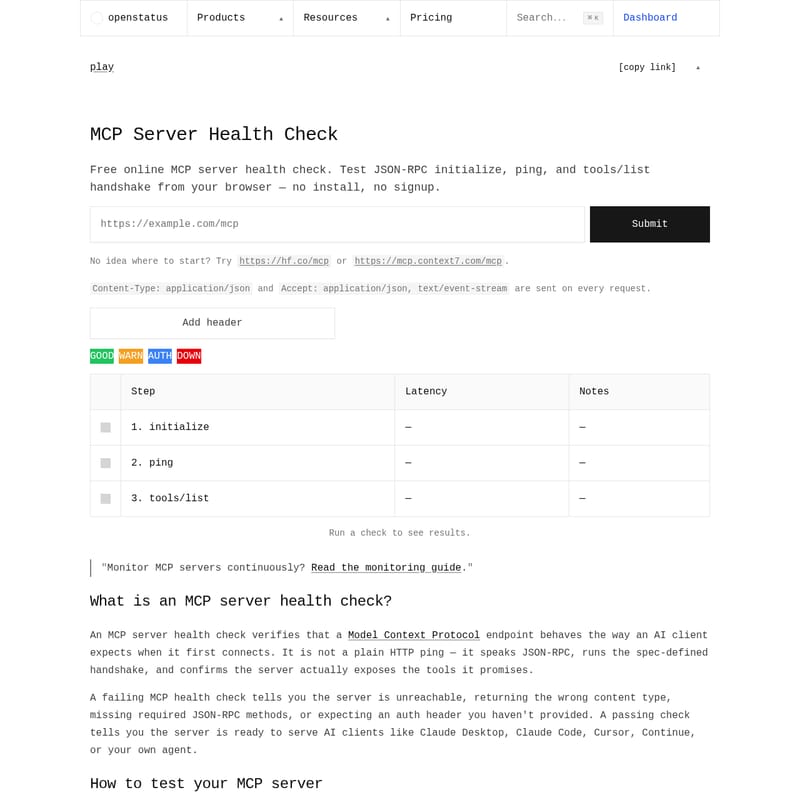
The Openstatus MCP Server Health Check is a free online utility designed to test JSON-RPC initialization, pings, and the tools/list handshake directly from your browser. With no installation and no signup required, it provides an immediate verdict on whether your MCP server is ready to serve AI clients like Claude Desktop, Cursor, or specialized agents.
What's the Openstatus MCP Server Health Check?
An MCP server health check is a specialized diagnostic process that verifies if a Model Context Protocol endpoint behaves exactly as an AI client expects during the initial connection phase. Unlike a basic HTTP ping that only checks for a connection, an MCP health check speaks the JSON-RPC language, executes the spec-defined handshake, and confirms that the server actually exposes the tools it claims to provide.
When you use the Openstatus tool, you are performing a deep inspection of the server's capabilities. A passing check indicates the server is fully prepared for integration, while a failing check provides specific technical details on why the connection failed—whether due to reachability issues, incorrect content types, missing methods, or authentication hurdles.
Key Features of the MCP Server Health Check Tool
- Zero Installation & Free Access: Test any streamable HTTP endpoint (like https://hf.co/mcp) without downloading software or creating an account.
- Complete JSON-RPC Handshake: The tool runs the exact sequence an AI client follows:
initialize,notifications/initialized, and a parallelping+tools/list. - In-Depth Latency Reporting: Measure the performance of each step in the handshake process to identify bottlenecks.
- Protocol Version Negotiation: Capture and verify the negotiated protocol version (e.g., 2025-06-18) to ensure updates haven't changed server behavior.
- Detailed Inspection: Click on any result row to view the exact JSON-RPC request and response, including
serverInfo,capabilities, andMcp-Session-Id. - Verdict System: Get clear status updates: GOOD (Healthy), WARN (Partial success, no tools exposed), AUTH (Authentication required), or DOWN (Unreachable or parse failure).
- OAuth & Header Support: Easily add Authorization headers and handle RFC 9728 compliant OAuth challenges with automated resource metadata parsing.
Why a JSON-RPC Ping is Better Than a Plain HTTP Check
A standard status-code pinger only checks if a URL returns a 200 OK response. However, an MCP server can return a 200 status and still be completely broken for AI clients. Common issues that a standard ping misses include:
- The server returning HTML instead of the required JSON-RPC format.
- The JSON-RPC ID failing to echo correctly.
- Failure to implement the
pingmethod. - An empty
tools/listresponse.
By performing a specific MCP server health check, you ensure that the server-client contract is maintained. The handshake also captures the negotiated protocol version, providing the only reliable signal that a server upgrade hasn't silently altered expected behaviors.
How to Use the Openstatus MCP Server Health Check
Testing your MCP server with Openstatus is a straightforward process that takes approximately 30 seconds. Follow these steps:
- Enter the URL: Paste your MCP server URL into the input field. Any streamable HTTP endpoint is compatible.
- Configure Headers: If your server requires authentication, use the "Add Header" button. Public servers can be tested without additional headers.
- Initiate the Check: Click "Submit." Openstatus will then send the
initialize,ping, andtools/listcalls in the correct sequence. - Analyze Results: Review the latency and notes for each step. You can inspect the specific JSON payloads for the session ID, protocol version, and advertised tools.
Note: Any data used during the check remains in your browser session. The only data persisted is the report you explicitly choose to share via a link.
Use Case Scenarios for MCP Server Health Checks
1. Developer Debugging
During the development of a new MCP server, developers can use this tool to ensure their JSON-RPC implementation strictly follows the Model Context Protocol specification. It helps identify why a server might work in a local environment but fail when deployed to a cloud provider or behind a proxy.
2. Production Monitoring
For organizations providing AI-ready infrastructure, continuous monitoring of MCP server health is critical. The tool helps ensure that endpoints remain reachable and that protocol version updates do not break existing tool integrations for end-users.
3. Connection Troubleshooting
When an AI agent (such as Claude Code or Continue) fails to connect to a server, the Openstatus health check can determine if the issue lies with the server's authentication (401/403 errors), its content-type negotiation (406 Not Acceptable), or misconfigured load balancers returning HTML marketing pages.
Common Failure Modes and Solutions
- Connection Refused / DNS: Often caused by an incorrect URL or firewall restrictions. Verify the endpoint is publicly accessible.
- 200 with HTML Body: This occurs when a URL points to a marketing page or load balancer rather than the JSON-RPC endpoint. This is the most frequent MCP misconfiguration.
- 401 / 403 Errors: Indicates missing or rotated authentication headers. Ensure the Bearer token used by your AI client is provided in the tool.
- 406 Not Acceptable: This suggests the server's Accept negotiation is broken. The health check always sends
application/jsonandtext/event-streamto accommodate standard requirements. - JSON-RPC -32601 Method Not Found: The server does not implement the optional
pingmethod. The tool will still pass ifinitializeandtools/listare successful.
FAQ: Frequently Asked Questions
What is an MCP health check?
It is a process that verifies a server's adherence to the Model Context Protocol using JSON-RPC handshakes rather than just checking HTTP status codes.
How do I test if my MCP server is working?
Simply paste your server URL into the Openstatus MCP Server Health Check tool and run the handshake test to see if it correctly returns tool lists and pings.
What's the difference between an MCP ping and an HTTP ping?
An HTTP ping only checks for a 200 OK status. An MCP ping verifies the JSON-RPC layer, ensuring the server can process AI-specific commands and maintain session states.
Do I need authentication to ping an MCP server?
Only if the server is private. Public MCP servers can be tested without headers. For protected resources, the tool supports Authorization headers and OAuth 2.0 metadata.
Why does my MCP server return text/event-stream?
This is often part of the protocol's requirements for streamable HTTP endpoints. The health check tool handles this by sending the appropriate Accept headers on every request.
Is the Openstatus MCP Server Health Check free?
Yes, it is a free online tool provided by Openstatus to support the developer community in building more reliable AI integrations.
Can I monitor my MCP server continuously?
Yes. While this tool provides on-demand checks, Openstatus also offers uptime monitoring and status page services for continuous oversight. You can refer to the official monitoring guide for more details.