Omnia Agent favicon

Omnia Agent

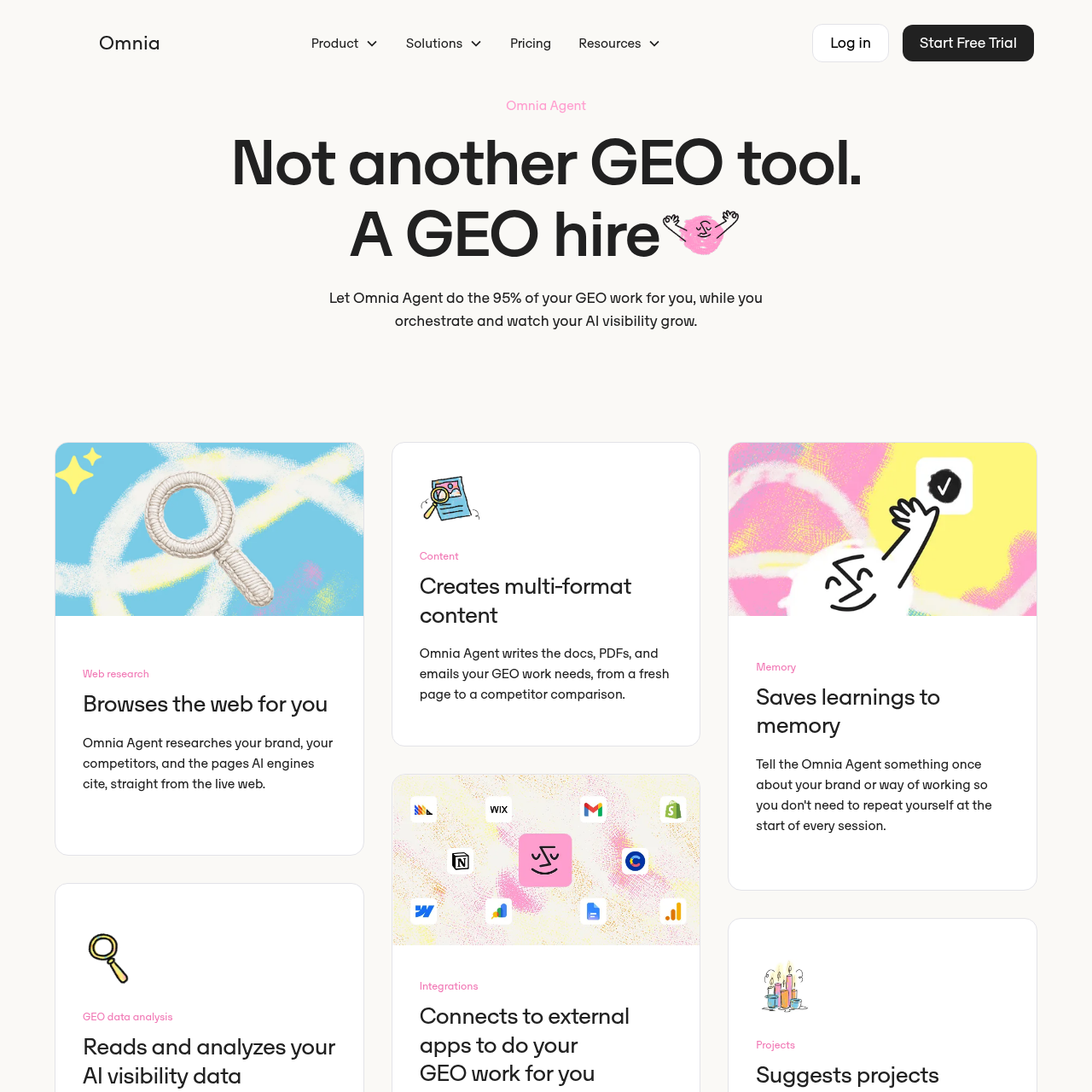
Omnia Agent is an AI-powered generative engine optimization assistant that audits visibility, drafts citation-targeted content, and executes approved workflow actions across integrated marketing and development platforms.

SEOAuditing complete websitesRewriting existing pages to target…Submitting new or updated pages…Opening pull requests on GitHub…
Omnia Agent product interface screenshot
Estimated monthly visits
41K
Data period:
Listed on AIToolly

What Is Omnia Agent? Product Overview

What the product does and how it is positioned

Omnia Agent is an artificial intelligence system built directly inside Omnia to assist teams with Generative Engine Optimization (GEO). Rather than operating as an isolated chat interface, the agent connects directly to an organization's Omnia account to examine share of voice, engine citations, and sentiment across tracked artificial intelligence search tools. It also crawls the live web to evaluate how competitors and third-party resources are represented in machine-generated answers.

The tool handles the research, drafting, and operational steps required to secure references across artificial intelligence engines. Using official integrations with software such as GitHub, Google Search Console, HubSpot, Contentful, and Notion, Omnia Agent can formulate content briefs, create citation-focused content, prepare outreach, and push site updates. High-impact operations—including publishing, dispatching outreach, modifying data, and spending credits—pause for explicit human review before execution.

What Can You Use Omnia Agent For?

Source-supported ways to use the product

Generative Search Visibility Auditing

Evaluate entire websites to pinpoint technical gaps, missing schema, and missing citations across artificial intelligence engines.

Third-Party Citation Outreach

Identify external publications cited by artificial intelligence models and prepare outreach campaigns through connected email or messaging platforms.

Multi-Platform Content Publishing

Draft comparison pages, informational articles, or product listings and export or push them live across headless CMS platforms and website builders.

Technical SEO and Repository Maintenance

Generate and push repository updates via GitHub pull requests to manage robots.txt configurations, llms.txt files, and structured data schemas.

How to Use Omnia Agent

The documented workflow, where available

  1. 1

    Connect Data and Tools

    Authenticate relevant third-party accounts via OAuth or API keys, including Google Search Console, Google Analytics, CMS platforms, or GitHub.

  2. 2

    Analyze AI Citations and Live Web Data

    Allow the agent to evaluate existing share of voice, sentiment, and third-party citations alongside live competitor research.

  3. 3

    Review Daily Suggested Projects

    Examine three daily proactive project recommendations generated by the agent to target artificial intelligence visibility opportunities.

  4. 4

    Draft Optimization Content and Assets

    Direct the agent to write web content, author outreach messages, construct tracking spreadsheets, or generate technical file updates.

  5. 5

    Approve and Publish

    Review generated outputs and grant explicit permission before the agent submits indexing requests, sends messages, or publishes pages live.

Integration Architecture and Execution Safeguards

Omnia Agent interfaces directly with external platforms using OAuth flows and API tokens, allowing it to integrate with analytics, content management systems, code repositories, and outreach tools. Because it integrates with systems such as Contentful, Webflow, GitHub, and Google Search Console, the agent can translate generative engine insights into real operational changes.

To mitigate operational risks, the agent operates under an explicit approval model. Activities involving data analysis, planning, and drafting take place without interruption, but actions that write to live production systems, send email communications, alter repository code, or consume credits pause until confirmed by a user. Access scopes are individually configured per integration and can be revoked at any time.

  • OAuth-based authentication storing credentials in an isolated, encrypted vault
  • Read-and-write permissions scoped to specific operational categories like CMS, email, and code hosting
  • Mandatory approval checkpoints before publishing, message transmission, or destructive tasks
  • Workspace isolation supporting customer data and learnings remain separated from other brands

What to Test Before Choosing Omnia Agent

Checks to run with your own material and workflow

  • Confirm which marketing, CMS, and developer integrations support the specific authorization scopes required by your organization.
  • Verify that the OAuth authorization and encrypted vault storage policies align with internal data security protocols.
  • Review the approval workflow interface to ensure your team can adequately inspect drafted content, pull requests, and outreach messages prior to release.
  • Check whether your primary artificial intelligence engines are actively tracked within the linked Omnia account data.

Omnia Agent Sources and Last Checked

What was checked and when

Last checked
Category
SEO

Omnia Agent Frequently Asked Questions

Answers based on the source-checked product record

What core functions does Omnia Agent perform?

Omnia Agent conducts live web research, inspects AI search visibility data, generates multi-format content, suggests daily optimization projects, and coordinates publishing workflows through connected tools.

Does Omnia Agent publish content or send outreach automatically?

No. Omnia Agent automatically reads data, drafts materials, and plans tasks, but it requires explicit user approval before publishing content, sending emails, spending credits, or deleting data.

How does Omnia Agent connect to third-party tools?

The agent connects to external tools such as Google Search Console, GitHub, HubSpot, and Contentful using official OAuth flows or dedicated API keys based on user-defined scopes.

How does Omnia Agent handle brand context across sessions?

Omnia Agent features a memory system that retains instructions, brand information, and workflow preferences so users do not need to repeat setup instructions in each session.

How is user data protected within Omnia Agent?

Each agent operates in an isolated workspace scoped to the specific brand, credentials remain encrypted in a separate vault, and saved information is not shared with other brands.

Explore other recently added tools in the same category.