markitdown
Sponsored product video
See markitdown in motion
markitdown: File to Markdown Converter for AI
Use markitdown, a file to markdown converter, to transform PDF, Word, and Excel files into clean Markdown for AI workflows, RAG pipelines, and LLM prompts.
2026-08-04
--K
markitdown Product Information
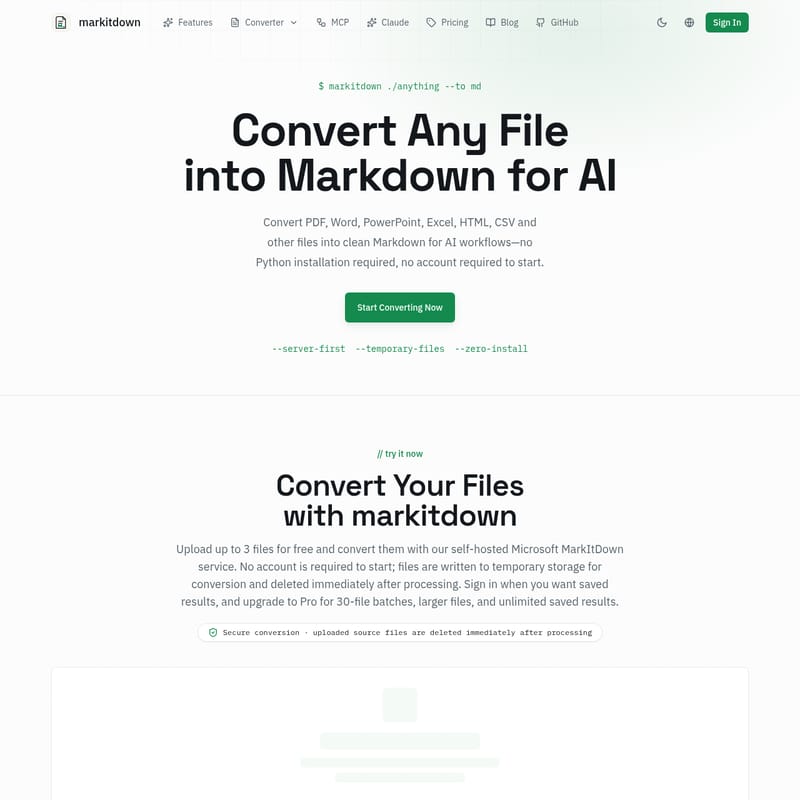
markitdown is a file to markdown converter that transforms various document types into structured text. It is powered by the open-source Microsoft MarkItDown library, enabling the conversion of formats including PDF, Word, PowerPoint, Excel, HTML, and CSV. By converting these files into Markdown, the service prepares content for large language model prompts and retrieval-augmented generation pipelines.
Multi-Format Conversion Support
The tool handles a wide range of input formats for document to markdown transitions. Supported source types include DOCX, PPTX, XLSX, and web-based formats like HTML. The system also processes structured data files such as JSON, XML, and CSV, alongside plain text. When a file is uploaded, the parser identifies structural elements within the document, such as headings, lists, links, and code blocks. This process ensures the resulting Markdown reflects the organization of the original source.
Beyond standard text documents, the service provides processing for spreadsheets and presentations. For instance, an Excel to Markdown conversion turns grid data into formatted Markdown tables. The engine also accommodates media files, including images and audio, and supports the conversion of Mermaid diagrams.
Document Structure and Table Preservation
A feature of the system is the ability to handle visual media and scanned documents. When processing scanned PDFs, built-in OCR identifies text and visual elements, allowing the system to rebuild tables. For technical documents, the converter detects mathematical equations and transforms them into LaTeX format. This ensures that technical notations remain in the final Markdown output.
This file to markdown converter utilizes open-source engines including pdf.js, mammoth, SheetJS, and turndown. These libraries analyze the underlying structure of files and map them to Markdown syntax. Because the tool is based on the Microsoft MarkItDown project, it follows a modular design that parses headings and inline formatting such as bold and italic text.
Integration with AI and LLM Workflows
The output is specifically structured as clean Markdown for AI workflows. Large language models and AI agents process information when it is presented in Markdown. By providing structured output, the converter maintains the context of the data for use in vector databases, knowledge bases, and search indexing.
The generated text is suitable for insertion into LLM prompts. Because the tool preserves document structure, the AI distinguishes between different sections of a document, such as headers and sub-headers. This structural integrity is used in RAG pipelines for the retrieval phase of the AI process.
Server-Side Processing and Data Handling
The conversion process is conducted on the server side through a self-hosted Microsoft MarkItDown service. Users can initiate the process by dragging and dropping files into the web interface. Once the conversion is complete, a preview of the Markdown output is generated for download. The service runs in an isolated worker to manage the transformation of the document.
Regarding data handling, the provider reports that files are deleted immediately after processing. Uploaded source documents are written to temporary storage for the duration of the conversion. The service does not store source files or write the contents of the documents to permanent logs. This approach is intended for researchers, analysts, and developers who require a temporary conversion environment for technical documentation.
faq
Which file formats can be converted to Markdown?
The service supports a selection of formats including PDF to Markdown and conversions for Word, PowerPoint, Excel, HTML, and CSV. It also handles data formats like JSON and XML, as well as images, audio files, and Mermaid diagrams.
Does the converter maintain tables and formatting?
The tool preserves document structure whenever the source file exposes those elements. This includes headings, lists, links, and inline formatting. For tabular data, such as that found in Excel or Word, the system converts the content into Markdown tables. Scanned documents are processed using OCR to reconstruct tables and mathematical formulas.
How does the system handle data during conversion?
The provider uses a server-first processing model where files are deleted immediately after processing. Documents are stored in temporary storage for the duration of the conversion and are not permanently saved or logged. The contents of the files are removed from the system once the Markdown result is returned.