Lyto
Lyto AI: The Advanced AI Chrome Extension for Browser Automation and Deep Research
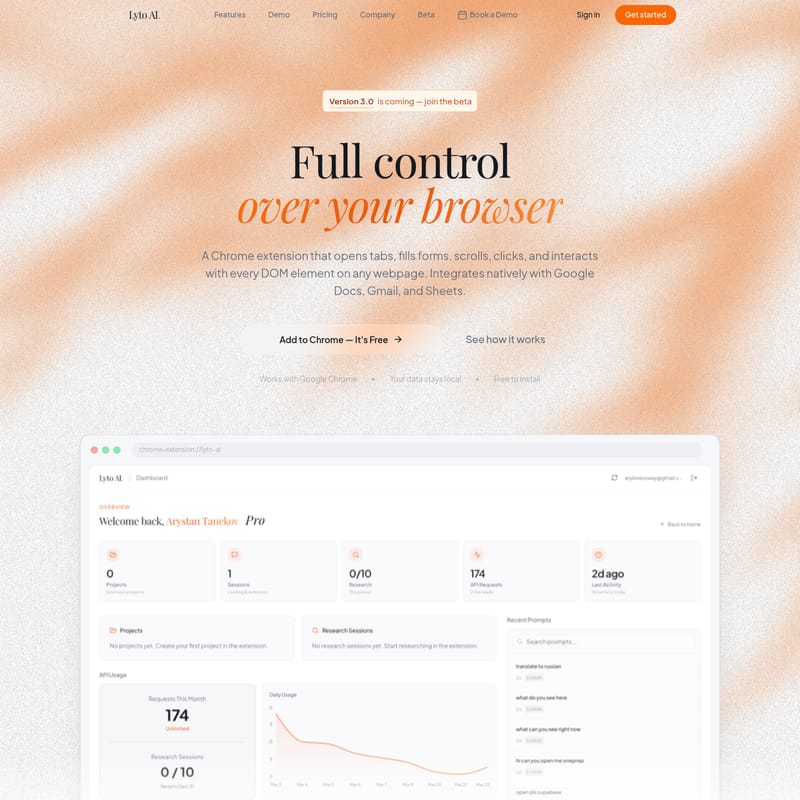
Lyto AI is a revolutionary Chrome extension that offers full browser control, automating tasks like form filling, clicking, and scrolling. It features deep research capabilities, context memory across tabs, and mobile-to-desktop integration via WhatsApp and Telegram, while keeping your data local for maximum privacy.
2026-06-30
--K
Lyto Product Information
Lyto AI: The Ultimate AI-Powered Chrome Extension for Complete Browser Automation
In the rapidly evolving world of digital productivity, Lyto AI emerges as a revolutionary tool designed to give users full control over their web browsing experience. As a sophisticated Chrome extension, Lyto AI goes beyond simple chat interfaces, allowing users to automate complex browser tasks, integrate with popular workplace tools, and maintain a seamless flow of information across various platforms. Whether you are a student, a developer, or a business professional, Lyto AI is built to eliminate busywork and enhance your daily routine.
What is Lyto AI?
Lyto AI is a cutting-edge Chrome extension that acts as a comprehensive browser assistant. Unlike traditional AI tools that require constant manual input, Lyto AI interacts natively with the Document Object Model (DOM) of any webpage. This means it can open and close tabs, fill out forms, scroll through content, and click buttons just like a human would, but with the speed and precision of artificial intelligence.
Currently moving toward Version 3.0, Lyto AI is designed for "power users" who need to bridge the gap between their browser, their mobile devices, and their professional software suites. One of the core tenets of Lyto AI is privacy and security, ensuring that your data stays local while providing high-level automation. It is free to install and offers native integration with Google Docs, Gmail, and Google Sheets, making it an essential companion for anyone working within the Google ecosystem.
Key Features of Lyto AI
Lyto AI is packed with features that transform how you interact with the web. Below are the standout capabilities that set this tool apart from standard AI assistants:
1. Full Browser Control and Automation
Lyto AI provides absolute control over your Chrome browser. It can interact with every DOM element on any webpage. This includes:
- Opening and closing tabs automatically based on your workflow.
- Scrolling through long pages to find specific information.
- Filling out complex forms with high accuracy to save time.
- Clicking buttons and interacting with UI elements to navigate multi-step processes.
2. Context Memory and Workflow Continuity
One of the biggest pain points in digital work is losing context when switching tabs. Lyto AI solves this with its Context Memory. It remembers your full context across different tabs and tools, meaning you no longer need to copy and paste information into a chatbot every time you switch tasks. It knows exactly where you left off, ensuring total workflow continuity.
3. Mobile-first Integration (WhatsApp & Telegram)
Lyto AI is the only browser AI that allows you to trigger desktop actions from your phone. You can text Lyto AI from WhatsApp or Telegram to request a PDF report, a chart, or a summary. Lyto AI will build the file on your computer and can even send it back to any contact. This unique feature means you can get finished files without even needing to open your laptop.
4. Deep Research and Data Fetching
Standard AI tools often rely on basic search results. Lyto AI performs deep research by parsing web data and fetching real-time information. Whether you are looking for the cheapest flight or pulling competitor pricing, Lyto AI delivers real answers and data fetching capabilities straight into your chat, rather than just providing a list of links.
5. Seamless Tool Integrations
Lyto AI plugs directly into the professional tools your team already uses, creating a unified workspace:
- Google Workspace: Generate Google Sheets tables with graphs or create clean Google Docs from raw data instantly.
- Development Workflows: Connect GitHub for codebase reviews or use Slack to keep your team in sync automatically.
- Design Integration: Connect Figma to find specific designs that match your prompts.
- Daily Routine: Connect Google Calendar to receive a daily agenda every morning with your schedule and priorities.
Lyto AI Use Cases
For Students and SAT Prep
Lyto AI acts as a personal tutor that sits right next to your work. If you are studying for the SAT or any major exam, it can highlight answers on the page and provide real-time explanations for the content you are reading. It connects dots between different papers and sources automatically, which has been shown to help students improve their grades.
For Sales and Business Professionals
Sales teams use Lyto AI to automate the tedious process of lead research. By scanning LinkedIn, news outlets, and company websites, Lyto AI can provide a comprehensive brief before every call, saving users up to 45 minutes a day. It also handles repetitive B2B business processes, from customer operations to internal coordination.
For Writers and Researchers
Freelance writers and researchers find a "cheat code" in Lyto AI. It handles research, outlines, and source-checking in minutes instead of hours. For those dealing with heavy data, the tool can pull competitor pricing or information from dozens of tabs and compile it into a formatted table or report in seconds.
For Developers and Designers
By integrating with GitHub, Lyto AI can review codebases for errors. Designers can use it to fetch assets or match prompts to existing designs in Figma. It handles the repetitive parts of the workflow so professionals can focus on creative thinking and complex problem-solving.
Pricing and Plans
Lyto AI offers simple, transparent pricing to suit individual power users and growing teams. All Pro plans come with a 7-day free trial, and users can cancel at any time.
Pro Plan
- Monthly: $25/mo
- Annual: $15/mo (Billed as one payment per year, saving you 20%)
- Includes: 400 requests/week (approx. 70 requests/day), extended page interactions, up to 7 deep researches per month, page monitoring, push notifications, and priority support.
Team Plan
- Pricing: From $120/mo
- Includes: Everything in the Pro plan, support for 5 to unlimited users, custom integrations, dedicated support, and an SLA guarantee.
Frequently Asked Questions (FAQ)
What can Lyto AI actually do?
Lyto AI is a comprehensive assistant that can open and close tabs, scroll, click, fill forms, and highlight text on any webpage. It performs deep research with cited sources, builds mind maps, and generates full websites. Its integrations with Gmail, Google Docs, Sheets, Telegram, WhatsApp, GitHub, Slack, and Figma allow it to manage almost every aspect of your digital workflow.
Does Lyto AI work with Telegram and WhatsApp?
Yes. You can message Lyto AI from your phone via WhatsApp or Telegram to request PDF reports, charts, or summaries, and it will build and send the file for you.
Does Lyto AI integrate with GitHub, Slack, and Figma?
Yes, it features native integrations with these tools to help with code reviews, team syncing, and design discovery.
Can Lyto AI build websites and mind maps?
Yes, Lyto AI can generate full websites from a prompt and build mind maps to help organize complex information.
Is my data private?
Absolutely. Lyto AI is designed so that your data stays local, ensuring your privacy while you use the extension.
Can Lyto AI compare products or prices across tabs?
Yes, Lyto AI can pull information from multiple open tabs simultaneously to compare pricing, features, or data points, and then compile them into a single table.
Which browsers does Lyto AI support?
Lyto AI is a dedicated Chrome extension and works with Google Chrome.
Do I need an account to get started?
Yes, you can sign in and get started by adding the extension to Chrome. A 7-day free trial is available for the Pro features.
How do I cancel or manage my subscription?
Subscriptions can be managed or cancelled at any time through your account settings. The Pro plan includes a 7-day free trial that can be cancelled anytime without charge.