Letterbook
Letterbook: AI Support Agent for Founders and Fast-Growing Teams
Letterbook is an AI-native support platform backed by Y Combinator, designed to automate ticket resolution by integrating with databases and Stripe. It replaces traditional helpdesks with a 15-minute setup and smart scenarios.
2026-04-01
0.8K
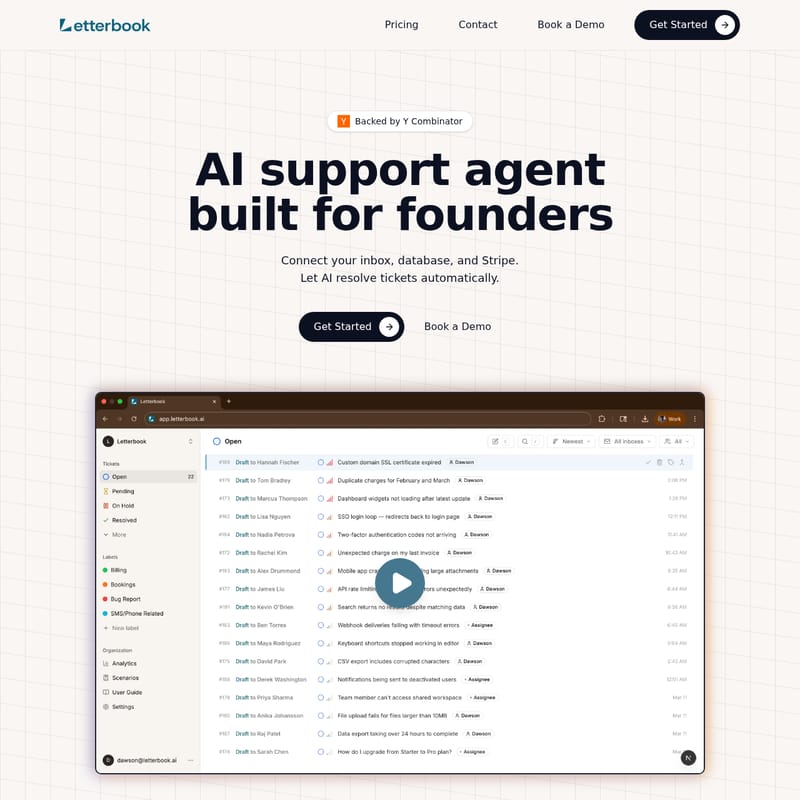
Letterbook Product Information
Letterbook: The AI Support Agent Built for Founders and Fast-Growing Teams
In the modern SaaS landscape, managing customer support can become a significant bottleneck for growing companies. Letterbook is an innovative AI support agent designed specifically for founders who need to scale their customer service without the overhead of traditional helpdesks. Backed by Y Combinator, Letterbook leverages artificial intelligence to resolve tickets automatically, ensuring your customers receive fast, accurate assistance while you focus on building your product.
What's Letterbook?
Letterbook is a next-generation, AI-native support platform that serves as an automated contact center. Unlike legacy systems that require manual intervention for every query, Letterbook connects directly to your existing business infrastructure—including your inbox, database, and Stripe account. By giving the Letterbook AI support agent read access to your account data, it can look up orders, manage subscriptions, and verify account details in real-time.
Letterbook is built for speed and efficiency, allowing teams to move up to 5x faster. It functions as a smart layer between your customer and your data, utilizing a "playbook" approach where the AI follows specific instructions to handle requests exactly how a founder would. Whether it is a billing inquiry or a technical bug report, Letterbook provides a modern support stack that grows alongside your startup.
Key Features of Letterbook
1. Seamless Data Integrations
Letterbook stands out by integrating directly with your DB (Database) and Stripe. This allows the AI to perform deep lookups on customer history, such as tracking order statuses or checking subscription tiers, without requiring a human agent to toggle between tabs.
2. Scenario-Based Playbooks
You can define specific scenarios to guide the Letterbook AI. By adding instructions for various customer requests, you ensure the AI follows your preferred protocols. Common scenarios include:
- User wants a refund
- User has trouble logging in with their email
- User wants to change their password
- User reports a bug
3. Review & Send Workflow
To maintain high quality, Letterbook generates draft replies based on your defined scenarios and integrated data. Founders can review these drafts and provide feedback. This feedback loop allows the Letterbook AI support agent to improve its responses significantly with every ticket processed.
4. Smart Knowledge Base
Letterbook features a smart knowledge base that is not static. It includes support scenarios that auto-update as tickets are solved, ensuring your documentation evolves as fast as your product.
5. Advanced Analytics
Monitor your support performance with built-in analytics. Track key metrics such as resolution time, automation rate, and customer satisfaction to understand the impact of AI on your support operations.
How to Use Letterbook
Getting started with Letterbook is designed to be frictionless, taking minutes rather than weeks. Follow these steps to launch your AI-powered contact center:
- Connect Your Stack: Link your communication inbox, your backend database, and your Stripe account to Letterbook.
- Import Existing Data: Import your current tickets and existing knowledge base to give the AI a head start.
- Define Your Scenarios: Input the "playbook" instructions for how you want different types of tickets to be handled (e.g., refund policies or login troubleshooting).
- Review AI Drafts: As tickets come in, the AI will draft responses referencing your data and articles. Review these drafts and provide feedback to train the model.
- Scale Automation: Once you are comfortable with the draft quality, let the AI resolve tickets automatically to hit high automation rates.
Use Case Scenarios
The Solo Founder
For a founder at the early stages, time is the most precious resource. Letterbook acts as the first support hire, handling repetitive tasks like password resets and refund requests, allowing the founder to stay focused on product development.
Fast-Growing Teams
As teams scale, the volume of support tickets can overwhelm a small staff. Letterbook provides a modern support stack that handles the surge in volume. Because the AI starts solving tickets in 15 minutes, it eliminates the 2-week lead time usually required to hire and train new human agents.
Data-Driven Support
When a customer asks, "Where is my order?", Letterbook doesn't just give a generic answer. It accesses the database, finds the specific order linked to the user's email, and provides a precise update, referencing specific database entries and Stripe transaction IDs.
Letterbook vs. Zendesk
When comparing Letterbook to traditional helpdesks like Zendesk, the differences are clear:
- Setup Time: Letterbook's AI starts solving tickets in 15 minutes. Zendesk often requires 2 weeks to hire/train agents and write documentation.
- Quality Improvement: Letterbook's resolution quality improves significantly with every ticket via machine learning. Traditional helpdesks depend entirely on the quality of the individual hire.
- Management Overhead: Letterbook requires none, whereas traditional systems demand hours each week for meetings, hiring, and manual oversight.
FAQ
Q: How fast can I get started with Letterbook? A: You can get your contact center launched in minutes. The AI typically begins solving and drafting ticket responses within 15 minutes of setup.
Q: Does Letterbook require access to my sensitive data? A: Letterbook requires read access to your database and Stripe account to look up necessary customer information like orders and subscriptions to resolve tickets accurately.
Q: Can I control how the AI responds? A: Yes. You define the scenarios and playbooks. Additionally, the "Review & Send" feature allows you to give feedback on drafts before they are sent, ensuring the AI aligns with your brand voice.
Q: What metrics can I track? A: Letterbook provides detailed analytics on resolution time, automation rates, and customer satisfaction scores.