ServiceBeard
ServiceBeard: Seamlessly Turn Your Support Mailboxes into Actionable Issue Boards
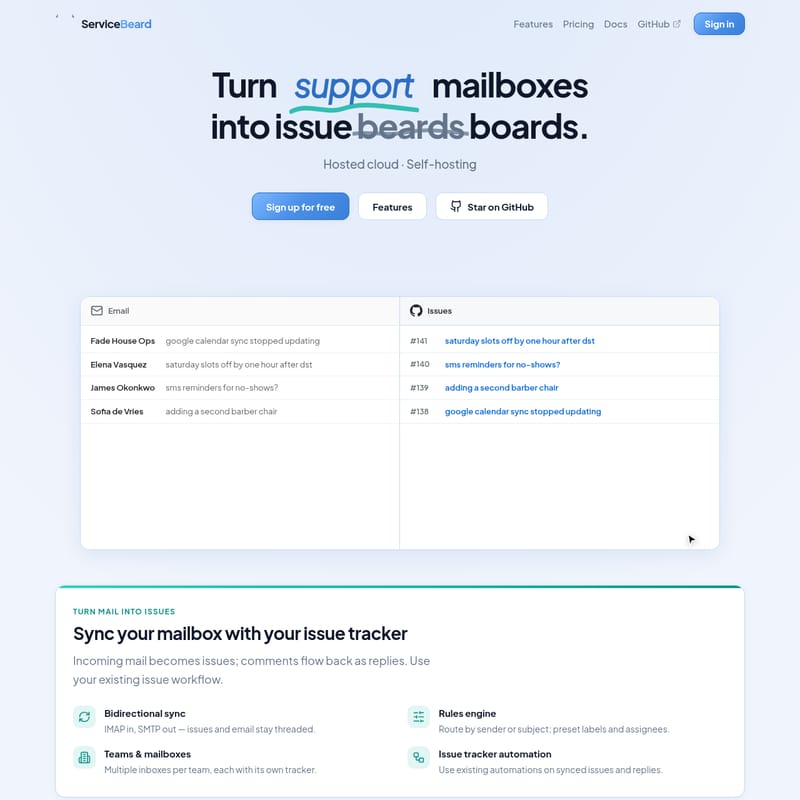
ServiceBeard is a powerful tool designed to bridge the gap between support email inboxes and professional issue trackers like GitHub, GitLab, and Linear. It enables teams to manage customer support without leaving their development workflow by syncing emails as issues and replies as comments.
2026-07-14
--K
ServiceBeard Product Information
ServiceBeard: Turn Your Support Mailboxes into Productive Issue Boards
In the modern development landscape, switching between a customer support inbox and an issue tracker can lead to significant friction, lost context, and decreased productivity. ServiceBeard provides a streamlined solution to this problem by allowing teams to turn their support mailboxes into functional issue boards. By integrating directly with the tools your team already uses, ServiceBeard ensures that support requests are handled within your existing development workflow, eliminating the need for constant context switching.
What is ServiceBeard?
ServiceBeard is an innovative synchronization tool that connects your team's shared email inboxes to popular issue trackers like GitHub, GitLab, and Linear. Developed by Joram van den Boezem and managed by Nabble B.V., the platform was born out of the need for a self-hosted service desk that doesn't force teams to adopt a new, unfamiliar workflow.
Instead of managing a separate helpdesk software, ServiceBeard allows you to leverage the robust tracking, assignment, and status features already available in your preferred issue tracker. Whether you are using ServiceBeard for external customer support or internal operations, it serves as the bridge that transforms incoming IMAP emails into tracked issues and outgoing SMTP replies back into email threads.
Key Features of ServiceBeard
ServiceBeard is packed with features designed to make email-based support feel like a native part of your development environment. Below are the core features that make ServiceBeard a powerful choice for modern teams.
Bidirectional Synchronization
One of the standout features of ServiceBeard is its true bidirectional sync. It uses IMAP to bring incoming mail into your issue tracker as new issues. When a developer or support agent comments on that issue, ServiceBeard uses SMTP to send that comment back as an email reply to the original sender. This ensures that the conversation stays threaded and consistent for both the team and the customer.
Advanced Rules Engine
To help keep your boards organized, ServiceBeard includes a comprehensive rules engine. You can automatically route issues based on the sender or the subject line. Furthermore, you can set preset labels and assignees for incoming mail, ensuring that the right person on the team sees the request immediately without manual triaging.
Teams and Multiple Mailboxes
ServiceBeard supports complex organizational structures. You can manage multiple mailboxes per team, with each individual mailbox syncing to its own specific tracker or project. This flexibility allows different departments (e.g., Ops, Support, Sales) to maintain their own workflows within the same ServiceBeard instance.
Native Issue Tracker Automation
Because ServiceBeard creates actual issues in your tracker, you can continue to use all your existing automations. Whether you have custom GitHub Actions, GitLab CI/CD triggers, or Linear automated workflows, ServiceBeard-synced issues will trigger them just like any other issue created manually.
Supported Issue Trackers
ServiceBeard is designed to connect the inbox your team already shares to the tracker they already use. Currently, ServiceBeard supports the industry's leading platforms:
GitHub Integration
ServiceBeard supports both GitHub Cloud and GitHub Enterprise Server. Setup is made simple through a dedicated GitHub App installation. Once connected, ServiceBeard can:
- Automatically create issues in your specified repositories.
- Perform automatic webhook installation for seamless communication.
GitLab Integration
Whether you use GitLab.com, GitLab Dedicated, or self-hosted GitLab instances, ServiceBeard provides full support. It utilizes project access tokens to:
- Create issues within specific GitLab projects.
- Handle automatic webhook setup to ensure replies flow back to the email sender.
Linear Integration
For teams using Linear workspaces on linear.app, ServiceBeard integrates using personal API keys. This allows for:
- Creating issues within specific teams or projects in Linear.
- Automatic webhook installation for real-time synchronization.
Deployment Options: Your Stack, Your Choice
ServiceBeard offers two primary ways to deploy the service, catering to different security and infrastructure needs.
Managed Cloud
For teams that want to skip the infrastructure management, the ServiceBeard Managed Cloud is the ideal choice. Hosted in the EU and prioritizing AI transparency, the cloud version offers:
- Per-team plans with synced mailboxes.
- Custom rules and fast poll intervals.
- The ability to sign in and connect your first mailbox in minutes.
Self-Hosting
For organizations requiring complete control over their data, ServiceBeard is open source and available on GitHub. You can deploy it using:
- Docker Compose for simple setups.
- Helm charts for Kubernetes environments.
- Pre-built images from ghcr.io.
ServiceBeard Use Cases
ServiceBeard is versatile enough to handle a variety of professional scenarios. Based on the platform's capabilities, here are common use cases:
- Customer Support Desk: Transform a
[email protected]inbox into a GitHub repository where developers can directly address technical bugs reported by users. - Operations & Infrastructure: Manage alerts and requests (like "Google Calendar sync stopped updating") by routing them from an ops mailbox to a GitLab project.
- Appointment Management: Use the rules engine to handle specific service requests, such as "adding a second barber chair" or "DST slot corrections," by assigning them to the relevant project lead.
- Internal Ticketing: Help HR or Finance teams manage internal requests using the Linear workflow they are already comfortable with.
Frequently Asked Questions (FAQ)
How does ServiceBeard handle email threading?
ServiceBeard uses IMAP for incoming mail and SMTP for outgoing mail. It ensures that issues and email replies stay threaded, so the customer sees a standard email conversation while your team sees an issue thread.
Is ServiceBeard open source?
Yes, ServiceBeard is open source. You can view the source code and contribute on GitHub. This also allows you to self-host the application on your own servers.
Can I use multiple mailboxes with one project?
Yes. ServiceBeard allows you to connect multiple inboxes per team, and each can be configured with its own rules and target tracker projects.
Which issue trackers are supported?
Currently, ServiceBeard supports GitHub (Cloud and Enterprise), GitLab (Cloud, Dedicated, and Self-hosted), and Linear.
How do I set up GitLab integration?
GitLab integration is handled through project access tokens. ServiceBeard will automatically install the necessary webhooks once the token is provided.
Where is the Managed Cloud hosted?
The ServiceBeard managed cloud service is hosted in the EU, ensuring compliance with local data standards and providing transparency regarding AI usage.