Kickbacks CLI
Kickbacks CLI: The Ultimate Terminal Companion for Real-Time Kickbacks.ai Earnings and Status Tracking
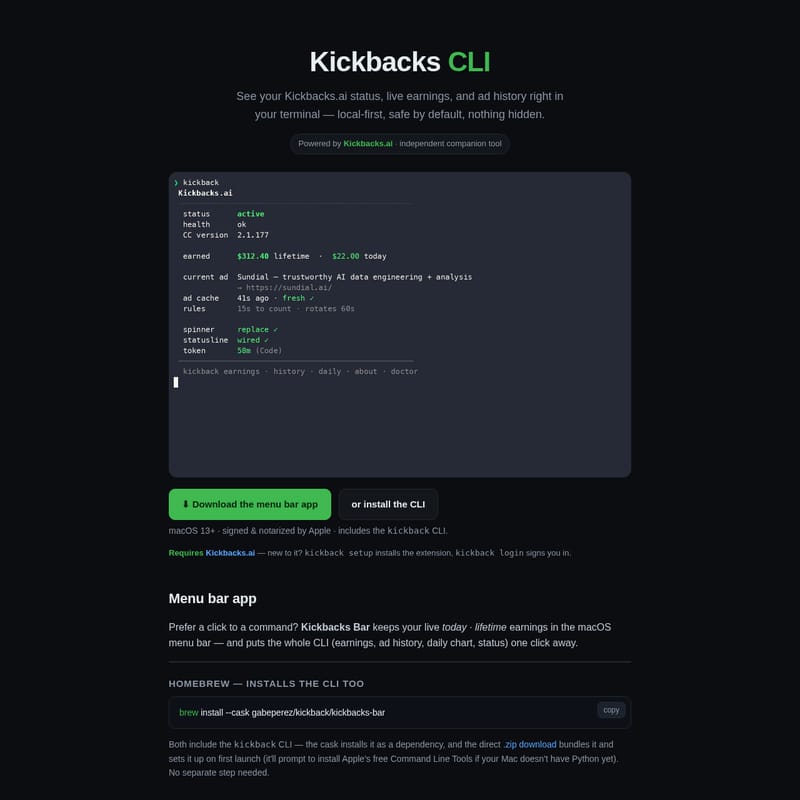
Kickbacks CLI is a powerful, local-first terminal tool and macOS menu bar app designed to provide real-time visibility into your Kickbacks.ai earnings, ad history, and system status. It offers a secure, independent way to monitor your progress without compromising privacy.
2026-07-13
24.0K
Kickbacks CLI Product Information
Kickbacks CLI: The Comprehensive Guide to Your Local-First Kickbacks.ai Dashboard
In the world of digital earnings and automated extensions, transparency and accessibility are paramount. Kickbacks CLI emerges as the premier independent companion tool for Kickbacks.ai users who want to stay informed without leaving their development environment. Whether you are a developer who lives in the terminal or a macOS user who prefers a glanceable menu bar icon, Kickbacks CLI provides the essential data you need: live earnings, ad history, and real-time status updates.
What is Kickbacks CLI?
Kickbacks CLI is a robust command-line interface and macOS companion app designed to bring your Kickbacks.ai status directly to your fingertips. It is a "local-first" tool, meaning it prioritizes your data's safety and privacy by operating primarily on your machine. Developed as an independent utility, it complements the official Kickbacks.ai extension by offering a detailed view of your performance that is otherwise tucked away.
By using Kickbacks CLI, you gain immediate access to your live earnings, lifetime earnings, and a comprehensive ad history. It bridges the gap between the background operation of the extension and your need for actionable information, all while remaining signed and notarized by Apple for maximum security on macOS 13+.
Key Features of Kickbacks CLI
1. Comprehensive Earnings Dashboard
Kickbacks CLI allows you to see your Kickbacks.ai status and live earnings instantly. The tool tracks both "today" and "lifetime" earnings, providing a clear picture of your progress. Because the tool is powered by Kickbacks.ai data, it ensures you are always looking at the most relevant numbers available from the backend.
2. Ad History and Daily Charts
Beyond just the numbers, Kickbacks CLI provides a detailed ad history. You can track rotations and see which ads were displayed, helping you understand the patterns behind your earnings. The daily chart feature offers a visual representation of your activity, making it easier to analyze trends over time.
3. Local-First and Safe by Default
Security is a core pillar of Kickbacks CLI. It is designed to be safe by default, with every feature that writes data being opt-in.
- Read-Only by Default: The tool primarily reads local files created by the extension.
- No Code Access: Kickbacks CLI never reads your code, prompts, or completions.
- No Telemetry: There are no analytics or "phoning home" to third parties; data only moves between you and the official Kickbacks.ai backend.
4. macOS Menu Bar Integration
For those who prefer a graphical interface, the Kickbacks Bar app puts your lifetime earnings and daily status right in the macOS menu bar. One click opens the full power of the CLI, including the daily chart and ad history, making it a perfect tool for non-terminal users who still want the power of the Kickbacks CLI.
How to Install and Use Kickbacks CLI
Installing Kickbacks CLI is a seamless process designed for macOS users. The tool requires macOS 13+ and Apple's Command Line Tools (which include Python 3).
Installation via Homebrew
The easiest way to get both the menu bar app and the CLI is through Homebrew:
brew install --cask gabeperez/kickback/kickbacks-bar
This command installs the Kickbacks Bar and includes the Kickbacks CLI as a dependency, setting everything up automatically.
One-Line Install for CLI Only
If you only want the terminal tool, you can use the official install script:
curl -fsSL https://gabeperez.github.io/kickback-cli/install.sh | bash
Alternatively, use Homebrew for the standalone CLI:
brew install gabeperez/kickback/kickback
Getting Started
Once installed, you can initialize the tool with two simple commands:
kickback setup: Installs the necessary extension components if they aren't already present.kickback login: Signs you into your account to begin tracking earnings.kickback about: Run this anytime to see a summary of the tool's capabilities generated directly from the CLI.
Use Case Scenarios
The Developer Workflow
For developers using Claude Code or similar editors, Kickbacks CLI provides a way to monitor the Kickbacks.ai status without tab-switching. By keeping a terminal pane open with kickback, you can watch your earnings accrue in real-time as you work.
Earnings Optimization
By utilizing the ad history and daily charts, users can identify high-activity periods. While the earnings are approximate (derived by attributing changes to the current ad), they provide the best possible insight into which rotations are contributing to your lifetime earnings.
System Troubleshooting
If you suspect the extension isn't running correctly, kickback doctor is an invaluable tool. It checks the token format, backend connectivity, and keychain access live, ensuring that your Kickbacks CLI setup is healthy and functioning.
Configuration and Customization
Kickbacks CLI is highly configurable. All settings are stored in ~/.config/kickback/config.json. You can manage features using the kickback config command:
- Network: Toggle contact with the backend (defaults to ON).
- Sampler: A background job that logs ad rotations and earnings for your history (defaults to OFF).
- Notifications: Receive a daily macOS notification with your earnings (defaults to OFF).
- Token Refresh: Automatically refreshes expiring tokens when your editor is closed (defaults to OFF).
FAQ
Is Kickbacks CLI an official tool?
No, it is an independent companion tool. While it is powered by Kickbacks.ai data and talks to the official backend, it is not operated by the Kickbacks.ai team.
How accurate are the earnings displayed?
Earnings are based on aggregate data (lifetime/today) provided by the backend. Since per-ad metrics aren't exposed directly, Kickbacks CLI attributes earnings changes to the active ad. These are approximate values representing your share, not the total advertiser spend.
Does the tool have access to my private data?
Kickbacks CLI only reads your Kickbacks access token and relevant status files (cli-ad.json, debug.log). It specifically never reads your code prompts or completions. It uses the macOS Keychain to decrypt your token, the same security measure used by your code editor.
What happens if the Kickbacks.ai extension updates?
Kickbacks CLI is built to degrade gracefully. If the extension changes its token format or the backend URL shifts, the tool might show earnings as "unavailable" rather than crashing. You can use kickback doctor to diagnose these issues quickly.