InspireNote
InspireNote: Creative Prompts & Brainstorming Idea Generator for iPhone and iPad
InspireNote is a powerful brainstorming and lightweight note-taking app designed to boost creativity through 100+ specialized idea cards. Developed by 晓乐 陈, it helps users spark innovation, organize thoughts, and record inspirations across Apple devices including iPhone, iPad, Mac, and Vision Pro.
2026-02-09
597600.0K
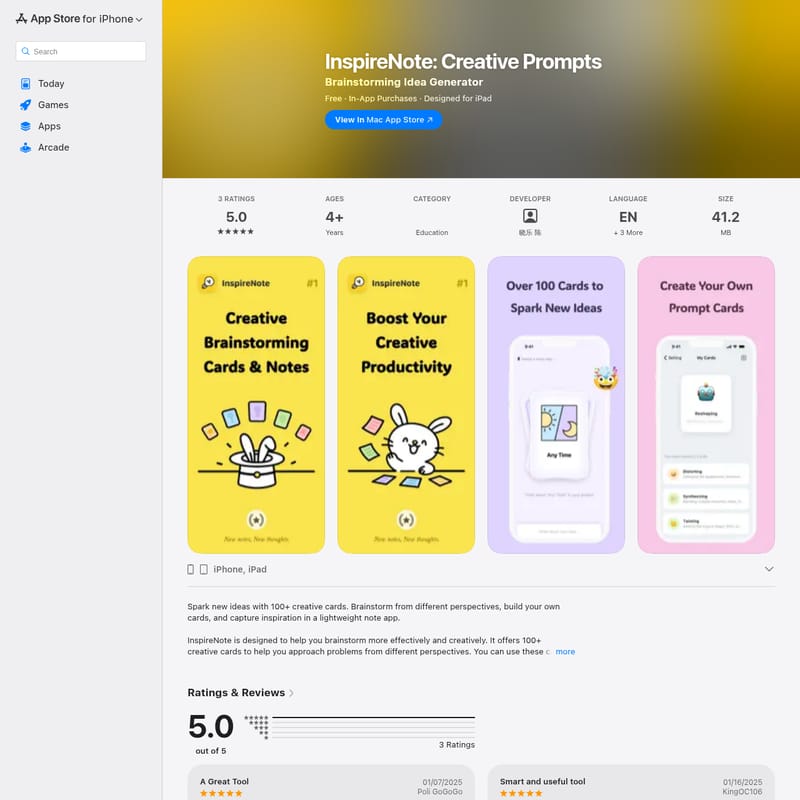
InspireNote Product Information
InspireNote: The Ultimate Creative Prompts and Brainstorming Idea Generator
Unlock your creative potential with InspireNote, a specialized mobile application designed to transform the way you approach brainstorming and idea generation. Whether you are an individual creator or part of a collaborative team, InspireNote serves as a digital companion that helps you break through mental blocks and capture every spark of genius in a lightweight, user-friendly environment.
What's InspireNote?
InspireNote is a comprehensive brainstorming tool and lightweight note-taking app available for iPhone, iPad, Mac, and Apple Vision. At its core, it is an Idea Generator that utilizes a collection of over 100 creative cards to help users view problems from diverse perspectives.
Developed by 晓乐 陈 and categorized under Education, the app treats creativity like a muscle—something that grows stronger with daily practice. By providing structured prompts and a space to refine thoughts, InspireNote ensures that your best ideas are never lost. It is a game-changing tool for anyone looking to elevate their brainstorming sessions and move beyond traditional, often inefficient, creative methods.
Key Features of InspireNote
1. 100+ Creative Prompt Cards
The heart of InspireNote lies in its library of over 100 creative cards. These cards act as hints and prompts, pushing you to explore "out-of-the-box" concepts and approach your projects from angles you might not have considered otherwise.
2. Personalized Brainstorming Cards
Every creative process is unique. InspireNote allows you to build your own personal brainstorming cards (up to 99 cards), enabling a truly customized experience that aligns with your specific workflow or industry needs.
3. Lightweight Note-Taking and Organization
Capture and refine your inspirations instantly. The app supports:
- Inputting ordered and unordered lists.
- Moving or copying notes between different projects.
- A maximum character limit of 4,000 per note for detailed development.
4. Advanced Widgets and Customization
Stay connected to your ideas with configurable widgets, including:
- Idea Review and Project Review widgets.
- Random Notes widget for desktop review of past inspirations.
- Dark mode support for brainstorming pages and theme color "Follow System" support.
5. Multi-Device Compatibility
InspireNote is built for the Apple ecosystem, requiring iOS 17.0+ for iPhone, iPadOS 17.0+ for iPad, and macOS 14.0+ with an M1 chip or later for Mac. It also supports Apple Vision and features iCloud sync for seamless data management.
Use Case Scenarios
Individual Creative Practice
Use InspireNote as a daily exercise tool to strengthen your creative thinking. By interacting with the creative cards every day, you can build the habit of generating innovative solutions for personal projects or professional challenges.
Pre-Meeting Preparation
Traditional group brainstorming can often become bogged down. Use InspireNote to start the process ahead of time. By organizing and refining your ideas individually before a meeting, you can bring more structured and valuable insights to the team.
Team Collaboration and Meetings
InspireNote streamlines team sessions by collecting insights in a structured way. It helps team members stay focused and productive, ensuring that every meeting is engaging, fun, and effective rather than distracting.
How to Use InspireNote
Using InspireNote is straightforward and designed for immediate productivity:
- Start a Session: Open the brainstorming page to begin a new creative journey.
- Interact with Cards: Use the 100+ built-in cards to spark new thoughts. You can also hide card prompts to make your thinking even freer.
- Create Personal Prompts: Add your own custom cards to the deck to tailor the experience.
- Capture Your Ideas: Write down your thoughts in the lightweight note editor. Use ordered or unordered lists to keep things organized.
- Refine and Move: If an idea fits better elsewhere, move or copy the note from one project to another.
- Review Regularly: Add the "Random Notes" or "Idea Review" widgets to your home screen to stay inspired by past entries.
FAQ
Q: Is InspireNote free to use? A: The app is free to download and offers In-App Purchases, such as a Premium Lifetime membership for $0.99.
Q: What languages does the app support? A: InspireNote supports English, Japanese, Simplified Chinese, and Traditional Chinese.
Q: Does the app collect my personal data? A: No. According to the developer, InspireNote does not collect any data from the app.
Q: Can I use InspireNote on my Mac? A: Yes, it is compatible with Mac computers featuring the Apple M1 chip or later, running macOS 14.0 or newer.
Q: How many personal cards can I create? A: You can create up to 99 personal brainstorming cards to customize your creative process.