Grok 4.2
Grok AI: An Advanced Conversational Interface with DeepSearch and Creative Image Generation Capabilities
Grok is a sophisticated AI platform designed for high-level information processing, creative visualization, and personalized digital interactions. Featuring core technologies like DeepSearch for granular data retrieval and Imagine for generative visual content, Grok provides a versatile environment for users to explore complex queries and creative tasks. With integrated Persona selection, users can tailor the AI's communication style to suit specific professional or casual contexts, ensuring a highly relevant and engaging conversational experience for all users.
2026-02-25
212300.0K
Grok 4.2 Product Information
Grok: Revolutionizing Conversational AI with DeepSearch and Imagine
In the rapidly evolving landscape of artificial intelligence, Grok stands out as a powerful and versatile tool designed to redefine how users interact with information. Whether you are seeking deep analytical insights or creative visual outputs, Grok provides a comprehensive suite of features that cater to diverse digital needs. By leveraging advanced processing capabilities, Grok offers a seamless experience for those who require more than just a standard chatbot.
What's Grok?
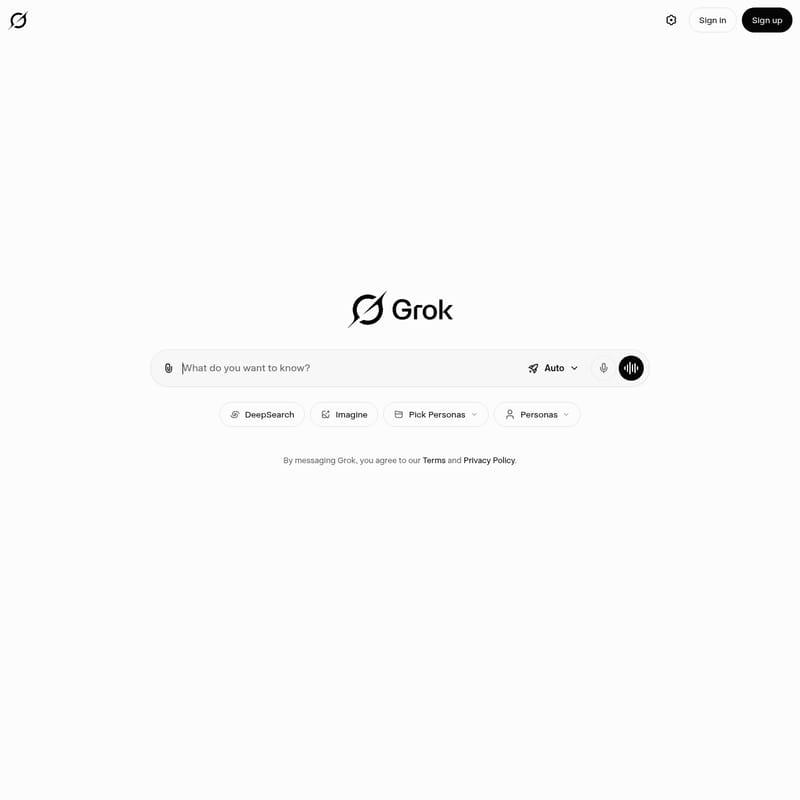
Grok is an advanced AI-driven conversational platform that integrates sophisticated data retrieval and creative generation technologies. It is designed to be a multi-functional assistant, capable of handling complex queries through its DeepSearch functionality and bringing ideas to life with its Imagine feature.
At its core, Grok is built to provide an interactive and personalized user experience. It allows users to engage in natural language conversations while offering the flexibility to customize the AI's personality through Personas. With a focus on accessibility and depth, Grok serves as a bridge between human curiosity and the vast expanse of digital information.
Key Features of Grok
Grok is equipped with a variety of specialized tools that make it a leader in the AI space. Each feature is designed to enhance the utility and engagement of the platform.
DeepSearch
The DeepSearch feature is one of the most powerful aspects of Grok. Unlike standard search functions, DeepSearch allows the AI to perform a more thorough and granular analysis of information. This ensures that users receive highly accurate, context-aware, and comprehensive answers to their most challenging questions.
Imagine
With Imagine, Grok transcends text-based communication. This feature allows users to generate visual content based on descriptive prompts. By using Imagine, you can translate complex concepts or creative thoughts into visual representations, making Grok an essential tool for creators and thinkers alike.
Personas and Pick Personas
Understanding that different contexts require different tones, Grok introduces the Personas feature. Users can use the Pick Personas option to select the specific "personality" or style of the AI. Whether you need a formal professional, a witty companion, or a specific expert tone, Grok adapts its messaging to meet your preferences.
Seamless Access: Sign In and Sign Up
Grok ensures a personalized and secure experience through its Sign In and Sign Up protocols. By creating an account, users can maintain their preferences and history, ensuring that every interaction with Grok is informed by previous engagements.
Auto Mode
For those who want a streamlined experience, the Auto setting allows Grok to automatically determine the best approach for a query, balancing between speed, depth, and creativity without manual intervention.
Use Case Scenarios for Grok
Grok is designed to be adaptable across various industries and personal use cases. Here are some ways users can leverage its power:
1. In-Depth Research
Researchers and students can utilize DeepSearch within Grok to find nuanced information that might be buried in traditional search results. Grok can synthesize complex data points into easy-to-understand summaries.
2. Creative Concept Visualization
Artists and designers can use the Imagine feature to quickly draft visual ideas. By simply describing a scene or a concept to Grok, they can receive a generated image that serves as a starting point for their creative process.
3. Professional Communication
Business professionals can use the Pick Personas feature to draft emails or reports in a specific professional tone. Grok helps ensure that the communication is appropriate for the target audience.
4. Everyday Assistance
From answering quick questions to providing entertainment, Grok acts as a 24/7 digital assistant that is always ready to engage in meaningful conversation.
FAQ
Note: By messaging Grok, you agree to the platform's Terms and Privacy Policy.
How do I get started with Grok?
To begin using Grok, you can either Sign In if you already have an account or Sign Up to create a new profile. This allows you to access all the premium features like DeepSearch and Imagine.
What is the benefit of using Personas in Grok?
The Personas feature allows you to tailor the AI's communication style. Using Pick Personas ensures that the answers you receive from Grok are not only accurate but also delivered in a tone that suits your current needs.
Can Grok generate images?
Yes, by using the Imagine feature, Grok can create visual content based on the descriptions you provide in the chat interface.
What makes DeepSearch different from regular search?
DeepSearch in Grok goes beyond surface-level results. It analyzes information more deeply to provide context-rich and highly detailed responses to complex inquiries.
Is there an automated mode for Grok?
Yes, Grok features an Auto mode that optimizes the AI's response logic based on the nature of your request, ensuring the most efficient delivery of information.