GitAgent by Lyzr
GitAgent: The Open Standard for Defining, Versioning, and Running Git-Native AI Agents
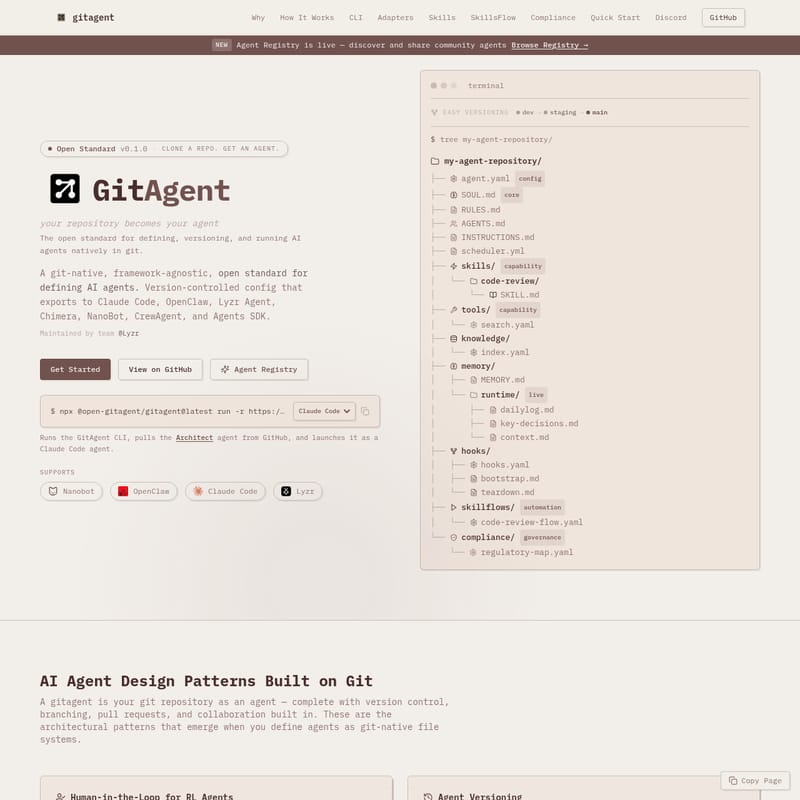
GitAgent is a framework-agnostic, git-native open standard designed to transform your repositories into autonomous AI agents. Maintained by team @Lyzr, GitAgent allows developers to define agents using a structured file system—including agent.yaml, SOUL.md, and SKILL.md—providing built-in version control, branching, and human-in-the-loop workflows. It supports seamless exports to major platforms like Claude Code, OpenAI, CrewAI, and Lyzr Studio, ensuring your AI agent logic remains portable and compliant. With features like SkillsFlow for deterministic workflows and integrated regulatory governance, GitAgent treats AI agent quality with the same rigor as traditional software engineering.
2026-03-22
6.0K
GitAgent by Lyzr Product Information
GitAgent: The Git-Native Open Standard for AI Agents
GitAgent represents a paradigm shift in how artificial intelligence is developed and deployed. By treating your repository as your agent, GitAgent provides a git-native, framework-agnostic open standard for defining, versioning, and running AI agents. This approach ensures that every change to your AI agent—from its core personality to its specific skills—is tracked, audited, and managed through the same version control systems developers already trust.
What's GitAgent?
GitAgent is an open standard (v0.1.0) that allows you to define AI agents natively in git. Instead of opaque configurations, a gitagent is a structured repository containing version-controlled files that define the agent's soul, skills, and constraints. This git-native architecture enables architectural patterns such as branching for agent development, pull requests for human review of AI learning, and tagged releases for stable deployment.
Maintained by the team at @Lyzr, GitAgent acts as a universal bridge. You can define your agent once and export it to various runtimes, including Claude Code, OpenClaw, Lyzr Agent, Chimera, NanoBot, CrewAgent, and the OpenAI Agents SDK.
Key Features of GitAgent
Git-Native Versioning and Collaboration
With GitAgent, every prompt adjustment or skill addition is a git commit. You can use git diff to see exactly what changed between versions and git blame to trace the origin of specific instructions. This enables a robust "Undo" history for your AI agent.
Framework Agnostic Exporting
GitAgent is designed for portability. Using the gitagent export command, you can transform your git-based definition into formats compatible with:
- Claude Code: Generates CLAUDE.md with skill and compliance mapping.
- OpenAI Agents SDK: Produces Python code with tool stubs.
- CrewAI: Extracts roles and goals into YAML crew configurations.
- Lyzr Studio: Deploys via REST API with provider auto-mapping.
SkillsFlow: Deterministic Workflows
Unlike unpredictable LLM reasoning, SkillsFlow allows for deterministic, multi-step workflows. Defined in YAML, these flows chain skills, agents, and tools with specific dependencies and data flow templates, ensuring the agent follows a consistent execution pipeline.
Live Agent Memory
GitAgent utilizes the memory/ folder to persist state. The runtime/ subfolder allows agents to write live knowledge—such as dailylog.md and key-decisions.md—which persists across different sessions.
Built-in Compliance and Governance
GitAgent is compliance-ready, supporting frameworks like FINRA, SEC, and the Federal Reserve. It features segregation of duties (SOD) where roles like "maker" and "checker" are defined to prevent single-point failures in critical processes.
How to Use GitAgent
To begin building with the GitAgent framework, follow these steps to initialize and run your first agent.
Quick Start Commands
- Install the CLI:
$ npm install -g gitagent - Scaffold an Agent: Use a template to create the folder structure.
$ gitagent init --template standard - Validate the Configuration: Ensure your
agent.yamland skills meet the spec.$ gitagent validate - Run via Remote Repo: You can launch an agent directly from a GitHub URL.
$ gitagent run -r https://github.com/shreyas-lyzr/architect -a claude
The Core Configuration
A standard gitagent requires three primary files:
- agent.yaml: Defines the model, version, tools, and runtime constraints.
- SOUL.md: Defines the agent's core personality and behavior.
- SKILL.md: A capability module that outlines specific instructions and allowed tools.
Use Cases for GitAgent
"The VM is stateless. Git is the state. GitAgent ensures full audit trails and deterministic replay by committing every meaningful event to the repository."
- Human-in-the-Loop (HITL) for RL: When an agent learns a new skill, it opens a PR. A human developer reviews the changes before merging them into the agent's core.
- CI/CD for Agents: Use GitHub Actions to run
gitagent validateon every push. This treats agent quality like code quality, blocking bad merges automatically. - Agent Forking and Remixing: Developers can fork a public agent repository, customize the
SOUL.md, add new tools, and contribute improvements back via Pull Request. - Multi-Agent Monorepos: Share context and skills across multiple agents by placing shared
skills/orknowledge/at the root of a monorepo.
FAQ
What makes GitAgent a git-native AI agent framework?
It uses the file system and git primitives (commits, branches, PRs) as the primary interface for agent orchestration. The agent's state, memory, and configuration are all stored as versioned files.
How is GitAgent different from other AI agent frameworks?
Most frameworks are tied to a specific runtime or library. GitAgent is an open standard. It allows you to define the agent's logic in a neutral format and then export it to work with various platforms like CrewAI, OpenAI, or Claude Code.
Is GitAgent an open standard?
Yes, it is an open standard (v0.1.0) released under the MIT License, created to foster collaboration and interoperability in the AI agent ecosystem.
How do I handle secrets like API keys?
GitAgent follows standard development practices. You can manage credentials via a local .env file, which is kept out of version control using a .gitignore file, ensuring your agent config remains shareable while secrets stay local.