Foxchat
Foxchat: Lightweight Intercom-Style Live Chat Widget for Slack Teams
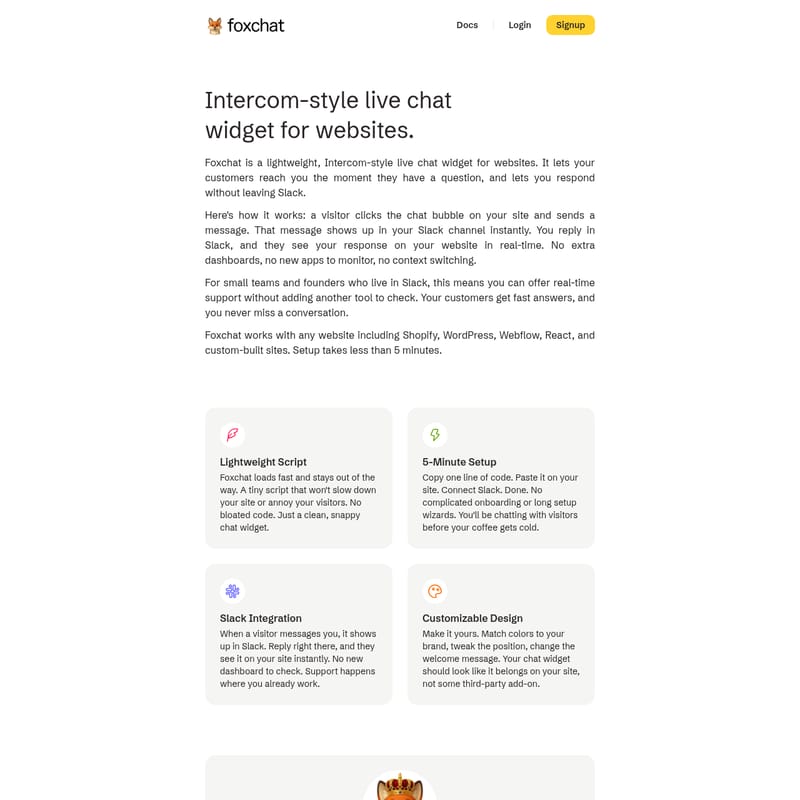
Foxchat is a streamlined, Intercom-style live chat widget designed for websites. It enables seamless communication between site visitors and team members by integrating directly with Slack. Small teams and founders can manage real-time customer support without leaving their primary workspace, avoiding the need for additional dashboards. With a lightweight script that ensures fast loading times, Foxchat supports platforms like Shopify, WordPress, and Webflow. Setup takes under five minutes, allowing for immediate engagement through customizable chat bubbles. The tool offers transparent pricing, including unlimited agents and conversations, making it an ideal solution for efficient, integrated customer messaging.
2026-02-26
--K
Foxchat Product Information
Foxchat: The Lightweight Intercom-Style Live Chat Widget Integrated with Slack
In the modern digital landscape, providing instant support is no longer a luxury—it is a necessity. Foxchat provides a seamless, Intercom-style live chat widget designed specifically for websites that prioritize speed and efficiency. By bridging the gap between your website visitors and your Slack workspace, Foxchat ensures that your team can deliver high-quality support without the friction of traditional helpdesk software.
What's Foxchat?
Foxchat is a lightweight, Intercom-style live chat widget built for websites that allows your customers to reach you the moment they have a question. Unlike traditional live chat tools that require you to log into a separate dashboard, Foxchat lets you respond to inquiries without leaving Slack.
For small teams and founders who live in Slack, Foxchat is the ultimate communication bridge. It transforms your existing workflow into a powerful support desk. When a visitor clicks the chat bubble on your site and sends a message, that message appears in your Slack channel instantly. You reply directly in Slack, and the visitor sees your response on your website in real-time. This eliminates context switching and ensures you never miss a critical conversation with a potential lead or existing customer.
Key Features of Foxchat
Foxchat is packed with features designed to make customer communication effortless and branding-consistent.
Slack Integration
The core of the Foxchat experience is its deep Slack integration. There is no new app to monitor and no extra dashboard to check. Support happens exactly where you already work. This integration allows for a unified communication stream, making it easier for teams to collaborate on customer responses directly within their existing Slack environment.
Lightweight Script
Performance is critical for SEO and user experience. The Foxchat live chat widget utilizes a lightweight script that loads incredibly fast. It stays out of the way, ensuring that your website remains snappy and responsive. There is no bloated code to worry about—just a clean, efficient chat interface.
5-Minute Setup
Speed of deployment is a priority for any business. Foxchat offers a 5-minute setup process. All it takes is copying one line of code and pasting it onto your site. Once you connect your Slack account, you are ready to start chatting with visitors before your coffee gets cold. No complicated onboarding or long setup wizards are required.
Customizable Design
Your live chat widget should feel like a native part of your website. Foxchat offers a customizable design that lets you match colors to your brand, tweak the widget's position, and change the welcome message. This ensures the chat experience looks like it belongs on your site rather than appearing as a disconnected third-party add-on.
Platform Compatibility
Foxchat is versatile and works with any website architecture. Whether you are using a CMS or a custom framework, Foxchat has you covered:
- Shopify
- WordPress
- Webflow
- React
- Custom-built sites
Foxchat Use Cases
Foxchat is designed for various scenarios where speed and Slack-centric workflows are paramount.
For Founders and Small Teams
Founders who are busy building their products often don't have time to monitor multiple support tabs. Foxchat allows them to stay engaged with customers directly from Slack, ensuring they can provide "real-time support" while managing their daily tasks.
For E-commerce (Shopify & WordPress)
Online stores can use Foxchat to reduce bounce rates by answering product questions immediately. A visitor on a Shopify or WordPress store can click the chat bubble, ask about shipping or sizing, and receive an instant reply from the team via Slack.
For SaaS and Webflow Agencies
Agencies and SaaS startups can use the customizable design to ensure the chat widget matches their high-end aesthetic while providing a direct line for lead generation and technical support.
How to Use Foxchat
Setting up and using Foxchat is a straightforward three-step process:
- Installation: Copy the single line of provided code and paste it into your website's HTML.
- Connection: Link your Foxchat account to your preferred Slack channel.
- Engagement: When a visitor sends a message through the chat bubble on your site, it appears in Slack. Type your reply in Slack, and it is instantly delivered to the visitor on your website.
Pricing and Plans
Foxchat offers simple, transparent pricing at $19 per month, billed yearly (which includes 2 months free).
The plan includes everything you need to support your customers effectively:
- Up to 5 projects
- Full Slack integration
- Unlimited agents
- No Foxchat branding
- 90 days of message history
- Unlimited conversations
You can start with a 14-Day Free Trial with $0.00 due today and no credit card required.
FAQ
Q: Do I need to install a new app to use Foxchat? A: No. Foxchat works entirely through your website and your existing Slack app. There are no new dashboards to monitor.
Q: Will Foxchat slow down my website? A: Not at all. Foxchat uses a lightweight script designed to be fast and non-intrusive, ensuring your site speed remains optimal.
Q: Can I use Foxchat on multiple websites? A: Yes, the standard plan allows you to use Foxchat on up to 5 different projects.
Q: Can my whole team respond to messages? A: Absolutely. Foxchat supports unlimited agents, so anyone in your connected Slack channel can jump in and help a customer.
Q: What happens if I miss a message? A: Foxchat keeps a 90-day message history, and because it integrates with Slack, the notification will remain in your channel until you address it.