FontDance
AIToolly product video
See FontDance in motion
FontDanceAI: The Ultimate AI Font Generator for Creating Professional TTF and WOFF2 Typeable Fonts
FontDance is a professional-grade AI font generator that allows designers to create, preview, and export typeable TTF and WOFF2 font files in just five minutes. By utilizing advanced style prompts and image references, this AI font generator streamlines the typography workflow, ensuring cleaner glyphs, consistent spacing, and readable characters. Perfect for branding, posters, and digital interfaces, FontDance bridges the gap between AI creativity and functional design assets.
2026-06-26
--K
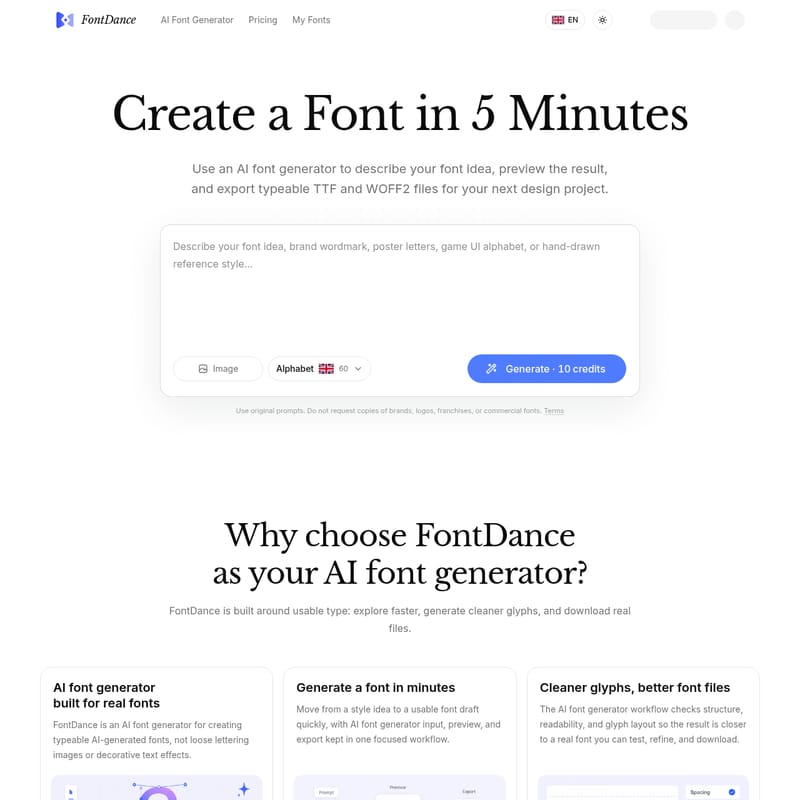
FontDance Product Information
FontDanceAI: The Ultimate AI Font Generator for Professional Typography
In the modern design landscape, the demand for unique, high-quality typography is higher than ever. FontDance emerges as a leading AI font generator designed to bridge the gap between creative conceptualization and functional font production. Unlike standard tools that merely generate static images of letters, FontDance is a comprehensive AI font generator built for creating real, typeable fonts that designers can use in their favorite software and web projects.
What is FontDance AI Font Generator?
FontDance is an innovative AI font generator that allows users to describe their font ideas using natural language or image references and transform them into usable font files in as little as five minutes. This platform is centered around the concept of "usable type," meaning the output isn't just a decorative text effect or a loose lettering image. Instead, the AI font generator focuses on the structure, rhythm, and layout of glyphs, ensuring that every result is a high-quality typeface ready for professional use.
By leveraging the power of an AI font generator, FontDance simplifies the traditionally complex and time-consuming process of type design. It provides a focused workflow where prompt input, generation, checking, testing, and export are all handled within a single, connected interface.
Key Features of the FontDance AI Font Generator
1. Real Typeable Font Files
The primary advantage of using this AI font generator is the ability to export actual TTF (TrueType Font) and WOFF2 (Web Open Font Format 2) files. This ensures that your AI-generated fonts are compatible with design tools, websites, prototypes, and various digital brand experiments.
2. Rapid Generation Workflow
Time is a critical resource for creators. FontDance allows you to move from a style idea to a usable font draft quickly. As a fast-acting AI font generator, it streamlines the path from prompt to preview, making it possible to have a functional draft ready in minutes.
3. High-Quality Glyph Production
One of the common issues with automated typography is messy letterforms. The FontDance AI font generator workflow specifically checks structure, readability, and glyph layout. This means the result is significantly closer to a professional font that can be tested and refined immediately.
4. Text and Image Input Options
Flexibility is at the core of the FontDance experience. You can start your AI font generator workflow using:
- Style Prompts: Write a detailed description of the shape, mood, and weight you desire.
- Image References: Upload a visual reference to guide the AI's aesthetic direction.
- Combined Input: Use both prompts and images to fine-tune the visual direction.
5. Live Text Preview
Before you commit to a download, the AI font generator provides a live text preview. You can type your own words to test the spacing, rhythm, and overall feel of the font, ensuring the result is worth exporting for your project.
6. Originality Guardrails
To ensure ethical use and creative integrity, the AI font generator is built with originality guardrails. It is designed for original font ideas and discourages the copying of existing brand logos, franchises, or commercial typefaces.
Use Cases for FontDance AI Font Generator
The versatility of the AI font generator makes it suitable for a wide range of creative applications. Here are some ways professionals are currently using FontDance:
Branding and Identity Design
Create a sharp geometric vector display font for tech branding. By using prompts that emphasize faceted 2D polygon letterforms and crisp angular corners, designers can produce high-contrast black shapes that offer strong readability for logos and posters.
Marketing and Social Media Campaigns
Content creators use the AI font generator to explore expressive lettering directions for social campaigns. The ability to quickly generate and test several names or slogans helps in finding a direction that captures the audience's attention without needing to open a complex font editor.
Game UI and Digital Interfaces
For indie game makers, FontDance provides a path to create playful alphabets for UI design. Starting from a prompt and getting a testable font draft saves significant production time during the development of small games and applications.
Surreal and Artistic Projects
Designers can push the boundaries of typography by generating "grotesque alien" fonts. With features like warped mutant letterforms, twisted stems, and organic curves, the AI font generator is perfect for creating surreal brand graphics and music covers.
How to Use the FontDance AI Font Generator
Creating your own custom typeface is a straightforward three-step process within the FontDance ecosystem:
Step 01: Describe the Style
Begin by telling the AI font generator exactly what you need. Specify the shape, mood, weight, contrast, and spacing. For example, you might describe a "dreamy floral editorial font with tall elegant serif letterforms."
Step 02: Generate and Review
Let the AI font generator create the first draft of your character system, including uppercase, lowercase, punctuation, and symbols. During this stage, you should review whether the letters feel consistent, readable, and useful for your specific project goals.
Step 03: Preview and Download
Use the live preview tool to test your own words. Once you are satisfied with the rhythm and spacing, you can download the final TTF and WOFF2 files, ready to be integrated into your design software or website.
Pricing Plans
FontDance offers simple pricing plans to match the needs of different creators:
- Starter ($9.90): Best for individuals, offering 2 AI font generations each month.
- Creator ($29.90): Designed for active designers, offering 15 AI font generations each month.
- Business ($199.90): Built for teams and shared business workflows, providing 200 AI font generations each month.
Note: Yearly billing options are available with a 30% discount.
Frequently Asked Questions (FAQ)
Is FontDance a real font generator?
Yes, FontDance is a professional AI font generator that focuses on usable type, providing real TTF and WOFF2 files rather than just decorative images.
Can I use an image as a reference?
Absolutely. You can start your workflow with a written style prompt, an optional reference image, or a combination of both to guide the generation.
Do I get real font files?
Yes, every successful generation allows you to export your font as TTF and WOFF2 files, which are the industry standards for design and web use.
Can I preview my own text?
Yes, the platform includes a live text preview feature. You can type your own words to test the spacing and rhythm before deciding whether to export the font.
How do I get a better result?
To achieve the best results, be specific in your prompts regarding the mood, weight, contrast, and intended use of the font. The quality-aware system also reviews structure to ensure you receive a usable draft.
Can I use the font for a brand or project?
FontDance is designed for creating original font ideas that can be used in design tools, websites, and brand experiments. However, users are reminded not to request copies of existing commercial brands or logos.
"The TTF and WOFF2 export path is what makes it useful. A font idea is only valuable to me when I can actually try it in the layout." — Jon Bell, Frontend Engineer
Turn your next idea into a usable font today with the FontDance AI font generator.