Floor Plan Maker
AIToolly product video
See Floor Plan Maker in motion
Free AI Floor Plan Maker: Create Professional 2D and 3D Layouts Instantly Online
The Floor Plan Maker is a free, AI-powered online tool designed to turn your ideas into clean, professional layouts. Generate technical, 2.5D, and 3D isometric plans for home renovations, small space optimization, and client presentations with no design skills required.
2026-06-03
2.0K
Floor Plan Maker Product Information
Floor Plan Maker: The Ultimate AI-Powered Tool for Designing Better Spaces
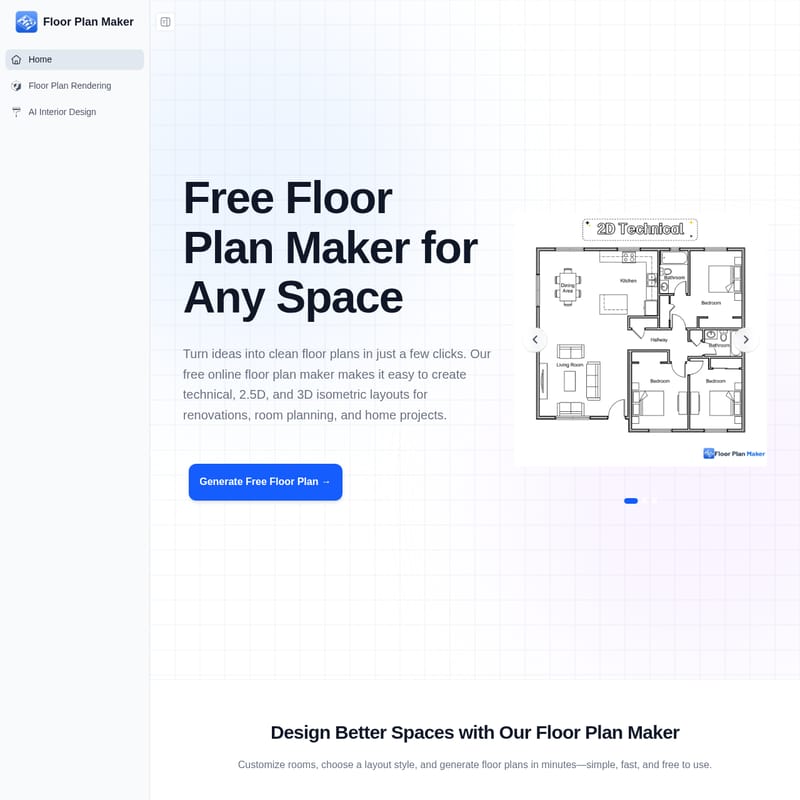
Creating a functional and aesthetic home layout no longer requires complex software or professional drafting skills. With the Floor Plan Maker, you can turn your creative ideas into clean, professional floor plans in just a few clicks. This free online floor plan maker makes it incredibly easy to create technical, 2.5D, and 3D isometric layouts tailored for renovations, room planning, and various home projects.
What’s Floor Plan Maker?
A floor plan maker is a specialized digital tool designed to help you create room or home layouts without the need for manual drawing. The AI floor plan maker leverages advanced technology to generate practical layouts based on your specific preferences. Whether you are looking to visualize a single room or an entire house, this online floor plan maker allows you to choose room types, adjust space sizes, and instantly generate floor plans that are perfect for testing different room ideas or preparing for a major remodel.
Features of the Floor Plan Maker
The Floor Plan Maker is packed with features that simplify the design process for homeowners, creators, and professionals alike. Here is everything you need to know about what this tool offers:
1. Flexible Room Setup
Customization is at the heart of the Floor Plan Maker. You can easily adjust the number of bedrooms, bathrooms, kitchens, dining areas, and living rooms. This flexibility ensures that the generated plan matches your specific home layout and planning needs.
2. Multiple Floor Plan Styles
Not every project requires the same visual style. Our floor plan maker allows you to generate three distinct styles:
- Technical Plans: Best for precise planning and structural overviews.
- 2.5D Previews: Offers an immersive perspective that bridges the gap between 2D and 3D.
- 3D Isometric Views: Provides a detailed, three-dimensional look at the space, perfect for inspiration and high-quality presentations.
3. Adjustable Space Size
Accuracy is vital in real-world planning. The Floor Plan Maker allows you to set the gross area and fine-tune dimensions. You can switch between metric and imperial units to ensure the layout matches your real-world space requirements.
4. Fast AI Floor Plan Generation
Forget the hours spent on manual drafting. This AI floor plan maker creates comprehensive layouts in seconds. By simply inputting your preferences, the AI does the heavy lifting, allowing you to focus on the design rather than the drawing process.
5. Built for Any Space Type
Whether you are working on a studio apartment, a compact family home, or a large-scale renovation, the floor plan maker handles spaces of all sizes with ease.
6. No Design Skills Needed
The tool features a beginner-friendly interface. You don’t need to be an architect or a designer to produce high-quality results. The floor plan maker is built to be intuitive, making it accessible for everyone.
How to Use the Floor Plan Maker
Creating a professional layout is simple and follows a straightforward three-step process. You don't need any prior design experience to get started with the floor plan maker.
- Set Your Room Preferences: Start by choosing the number of bedrooms, bathrooms, kitchens, and living areas. Input the total space size based on the specific requirements of your project.
- Choose a Floor Plan Style: Select from Technical, 2.5D, or 3D Isometric views. Your choice should depend on whether you need the plan for basic planning, visual inspiration, or a professional presentation.
- Generate and Refine Your Layout: Click generate, and the AI floor plan maker will create your layout instantly. From here, you can compare different arrangements and explore various room setups to find the perfect fit.
Use Cases: Why Use a Floor Plan Maker?
Plan Home Renovations Before Making Costly Changes
Remodeling is a significant investment, and the floor plan maker helps you test ideas before any construction begins. Whether you are redesigning a kitchen or adding a new bathroom, the AI floor plan maker helps you compare layouts in minutes, ensuring the final result works for your lifestyle.
Create Smarter Layouts for Small Living Spaces
Small apartments require thoughtful planning to remain functional. Using a floor plan maker to experiment with room placement can help you maximize every square meter in a studio or compact family home, improving comfort and utility.
Present Clear Layouts for Clients and Listings
For those in real estate or home staging, clear visuals are essential. Use the floor plan maker to generate polished technical plans or 3D isometric views. These visuals make spaces easier to understand for clients and can significantly enhance property listings and project discussions.
Explore Interior Layout Ideas Before You Start
Before you move furniture or start a renovation, use the floor plan maker to see multiple layout options side-by-side. It turns rough inspiration into intentional, practical layouts that you can visualize with confidence.
Why Choose AI Over Traditional Floor Planning?
Traditional floor planning often involves steep learning curves and high costs. Here is why the AI floor plan maker is a superior choice for many:
Traditional Floor Planning:
- Requires complex design software or manual sketches.
- Often takes hours to adjust single layouts.
- Complicated tools that are difficult for beginners.
- Often requires downloads and expensive subscriptions.
- Frequently hides high-quality exports behind paywalls or watermarks.
Faster Floor Planning with AI:
- No sign-up required; use it instantly online.
- Simple, beginner-friendly workflow.
- Generates layouts in seconds.
- Free for personal use with clean exports and no watermarks.
- Includes Technical, 2.5D, and 3D isometric styles.
FAQ About Floor Plan Maker
What Is a Floor Plan Maker? A floor plan maker is a tool that helps you create room or home layouts without manual drawing. You simply choose room types and adjust space sizes to generate plans for renovations or layout testing.
How to Make a Floor Plan Online? To make a floor plan online, choose your room setup, adjust the area size, select your preferred style (Technical, 2.5D, or 3D Isometric), and let the AI generate the layout in seconds.
How Long Does It Take to Generate a Floor Plan? Most floor plans are generated in just a few seconds, making it much faster than manual drafting.
Can I Use the Generated Layout for Construction? AI-generated plans are best for early planning, inspiration, and exploration. For actual construction, always consult with a licensed architect or contractor to verify measurements and building requirements.
Do I Need to Sign Up to Use the Floor Plan Maker? No sign-up is required. You can start using the online floor plan maker immediately without creating an account.
Will My Floor Plans Have a Watermark? No. Floor plans created for personal use do not have watermarks, making it easy to share and review your layout ideas.