Exstats
Exstats: Comprehensive Browser Extension Analytics and Competitor Tracking for Extension Developers
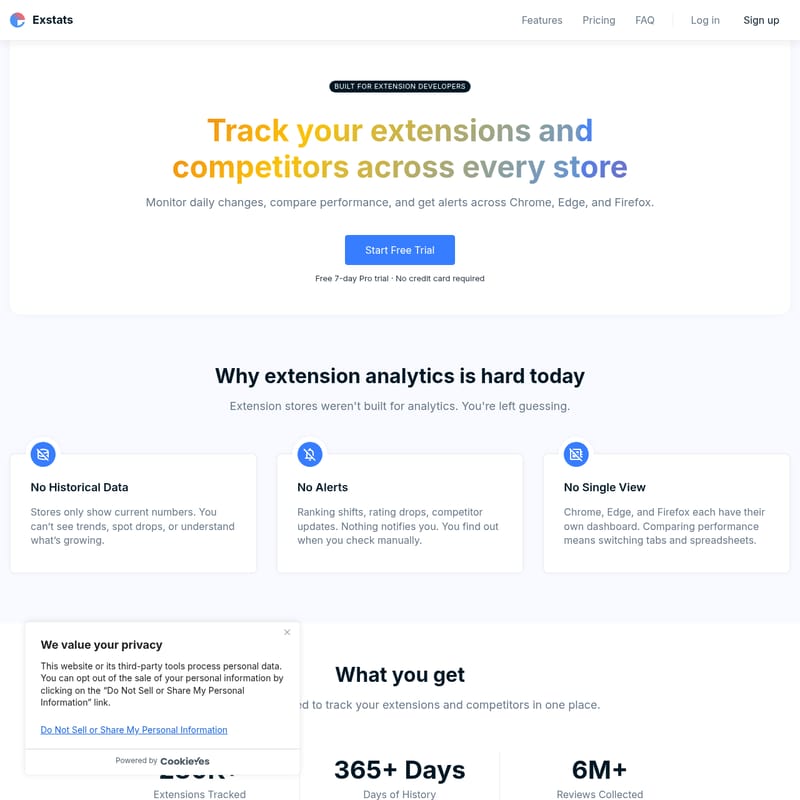
Exstats is a powerful analytics platform designed specifically for browser extension developers. It centralizes performance tracking across Chrome, Edge, and Firefox stores, offering historical data, competitor analysis, and AI-powered keyword tracking. With over 280,000 extensions tracked and detailed market trends, Exstats helps developers optimize their extensions and monitor daily changes effortlessly.
2026-06-01
0.7K
Exstats Product Information
Exstats: The Ultimate Browser Extension Analytics and Competitor Tracking Platform
In the competitive landscape of browser extensions, staying ahead of the curve requires more than just high-quality code; it requires data-driven insights. Exstats is a specialized platform built for extension developers who need to track their extensions and competitors across every major store. Whether you are publishing on Chrome, Edge, or Firefox, Exstats provides a centralized hub to monitor performance, analyze market trends, and optimize your search presence.
What is Exstats?
Exstats is a comprehensive browser extension analytics tool designed to solve the common frustrations developers face when using native store dashboards. Historically, extension stores were not built for deep analytics, leaving developers to guess about their performance trends. Exstats bridges this gap by offering historical data, automated alerts, and a single-view dashboard for all your extensions.
With over 280,000+ extensions tracked and more than 365 days of historical data, Exstats is the go-to resource for developers looking to understand their growth. The platform has already collected over 6 million reviews, providing a massive dataset for market research and competitive analysis.
Why Extension Analytics is Hard Today
Extension developers often struggle with the limitations of official store dashboards. Exstats addresses these specific pain points:
- No Historical Data: Most stores only show current numbers. Without historical context, you cannot see long-term trends, spot sudden drops, or understand what is driving growth.
- No Alerts: Without Exstats, you have to manually check for ranking shifts, rating drops, or competitor updates. You often find out about issues only when it is too late.
- No Single View: Managing extensions across Chrome, Edge, and Firefox usually means switching between multiple tabs and maintaining complex spreadsheets. Exstats consolidates this into one interface.
Core Features of Exstats
Product Dashboard
The Product Dashboard is the heart of the Exstats experience. It allows you to group your extensions from the Chrome Web Store, Microsoft Edge Add-ons, and Firefox Browser Add-ons into a single product view.
- Competitor Comparison Tables: Add your competitors to see how your ratings, user counts, and category ranks stack up side-by-side.
- Centralized Reviews: View all your reviews in one table, making it easier to manage user feedback.
- Automated Notifications: Set up Email and Slack alerts to be notified immediately of any changes in performance or status.
Extension Explorer
For those looking to explore the market, the Extension Explorer provides a powerful search engine for the extension ecosystem. You can browse over 280,000 extensions using more than 30 searchable fields.
- Filter and Sort: Search by ratings, installs, update frequency, and category rank.
- Daily Deltas: Monitor daily, weekly, and monthly changes (1D, 7D, 30D) to identify rising stars in the market.
- Data Export: Export your findings to CSV or XLSX for further analysis in professional workflows.
Keyword Tracking
Visibility is key to extension success. The Keyword Tracking feature in Exstats helps you understand your search engine optimization (SEO) performance within the extension stores.
- Rank History: Track your position changes over time with visual charts.
- Daily Updates: See how your ranking shifts daily for specific keywords.
- AI Keyword Suggestions: Use built-in AI tools to generate new keyword ideas and improve your extension's discoverability.
Store Trends
Stay informed about how each store is evolving. The Store Trends section tracks the overall health of the extension ecosystem, including total developers, users, and review activity.
- Growth Charts: Monitor extension and category growth to find the fastest-growing niches.
- Review Activity: Analyze rating distributions and review trends across the entire store.
- Sparklines: Get a quick visual representation of weekly changes to spot market shifts instantly.
Use Case: Maximizing Extension Growth
Exstats is used by developers and teams to turn raw store data into actionable strategy. By tracking performance over time, a developer can correlate a specific update with a surge in reviews or a drop in ranking. Competitor tracking allows teams to see when a rival extension updates their keywords or gains a significant number of users, allowing for quick strategic pivots.
For professional teams, the Business plan offers Slack alerts and team seats, ensuring that everyone from the developer to the product manager is aligned on the extension's performance metrics.
How to Use Exstats
Getting started with Exstats is simple and requires no code and no credit card. You can be up and running in minutes by following these three steps:
- Add Your Extensions: Search for your extension by name, URL, or ID. You can link listings from Chrome, Edge, and Firefox under a single product profile.
- Add Competitors: Identify your top competitors and add them to your product dashboard. This allows you to see their ratings and user growth alongside your own.
- Start Tracking: Once added, you will wake up to fresh data every morning. Monitor ratings, users, and rankings from one dashboard and set alerts to catch performance drops early.
Pricing Plans
Exstats offers tiered pricing to suit every stage of extension development. You can start for free or upgrade for more advanced tracking capabilities.
- Starter (Free): Ideal for exploring the platform. Includes 7 days of data history, 1 product, 3 competitors, 10 keywords, and 3 daily email alerts.
- Pro ($16/month): For growing extensions. Includes 90 days of history, 3 products, 6 competitors each, 100 keywords, and 30 alerts. Features include advanced search, CSV exports, and top-level trend metrics. Includes a 7-day free trial.
- Business ($39/month): For professionals and teams. Offers over 1 year of data history, 10 products, 15 competitors each, 500 keywords, and 200 alerts. Includes Slack integration, full trends dashboard, and 3 team seats.
FAQ
Q: Which stores are supported? A: Exstats currently supports the Chrome Web Store, Microsoft Edge Add-ons, and Firefox Browser Add-ons.
Q: How often is data updated? A: Data is updated daily, ensuring you have the most current information every morning.
Q: Where does the data come from? A: Exstats processes data from the supported extension stores and third-party tools to provide a comprehensive analytics view.
Q: Are themes included in the dataset? A: For specific information on themes or custom data needs, you can contact the Exstats support team. The current explorer focuses on extensions.
Q: How does the free trial work? A: You can start a 7-day Pro trial with no credit card required. This allows you to test the advanced features of Exstats risk-free.
Q: Is there an API? A: Custom Enterprise plans are available that include API access, SSO, and priority support for high-volume users.
Exstats is the top-ranked tool for extension developers, recognized as the #1 Product of the Day on Uneed and featured prominently on Product Hunt and DevHunt. Start tracking your extensions today and take control of your store performance.