Elvin
Elvin: A Proactive AI Assistant Designed to Draft Work and Manage Tasks Before You Even Ask
Elvin is a next-generation proactive AI that integrates with your email, calendar, and messaging apps to identify and execute tasks autonomously. Unlike reactive chatbots, Elvin drafts agendas, follow-ups, and project updates before you prompt it, effectively closing "open loops" in your workflow. With CASA Tier 2 certification and zero-setup integration, Elvin offers a secure, seamless way for founders, product managers, and consultants to reclaim an hour of their day by acting as a central brain that moves first.
2026-06-20
5.0K
Elvin Product Information
Elvin: The Proactive AI That Works Ahead of You
In the modern professional landscape, the work never stops arriving. Professionals often find themselves buried under hundreds of messages across email, chat, and meetings. Hidden within this noise are critical follow-ups, un-prepped meetings, and overdue invoices that stay "open loops" in your mind. Elvin is a revolutionary proactive AI built to solve this problem by working ahead of you, ensuring you never have to carry those open loops in your head again.
What is Elvin?
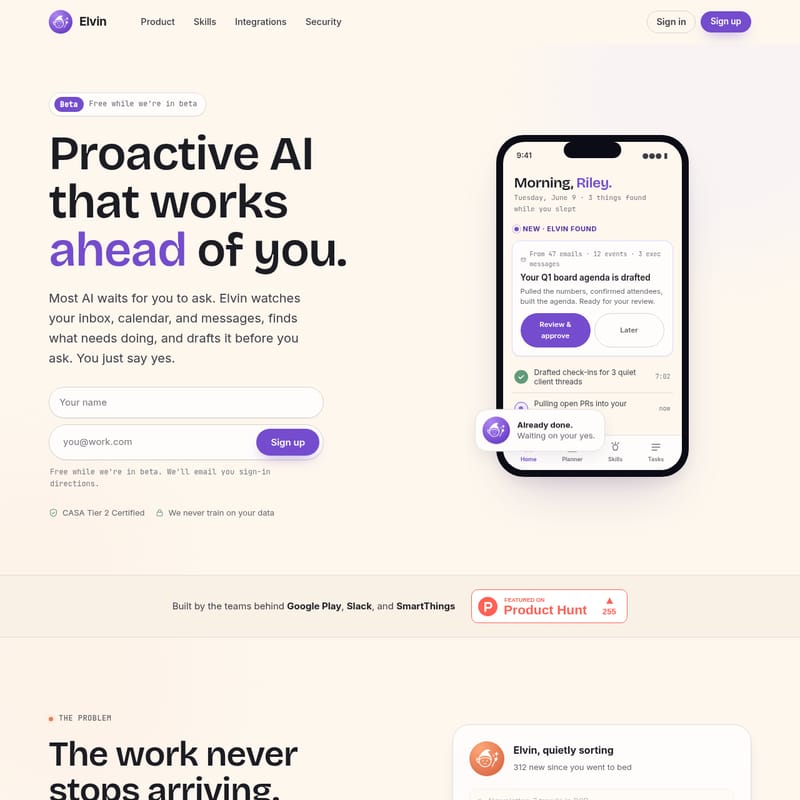
Elvin is not just another chatbot; it is a proactive AI assistant that watches your inbox, calendar, and messages to find what needs doing. While most AI tools wait for a prompt, Elvin moves first. It identifies upcoming responsibilities and drafts the necessary work—such as meeting agendas or client follow-ups—before you even think to ask. Built by the expert teams behind Google Play, Slack, and SmartThings, Elvin acts as a central brain that quietly sorts through your data to prepare your day while you sleep.
Key Features of Elvin
1. Proactive Action Without Prompts
Most AI tools require you to provide a checklist or a prompt. Elvin is different. If you have a board meeting on Thursday, a standard chatbot might give you a to-do list if you ask for it. Elvin, however, sees the meeting on your calendar, reads through relevant emails and executive messages, and drafts the full Q1 board agenda automatically. When you wake up, the work is already waiting for your review.
2. Zero Setup Integration
One of the most powerful features of Elvin is its simplicity. It works the minute you connect your accounts. There is no complex configuration or the need to build custom agents. Elvin learns how you work through two primary mechanisms:
- Context Live: Elvin picks up who you are and how you work based on your existing activities.
- Memory Live: You can tell Elvin your preferences once—such as "Keep my follow-ups under three sentences"—and it remembers that behavior forever.
3. Cloud-Based Computer Use
Unlike AI that only provides text, Elvin can operate a computer in the cloud to deliver finished files. Whether you need a formatted document, a spreadsheet with working formulas, a deck, or a chart for a report, Elvin hands you the completed asset ready for use in platforms like Notion or Slack.
4. Comprehensive Skills Library
Elvin comes equipped with a Skills Library tailored to specific professional roles. You can activate pre-built workflows with a single click, such as:
- Meeting Prep: Researches attendees and builds briefs.
- Stakeholder Updates: Drafts status updates based on recent activity.
- Inbox Zero: Triages tasks and drafts replies.
- Due Diligence: Pulls financials and competitive risks for investors.
5. Trust and Safety
Security is a top priority for Elvin. The platform is CASA Tier 2 Certified and has SOC 2 compliance underway. Elvin runs in a sandboxed cloud environment and never trains on your data. Most importantly, it never takes a sensitive action without your explicit "yes."
Use Cases: How Elvin Supports Different Roles
For Product Managers
Elvin monitors project health and communication. If an engineering lead emails a scope change and dates move in Linear, Elvin catches the change and drafts a revised sprint update for stakeholders before your morning standup.
For Consultants
Elvin identifies quiet client threads that may have been forgotten. It surfaces these threads and drafts check-in messages in your specific voice, allowing you to review and send them even during a busy commute.
For Founders
During a fundraise, investor intros and data-room requests can be scattered across multiple platforms. Elvin pulls every live thread into a single view and drafts replies to investors, keeping your raise warm while you focus on building your company.
For Engineering Managers
Elvin looks across projects and open PRs to flag blockers or items that are slipping. It provides a health check summary so you can address risks before they become fires.
For Investors
When a pitch lands over the weekend, Elvin researches the company and founder. It provides a comprehensive deal brief, including financials and competitive landscapes, before your first meeting on Monday.
How to Use Elvin
Using Elvin is designed to be as seamless as talking to a coworker.
- Connect Your Accounts: Sign up and connect your Gmail, Google Calendar, Slack, and other tools. Setup takes approximately one minute.
- Set Your Preferences: Use "Memory Live" to tell Elvin once how you want it to behave (e.g., "Never use formal sign-offs").
- Review the Morning Briefing: Every morning, Elvin presents a plan for your day based on your inbox and calendar. You can read it on your phone or listen to a Daily Briefing.
- Approve and Send: When Elvin drafts a document or an email, it waits for your approval. You simply review the work and hit "Send" or "Approve."
- Use Mobile or Chat: You can interact with Elvin via the web, iOS/Android apps, or even through Telegram and SMS. You can text Elvin to "Move my 3pm meeting," and it will handle the rescheduling and notifications for you.
FAQ
Q: Does Elvin train on my data? A: No. Elvin has a strict commitment to privacy and never trains its models on your emails, tasks, or personal data.
Q: How is Elvin different from tools like Zapier or Lindy? A: Tools like Zapier require you to design and maintain automations step-by-step. Elvin is proactive; it writes its own plans based on your context without you having to build anything.
Q: Is Elvin's computer use secure? A: Yes. Unlike some "power tools" that require full access to your local machine, Elvin operates in a sandboxed cloud environment with only the permissions you grant.
Q: Can I customize the work Elvin does? A: Absolutely. You can describe a new task to Elvin, and it will build a "Skill" for it. You can name the skill, save it, and tell Elvin how often to run it.
Q: Where does Elvin live? A: Elvin is available on the web, as a mobile app for iOS and Android, and is directly accessible via Telegram and SMS text messaging for on-the-go productivity.