Dokie AI
Dokie AI: The Advanced AI Presentation Maker Powered by Claude Opus 4.6
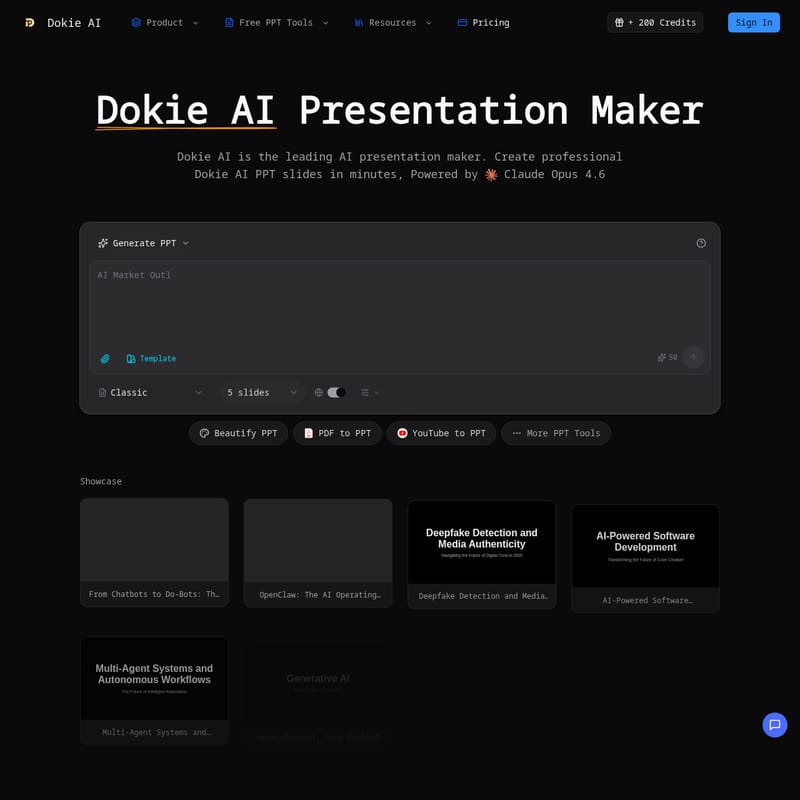
Dokie AI is the leading AI presentation maker designed to transform text descriptions, PDFs, and videos into professional PPT slides instantly. Powered by Claude Opus 4.6, this AI PowerPoint generator streamlines the entire creation process, offering features like AI beautification, real-time editing, and multi-format conversion (Word, YouTube, or PDF to PPT). Whether you need to generate a complete deck from scratch or enhance existing slides, Dokie AI uses advanced AIPPT technology to ensure consistent branding, smart layouts, and professional design. With support for speaker notes generation and PPTX export, it is the ultimate tool for business and education.
2026-03-16
39.0K
Dokie AI Product Information
Dokie AI: The Ultimate AI Presentation Maker for Professional Slides
In today's fast-paced digital world, creating impactful presentations shouldn't take hours of manual labor. Dokie AI emerges as the leading AI presentation maker, designed to revolutionize how professionals, educators, and creators build slide decks. Powered by the advanced Claude Opus 4.6, Dokie AI serves as a comprehensive AI PowerPoint generator that handles everything from content structure to visual design, allowing you to focus on your message rather than formatting.
What's Dokie AI?
Dokie AI is a cutting-edge platform that functions as an all-in-one AI PPT maker. It is a revolutionary tool that transforms simple ideas, text prompts, or existing documents into polished, professional Dokie AI PPT slides. Unlike traditional software, Dokie AI uses sophisticated artificial intelligence to automate the layout, design, and content generation process.
As a versatile AI PowerPoint generator, Dokie AI is built to cater to a global audience, offering multi-language support and a suite of conversion tools. It is widely recognized by the tech community, featured in outlets like Superhuman AI and AiNews.com, as the go-to AIPPT solution for instant, high-quality presentation delivery.
Features of Dokie AI
AI PPT Generation
At the core of the platform is the AI PPT generator. By simply describing your topic, the Dokie AI presentation engine creates a complete deck with professional layouts and compelling narratives. It acts as a smart PPT generator AI that understands context and hierarchy.
AI PowerPoint Beautification
If you have an existing deck that looks outdated, the AI beautify PPT feature is your solution. Upload your slides, and Dokie AI's AIPPT technology will enhance the design, fix messy layouts, and apply consistent, modern styling instantly.
Advanced Conversion Tools
Dokie AI offers an extensive range of conversion features to turn any resource into a presentation:
- PDF to PPT: Convert static PDF documents into editable slides.
- YouTube to PPT: Transform video content into structured presentations.
- Word to PPT: Turn long-form documents into concise slide decks.
- HTML to PPT: Convert web pages directly into PowerPoint format.
Smart Design & Content Tools
- Smart Layouts: The AI automatically selects the most effective design patterns based on your content type.
- Chart Generation: Transform raw data into beautiful, professional visualizations.
- Image Suggestions: Receive relevant visual recommendations that match your slide's message.
- Speaker Notes: Automatically generate detailed talking points for every slide to ensure a confident delivery.
Real-time Preview and Export
Users can preview their Dokie AI PPT slides directly in the browser. Once the AI PPT maker has finished its work, you can make on-the-fly edits and export the final product to a standard PPTX file, compatible with Microsoft PowerPoint, Google Slides, and Keynote.
Use Case for Dokie AI
Dokie AI is designed for a variety of professional and creative scenarios:
- Business Professionals: Create pitch decks, quarterly reports, and marketing presentations in minutes using the AI PowerPoint generator.
- Educators: Quickly turn lesson notes or academic papers (Word/PDF) into engaging classroom slides.
- Content Creators: Use the YouTube to PPT feature to repurpose video content into downloadable presentations for their audience.
- Marketing Teams: Use the AI beautify PPT tool to ensure all brand presentations remain consistent and visually stunning.
- Data Analysts: Leverage the Chart Generation feature of the AI presentation maker to visualize complex data sets for stakeholders.
How to Use Dokie AI
- Input Your Content: Start by providing a text description, a prompt, or uploading a file (PDF, Word, or even a YouTube link).
- Generate: Let the AI PPT generator process the information. It will use Claude Opus 4.6 to structure the slides and apply AIPPT design principles.
- Beautify and Edit: Use the AI beautify PPT tool to refine the visuals. You can also manually edit text or layouts in the real-time previewer.
- Add Speaker Notes: Allow the AI presentation maker to generate your script and talking points.
- Export: Download your completed Dokie AI PPT as a PPTX file for your meeting or lecture.
FAQ
What is Dokie AI? Dokie AI is a professional AI presentation maker that uses artificial intelligence to generate and beautify PowerPoint slides from various inputs like text, PDFs, and videos.
How does the AI PPT generator work? It uses the Claude Opus 4.6 model to analyze your input, create a logical content structure, and apply professional design layouts automatically.
Can I edit presentations generated by the AI PPT maker? Yes. Dokie AI allows for real-time browser-based editing, making it as easy to modify slides as it is to edit a standard document.
What file formats does the AI PowerPoint generator support? You can export your finished work to PPTX, ensuring compatibility with Microsoft PowerPoint, Google Slides, and Keynote.
Can I upload and beautify existing presentations? Absolutely. Dokie AI includes a specialized AI beautify PPT tool specifically for enhancing and redesigning existing slides.
Is Dokie AI better than other AI PPT makers? Dokie AI stands out due to its use of Claude Opus 4.6, its high-speed generation, and its comprehensive suite of "to-PPT" conversion tools that many other platforms lack.
How fast is the AI PPT generator? Most presentations are generated in minutes, providing a 10x speed increase over manual creation.