Deroom AI
AIToolly product video
See Deroom AI in motion
Deroom AI: The Ultimate AI Room Design Tool for Photorealistic Interior Redesign
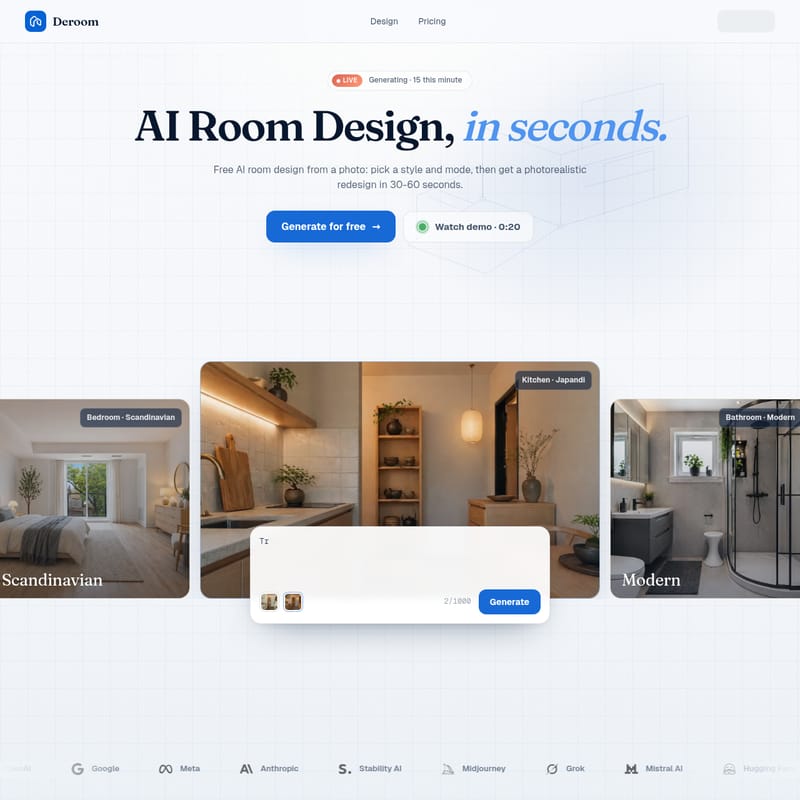
Deroom is a high-performance AI room design platform that transforms standard photos into photorealistic redesigns in under 60 seconds. With 12 curated editorial styles and 5 versatile action modes, Deroom serves homeowners, real-estate agents, and professional designers looking for high-quality, 4K interior visualizations.
2026-05-01
0.6K
Deroom AI Product Information
Deroom: Transforming Your Space with Advanced AI Room Design
In the modern era of interior styling, the bridge between imagination and reality has often been a difficult one to cross. Many homeowners and professionals find themselves lost in endless scrolls through Pinterest, unable to visualize how those trends would look in their own homes. Deroom changes that narrative by offering a powerful AI room design solution that turns a simple photo into a photorealistic redesign in mere seconds.
Whether you are a homeowner looking to refresh your living room, a real-estate agent aiming to stage a property, or a professional designer seeking quick inspiration, Deroom provides the tools to reimagine any space with editorial-quality precision.
What is Deroom?
Deroom is an innovative AI room design platform that utilizes generative AI to reimagine interior and exterior spaces from a single photo. Unlike traditional rendering software that requires hours of manual modeling, Deroom uses a sophisticated AI model to analyze your room's dimensions and layout, then applies a new style and configuration based on your preferences.
The core value of Deroom lies in its speed and realism. In just 30-60 seconds, the platform produces a photorealistic redesign that maintains the integrity of your original space while introducing high-end finishes, furniture, and decor. Deroom is built for those who value quality over quantity, offering curated styles that avoid the generic look often found in other AI tools.
Key Features of Deroom AI
Deroom stands out in the crowded field of AI design tools due to its focus on photographic quality and functional versatility. Here are the primary features that make Deroom a leader in AI room design:
1. 12 Curated Design Styles
Deroom offers twelve handpicked styles that have been specifically tuned for each room type. These styles were selected to ensure they look like they belong in an interior design magazine.
- Modern: Clean, sleek, and contemporary aesthetics.
- Minimalist: A "less is more" approach focusing on essential elements.
- Scandinavian: Emphasizing Nordic warmth and functional beauty.
- Japandi: A perfect fusion of Japanese and Scandinavian design principles.
- Mid-Century Modern: A 1950s-60s revival with organic shapes.
- Industrial: Urban loft vibes with raw materials.
- Bohemian: Layered, eclectic, and full of personality.
- Coastal: Bringing the airy, bright feel of a beach house.
- Zen: Often used for gardens, focusing on peace and balance.
2. 5 Powerful Action Modes
Not every project requires a complete overhaul. Deroom offers five distinct modes that allow you to control exactly how much of your original room is preserved:
- Full Redesign: A complete reimagining of the space while keeping the camera angle and room type.
- Quick Refresh: Keeps the layout and furniture but updates finishes, textiles, and decor.
- Furniture Swap: Introduces new furniture pieces while keeping your existing walls and floors intact.
- Recolor Only: Changes the walls, tones, and materials without moving a single piece of furniture.
- Declutter: Automatically cleans and tidies the space, removing mess while keeping the underlying objects.
3. Professional-Grade Output
Deroom is designed for professional use. Paid plans include 4K export capabilities, ensuring that your AI room design looks crisp on any screen or in print. Additionally, these exports are free of watermarks, providing a clean, commercial-ready product.
How to Use Deroom for Your AI Room Design
Getting a new room design is a simple three-step process that takes less than a minute. Deroom has streamlined the user experience to ensure that anyone, regardless of technical skill, can achieve professional results.
Step 01: Upload a Photo
Start by snapping or uploading a picture of your room. For the best results in your AI room design, use well-lit, full-room angles. Deroom supports JPG, PNG, and WebP formats up to 10MB.
Step 02: Pick Style & Mode
Choose from the 12 curated styles and the 5 action modes. Whether you want a "Full Redesign" in the "Japandi" style or a simple "Recolor" of your walls, this selection tells the AI exactly what you need.
Step 03: Get Photorealistic Results
The AI generates your render in 30-60 seconds. Once completed, you can download the 4K version, regenerate the image with a new seed for a different variation, or save it to your personal collection.
Use Cases for Deroom AI
Deroom is a versatile tool that caters to various industries and personal needs:
- Homeowners: Stop guessing and start seeing. Use Deroom to visualize how a new style would look before spending money on furniture or paint.
- Real-Estate Agents: Speed up the staging process. Use the Declutter or Full Redesign modes to make properties more attractive to potential buyers.
- Interior Designers: Use Deroom as a mood-boarding tool to quickly show clients different aesthetic directions for their space.
- Gardeners & Landscapers: Utilize the "Zen" style and garden room types to visualize outdoor transformations.
Deroom Pricing Plans
Deroom offers transparent pricing with options for every level of user. Credits are only charged when a generation succeeds.
| Plan | Price | Features | | :--- | :--- | :--- | | Starter | $9.99/mo | 20 generations/month, 12 styles, 5 modes, 4K export, no watermark, commercial rights. | | Pro | $24.99/mo | 60 generations/month, priority queue (under 20s), priority email support, plus everything in Starter. | | Enterprise | $49.99/mo | 180 generations/month, API access (Q3), dedicated Slack/Discord support, custom style training add-on. |
Note: Yearly plans are available with a 30% discount.
FAQ: Frequently Asked Questions
What is AI room design? AI room design uses generative AI to reimagine a room from a photo. You upload a picture of your space, pick a style and action mode, and the AI produces a photorealistic version of the same room in the chosen style — typically in 30-60 seconds.
Will the AI keep my room's actual layout? It depends on the mode you choose. Modes like Recolor Only and Furniture Swap preserve much of your existing layout, while Full Redesign takes more creative liberties while maintaining the camera angle and room type.
Can I use the generated designs commercially? Yes, users on any of the paid subscription plans (Starter, Pro, or Enterprise) receive full commercial usage rights for their generations.
How long does a generation take? Standard generations typically take between 30 and 60 seconds. Pro and Enterprise users have access to a priority queue, which can reduce wait times to under 20 seconds.
What makes the AI generations photorealistic? Deroom uses high-quality models that have been tuned specifically for architectural and interior photography, avoiding the artificial look of standard AI renders.
Deroom AI is the bridge between a Pinterest board and your real home. Sign up today and see your next room in high-definition.