Claude Code Voice Mode
Claude Voice Mode: A Conversational Hands-Free Experience for AI Interaction
Claude Voice Mode is a revolutionary beta feature that allows users to engage in complete, spoken two-way conversations with the Claude AI. Available on web, iOS, and Android, this tool enables hands-free interaction where users can speak prompts and listen to Claude’s verbal responses. It offers two distinct modes: Hands-free for quiet environments and Push-to-talk for noisy settings. With multiple voice options and seamless switching between text and audio, it enhances accessibility and productivity for tasks like daily planning, creative brainstorming, and interview preparation while maintaining high safety standards against voice cloning.
2026-04-04
132500.0K
Claude Code Voice Mode Product Information
Experience Natural Dialogue with Claude Voice Mode
In the evolving landscape of artificial intelligence, the way we interact with models is shifting from static typing to fluid, natural conversations. Claude Voice Mode is a cutting-edge beta feature designed to facilitate complete spoken interactions with Claude. Instead of being tethered to a keyboard, Claude Voice Mode allows you to speak your thoughts aloud and receive real-time verbal responses, making it an essential tool for users who need to multi-task or prefer auditory learning.
What's Claude Voice Mode?
Claude Voice Mode is a specialized communication feature available to all users across all plans, including the web interface and mobile applications (iOS and Android). It transforms the standard AI experience into a dynamic two-way dialogue. By utilizing Claude Voice Mode, you no longer have to read lengthy text responses; instead, you can listen to Claude’s insights as if you were speaking to a personal assistant.
Currently available in English, this feature is built to handle natural speech patterns, allowing for a more human-like exchange. Whether you are at your desk or on the move, Claude Voice Mode ensures that your interaction with AI is as seamless as a phone call.
Features of Claude Voice Mode
Claude Voice Mode is packed with features designed for flexibility, personalization, and safety:
- Two-Way Spoken Conversations: Speak directly to Claude and hear spoken responses in return.
- Flexible Interaction Modes: Choose between Hands-free mode for continuous listening or Push-to-talk mode for better control in loud environments.
- Customizable Voices: Select from a variety of preset voice options to personalize your listening experience and pace.
- Seamless Transitions: Easily switch between text and voice within a single chat session without losing context.
- Web Search Integration: Access real-time web information through your voice-activated queries.
- Transcript Availability: Every voice interaction is automatically converted into a text transcript saved in your chat history.
- Safety-First Design: Features built-in protections against voice cloning and impersonation through generative-by-design speech and limited voice presets.
How to Use Claude Voice Mode
Getting started with Claude Voice Mode is straightforward across different devices.
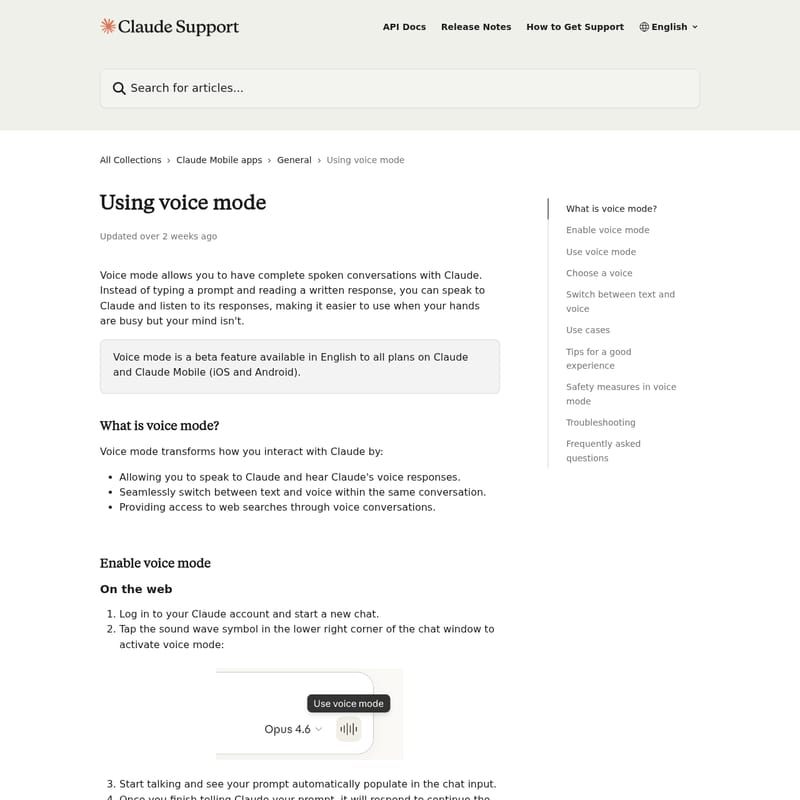
Using Claude Voice Mode on the Web
- Log in to your Claude account and open a new chat.
- Locate the sound wave symbol in the lower right corner of the chat window.
- Click the icon to activate Claude Voice Mode.
- Start speaking; your prompt will automatically populate the input field.
- To exit, click the "Stop" button.
Using Claude Voice Mode on Mobile (iOS and Android)
- Open the Claude mobile app.
- Tap the voice mode icon (sound wave next to the microphone) in the text input field.
- Choose your preferred voice during the initial setup.
- Begin your conversation naturally.
- Use the settings button in the bottom left corner to adjust the voice or pace at any time.
Operating Modes
- Hands-free mode: This is the default setting where Claude listens for natural pauses. It is perfect for quiet rooms.
- Push-to-talk mode: Use this in noisy environments. Hold the button while speaking and release it when finished to ensure Claude hears you clearly over background noise.
Use Case Scenarios
Claude Voice Mode excels in situations where typing is inconvenient or impossible:
- Daily Planning: Get a briefing on your schedule while getting dressed or making breakfast.
- Learning and Commuting: Use your travel time to explore new academic topics or listen to explanations of complex concepts.
- Creative Thinking: Use Claude Voice Mode to "think out loud," brainstorming ideas without the friction of typing.
- Interview Preparation: Practice answering questions through natural dialogue to build confidence for real-world interactions.
- Hands-Busy Tasks: Capture ideas or ask for advice while exercising, cooking, or performing household chores.
FAQ
Will my voice conversations be saved? Yes. Textual transcripts of your Claude Voice Mode sessions are saved in your chat history, just like standard text conversations.
What's the difference between dictation and voice mode? Dictation simply converts your speech to text for a prompt. Claude Voice Mode is a full two-way experience where Claude also speaks back to you.
Can I use voice mode in languages other than English? At this time, Claude Voice Mode is exclusively available in English.
Does voice mode count against my usage limits? Yes, voice conversations contribute toward your regular usage limits based on your specific subscription plan.
What should I do if Claude keeps interrupting me? If you are in a noisy area, Claude might mistake background noise for speech. Try switching to Push-to-talk mode or moving to a quieter space. You can also interrupt Claude at any time by speaking, and it will stop to listen.
Tips for the Best Experience
To get the most out of Claude Voice Mode, follow these simple suggestions:
- Check Permissions: Ensure your device has microphone permissions enabled for the Claude app.
- Connectivity: Use a stable internet connection to prevent choppy audio or responses cutting out.
- Speak Naturally: There is no need to speak like a robot; Claude Voice Mode is optimized for human speech patterns.
- Manage Complexity: For very complex requests, try breaking them into smaller, individual questions during the conversation.