Yamanote 3D
Yamanote 3D: Yamanote Line 3D Simulation
Explore a Yamanote Line 3D simulation in near real time. Visit thirty stations, listen to announcements, and experience a virtual Tokyo train ride online.
2026-08-03
--K
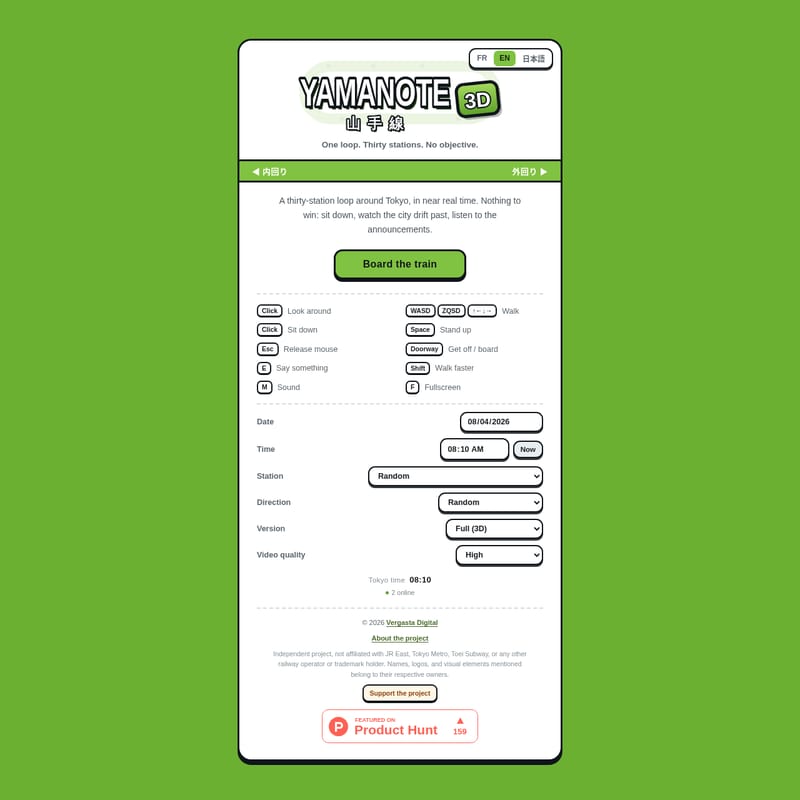
Yamanote 3D Product Information
Yamanote 3D is a Yamanote Line 3D simulation that features a thirty-station loop around Tokyo. This project provides a virtual Yamanote Line ride in near real time, allowing for observation of the city and station announcements.
Interactive Tokyo Train Simulation
The interactive railway simulation uses a specific set of controls for navigation and interaction. Users board the train or walk through the environment by clicking. Perspective is controlled using the WASD, ZQSD, or arrow keys. The spacebar is used to sit down, and the Esc key allows the user to stand up or release the mouse cursor.
Additional controls include the E key for getting off or boarding at doorways. Within the simulation, the Shift key is used to say something, the M key is used to walk faster, and the F key is used for sound.
Near Real-Time Railway Tour
This Tokyo train simulator includes both the inner loop, Uchi-mawari, and the outer loop, Soto-mawari. Users can select a specific station to start the tour, with options ranging from JY01 Tokyo to JY30 Yurakucho, or begin at a random station and direction.
To provide a near real-time Tokyo rail experience, the simulation syncs with current Tokyo time. Users also have the option to manually select a different date and time or use a random setting for environmental conditions.
Visual and Audio Modes
Two primary versions of the simulation are available: Full (3D) and Audio only (no 3D). The 3D version includes several video quality presets for the visual environment:
- Very Low
- Low
- Medium
- High
- Very High
- Ultra
- Extraordinary
The Audio only mode allows users to listen to the sounds of the railway loop without visual rendering.
Immersive City Atmosphere
Yamanote 3D is an independent project by Vergasta Digital. It is not affiliated with, endorsed by, or associated with JR East, Tokyo Metro, Toei Subway, or any other railway operator or trademark holder. All names, logos, and visual elements belong to their respective owners.
The simulation covers the complete thirty-station loop, focusing on the auditory and visual experience of the transit line. Users can exit the simulation view or release the mouse at any time using the Esc key.
faq
Which stations are included in the thirty-station loop?
The simulation includes all stations on the line, from JY01 Tokyo through JY30 Yurakucho. This includes major transit hubs such as JY13 Ikebukuro, JY17 Shinjuku, JY20 Shibuya, JY25 Shinagawa, and JY26 Takanawa Gateway.
How do users control movement and perspective in the simulation?
Users click to walk or board the train and use the WASD, ZQSD, or arrow keys to look around the 3D environment. The spacebar is used for sitting down, the M key allows for faster walking, and the Esc key is used to stand up or release the mouse cursor.
Does the simulation follow a real-time schedule?
The simulation defaults to the current Tokyo time to provide a near real-time experience. However, the interface allows users to manually select a specific date and time or choose a random setting.