Veltrix AI for E-commerce favicon

Veltrix AI for E-commerce

Veltrix AI for E-commerce is an analytics platform that analyzes business data across connected tools and uploaded documents to highlight operational issues, sales opportunities, and recommended next steps.

EcommerceExamines connected business tools and…Produces answers with source…Generates alerts, financial insights,…Multi-Source Data Ingestion
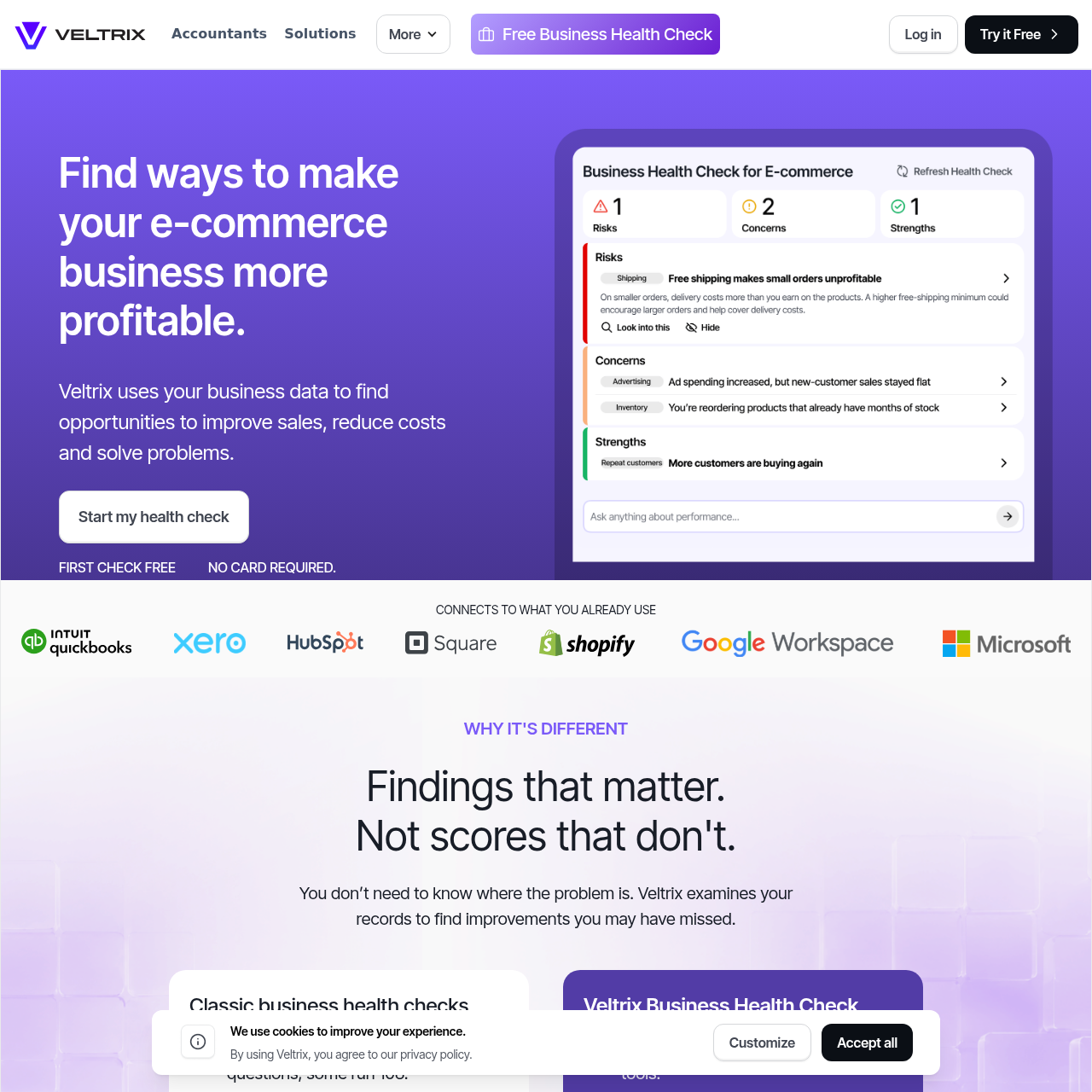
Veltrix AI for E-commerce product interface screenshot
Estimated monthly visits
14K
Data period:
Listed on AIToolly

What Is Veltrix AI for E-commerce? Product Overview

What the product does and how it is positioned

Veltrix AI for E-commerce is an analytics tool designed to evaluate business health by examining live operational and financial records. Rather than relying on self-reported survey answers, the system connects directly to business tools or ingested files to locate opportunities for revenue growth and expense reduction.

The platform organizes its diagnostic discoveries into structured findings covering what was detected, why it is significant, and what actions to take next. It also provides segmented workspaces for financial advisors and accountants managing multiple individual client accounts.

What Can You Use Veltrix AI for E-commerce For?

Source-supported ways to use the product

E-Commerce Business Optimization

Online store operators can connect store, payment, and marketing data to identify revenue bottlenecks, reduce expenses, and focus on verified opportunities.

Accountant and Bookkeeper Advisory

Professional advisors can generate isolated client health checks, yielding structured lists of financial risks, opportunities, and discussion points for upcoming reviews.

How to Use Veltrix AI for E-commerce

The documented workflow, where available

  1. 1

    Connect Data Sources

    Connect store, accounting, payment, or marketing applications, or upload data using PDF documents, Excel spreadsheets, or CSV files.

  2. 2

    Analyze Business Records

    Veltrix examines the provided business data to detect potential operational issues, cost-saving targets, and existing operational strengths.

  3. 3

    Review Findings and Solutions

    Explore generated findings divided into what was detected, why it matters to the organization, and recommended next actions.

Diagnostic Reporting and Data Integration

Veltrix AI for E-commerce assesses business performance by reading records directly from operational software or uploaded spreadsheets and documents. By relying on underlying data instead of subjective questionnaires, the software flags operational changes and potential issues across connected departments.

Every discovery generated by the platform follows a standardized three-part framework that explains the observed issue, details its operational significance, and proposes follow-up steps. The system also exposes the source records supporting its responses and signals when data is insufficient to answer an inquiry.

  • Operates via read-only connections to tools including QuickBooks, Xero, Shopify, Square, and HubSpot.
  • Accepts manual uploads of PDF, Excel, and CSV files when direct integrations are not configured.
  • Delivers findings that specify what was found, why it matters, and suggested follow-up tasks.
  • Cites underlying data sources for responses and explicitly indicates when information is unknown.

What to Test Before Choosing Veltrix AI for E-commerce

Checks to run with your own material and workflow

  • Confirm that your business systems, such as Shopify, Square, QuickBooks, Xero, or HubSpot, are compatible with the platform's direct integration options.
  • Verify that your offline records can be exported to PDF, Excel, or CSV formats before uploading them to the platform.
  • Check that read-only access meets your internal security and governance requirements for financial data analysis.
  • Review client workspace separation and permission settings if using the platform across multiple bookkeeping or advisory accounts.

Veltrix AI for E-commerce Sources and Last Checked

What was checked and when

Last checked
Category
Ecommerce

Veltrix AI for E-commerce Frequently Asked Questions

Answers based on the source-checked product record

How quickly does Veltrix generate initial business findings?

The platform produces its first findings within approximately two minutes of the initial sign-in, highlighting positive trends, cost drivers, and priority areas.

Which software tools and file types can be connected to Veltrix?

Veltrix connects to platforms such as QuickBooks, Xero, Shopify, Square, and HubSpot. Users who do not use supported accounting software can upload PDF, Excel, or CSV files.

What permissions does Veltrix require when connecting to third-party tools?

All platform connections operate on a read-only basis. Veltrix does not edit, post, or delete business data, and linked tools can be disconnected at any time.

Can accountants and bookkeepers use Veltrix to review multiple clients?

Yes. Advisors can analyze data per client, generating structured lists of risks, opportunities, and review topics within separate workspaces that feature configurable access controls.

How does Veltrix differ from general-purpose conversational AI tools?

Unlike general chat systems that rely on pasted snippets and estimate missing context, Veltrix reads live data across connected systems, displays source data for answers, and explicitly identifies when data is unavailable.

Explore other recently added tools in the same category.