Screen Charm
Screen Charm: The Ultimate Cinematic Mac Screen Recorder for Professional Demos and Tutorials
Screen Charm is a professional Mac screen recorder designed for developers, founders, and course creators. It features smart auto-zoom, cursor smoothing, and 4K export to create cinematic videos without manual editing.
2026-06-12
39.6K
Screen Charm Product Information
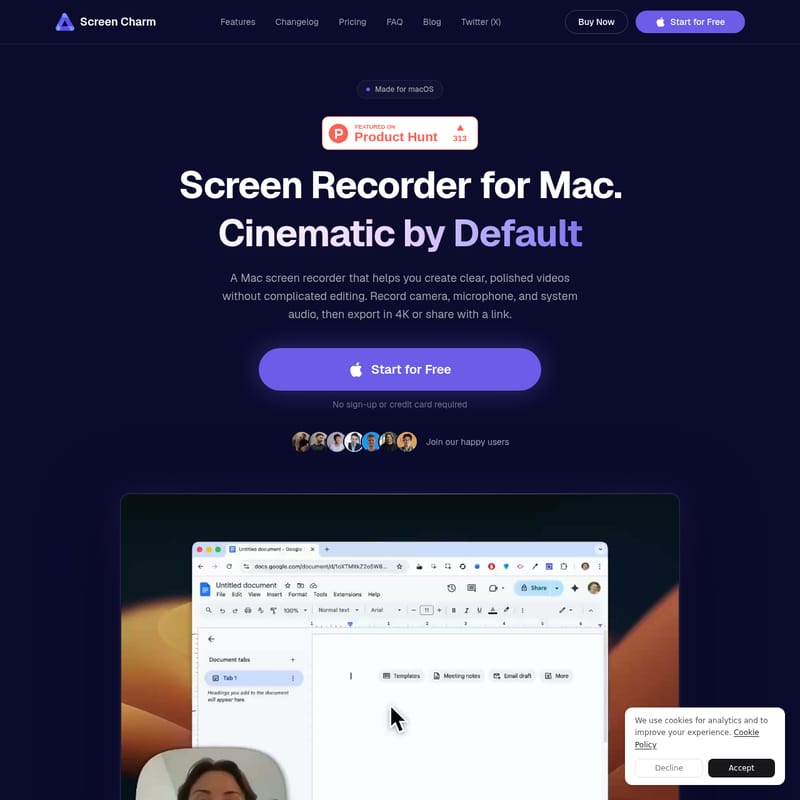
Screen Charm: The Cinematic Mac Screen Recorder for Professional Results
Creating professional-grade screen recordings on macOS has often required a steep learning curve and hours of tedious editing. Screen Charm changes that narrative by offering a Mac screen recorder that helps you create clear, polished, and cinematic videos without the need for complicated editing software. Whether you are a developer showcasing a new feature, a course creator building a curriculum, or a founder launching a SaaS product, Screen Charm is designed to make your screen captures look exceptional by default.
Built specifically for the macOS ecosystem, Screen Charm leverages the power of Apple Silicon to provide a smooth, fast, and high-quality recording experience. With the ability to record your camera, microphone, and system audio simultaneously, it serves as an all-in-one solution for anyone looking to turn a simple screen capture into a professional presentation.
What’s Screen Charm?
Screen Charm is a premium screen recording application made exclusively for macOS. It is defined by its "Cinematic by Default" philosophy, meaning it automatically applies professional visual enhancements to your recordings so you don't have to. Unlike standard recording tools that simply capture pixels, Screen Charm focuses on the presentation. It automatically smooths cursor movements, applies smart zoom effects to your clicks, and allows you to wrap your videos in beautiful device frames and backgrounds.
It is the ideal tool for makers who want to show their work in the best possible light. With Screen Charm, there is no sign-up or credit card required to start, and it offers a friction-free workflow that lets you export in 4K UHD or share your videos via a simple link.
Key Features of Screen Charm
Screen Charm is packed with features that cater to the needs of modern creators. Every tool within the app is designed to polish your recording without requiring you to leave the application.
Record Anything with Ease
With Screen Charm, you have total flexibility. You can capture your entire screen, a single application window, or a specific selected area. It supports recording your camera, microphone, and system audio, allowing for a comprehensive recording setup that starts in just seconds.
Smart Auto-Zoom and Smooth Cursor
One of the standout features of this Mac screen recorder is its automation.
- Smart Auto-Zoom: Every click you make is tracked. Once the recording is finished, Screen Charm automatically applies smooth zoom effects to those moments. You can keep them, tweak them, or turn them off entirely.
- Smooth Cursor: To prevent jarring movements, cursor smoothing is applied automatically post-recording. You can adjust the size and speed of the cursor to ensure your viewers can follow your actions perfectly.
Professional Camera Layouts
Screen Charm allows you to record your webcam alongside your screen. You can use a floating bubble overlay or pin the camera to the edges of the screen (left, right, top, or bottom). This flexibility ensures that your face is always positioned perfectly relative to the content you are demonstrating.
Aesthetics and Branding
To make your videos stand out on social media or landing pages, Screen Charm provides:
- Beautiful Backgrounds: Wrap your recording in gradients, photos, or solid colors.
- Device Frames: Place your recording inside a realistic MacBook frame for a polished, presentation-ready look.
- Video Style Controls: Adjust shadow depth, inner padding, corner radius, and background blur intensity.
Powerful Built-in Editor
The Screen Charm editor gives you full control over the final product:
- Trim & Cut: Remove mistakes and filler without re-recording.
- Speed Control: Speed up slow walk-throughs or slow down fast interactions for better clarity.
- Mic Enhancement: A single toggle removes background hiss and room noise, ensuring your voice is crisp.
- Motion Blur: Adds natural blur to fast moves, making the video feel more cinematic.
Use Cases for Screen Charm
Screen Charm is the go-to tool for various professional segments who need high-quality visual communication.
For Developers
Developers use Screen Charm to show their work, not just their code. It turns a standard recording into a professional demo suitable for landing pages, GitHub documentation, or Product Hunt launch posts. It helps in making technical demos look accessible and high-end.
For Course Creators
For those building online lessons, Screen Charm ensures that the content looks as good as it teaches. The auto-zoom feature keeps students focused on the specific UI elements being discussed, while the ability to cut dead air and adjust speed ensures the pacing is always perfect.
For Founders and SaaS Teams
Founders use Screen Charm to turn every product launch into a significant moment. By recording demos that actually convert, founders can showcase their SaaS apps or mobile tools with cinematic flair that attracts investors and customers alike.
How to Use Screen Charm
Getting started with Screen Charm is a straightforward process designed for the Mac-first workflow:
- Select Your Source: Choose whether to record the full screen, a window, or an area. Toggle your camera, microphone, and system audio as needed.
- Record: Hit the record button and perform your walkthrough. Screen Charm handles the heavy lifting in the background.
- Automatic Polish: Once finished, the app automatically applies cursor smoothing and smart auto-zoom effects.
- Edit and Refine: Use the built-in editor to trim the video, adjust the zoom levels, or add background music and mic enhancement.
- Style Your Video: Add a MacBook device frame and a beautiful gradient background to match your brand.
- Export and Share: Save your video as a local MP4 file in up to 4K resolution, or upload it to the cloud to get a shareable link instantly.
FAQ: Questions About Screen Charm
What is the best screen recorder for Mac? Screen Charm is widely considered a top choice for Mac users who want cinematic, professional-looking recordings without manual editing.
Can I record Mac system audio with Screen Charm? Yes, Screen Charm allows you to capture system audio alongside your microphone and screen recording.
Can I record my screen and webcam at the same time? Absolutely. You can record your camera in various layouts, such as a floating bubble or pinned to the edges of the frame.
Does Screen Charm export Mac screen recordings in 4K? Yes, you can export your finished videos locally as MP4 files in up to 4K UHD resolution.
Which operating systems are supported? Screen Charm is designed for macOS. It is Apple Silicon ready, and macOS Sonoma 14.0 or higher is recommended for the best experience.
Is there a subscription fee? No, Screen Charm offers a "Pay once, use forever" model. A one-time payment of $79 gives you lifetime access and updates.
Where are recordings saved? You can save your recordings locally on your Mac or upload them to the cloud for instant sharing via a link.
By choosing Screen Charm, you are investing in a tool that respects your time and elevates your brand. With its powerful automation and Mac-native performance, it is the definitive Mac screen recorder for the modern creator.