QWERTYS
QWERTYS: A Challenging Keyboard Layout Tetris Puzzle Game by Diego Dotta
Experience QWERTYS, a unique puzzle game where Tetris mechanics meet keyboard layouts. Rebuild your keyboard, manage layout shifts, and master high-speed key placement in this engaging challenge.
2026-06-08
57400.0K
QWERTYS Product Information
QWERTYS: The Ultimate Keyboard Layout Tetris Challenge
QWERTYS is a unique and engaging puzzle game that takes the classic mechanics of Tetris and adapts them to the familiar yet surprisingly complex world of keyboard layouts. Developed by Diegodotta (Diego Dotta) in collaboration with Claude, this game was born out of a creative spark—a "tiny love letter" to the Smart Keys keyboard app—that evolved into a standalone, addictive gaming experience. If you have ever wondered how well you truly know your keyboard, QWERTYS is the perfect game to test your spatial memory and reflexes.
What's QWERTYS?
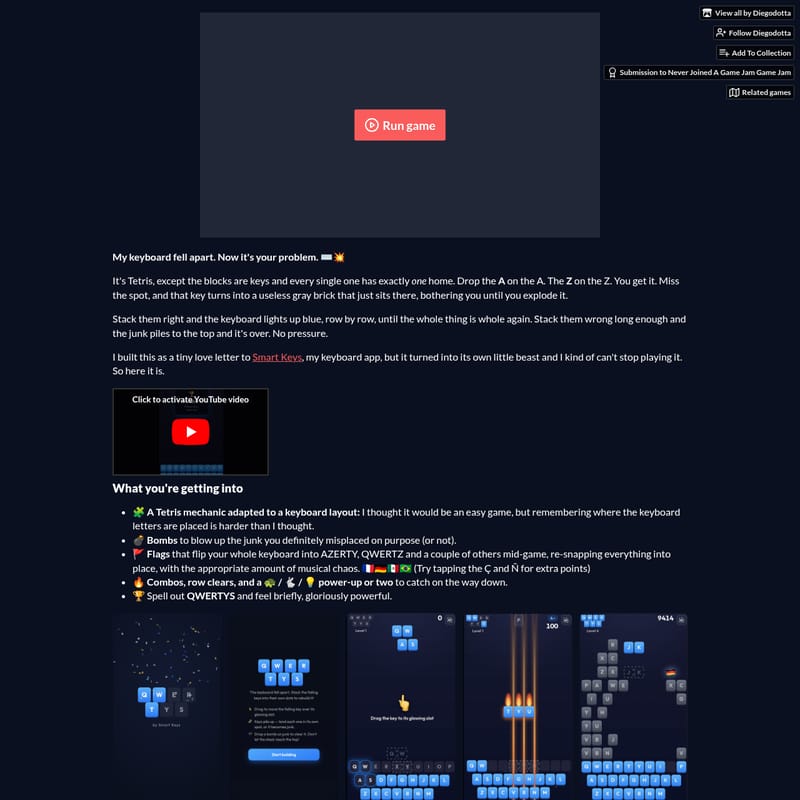
At its core, QWERTYS is a reimagining of the falling-block puzzle genre. The premise is simple but punishing: "My keyboard fell apart. Now it's your problem." In this game, the blocks are individual keyboard keys, and every single one has exactly one rightful home on the keyboard grid. Your task is to drop the A on the A, the Z on the Z, and so on.
Unlike traditional Tetris where you can rotate shapes to fit anywhere, QWERTYS requires precision. If you miss the spot, that key immediately transforms into a useless gray brick. These bricks clutter your workspace, creating obstacles that can only be cleared by specific mechanics. When you stack keys correctly, the keyboard begins to light up blue, row by row. Your ultimate goal is to complete the rows until the entire keyboard is whole again. However, if the junk piles up to the top, the game is over.
Key Features of QWERTYS
QWERTYS is packed with features that elevate it beyond a simple clone, adding layers of strategy and chaotic fun to the experience:
🧩 Keyboard-Adapted Tetris Mechanics
The core gameplay loop of QWERTYS challenges your knowledge of keyboard letters. While we type every day, remembering the exact placement of every key mid-game is harder than most players anticipate. This adaptation turns a mundane tool into a high-stakes puzzle field.
💣 Strategic Bombs
Misplacing a key is inevitable. To help manage the chaos, QWERTYS provides bombs to blow up the gray "junk" bricks that you might have misplaced on purpose—or by accident. These are essential for clearing space when the board becomes too cluttered.
🚩 Dynamic Layout Flags
One of the most chaotic features of QWERTYS is the inclusion of flags. These flags can flip your entire keyboard layout mid-game into AZERTY, QWERTZ, and several other international configurations. This forces everything to re-snap into place, accompanied by what the developer describes as "musical chaos." For those seeking extra points, tapping the Ç and Ñ keys provides a specialized bonus.
🔥 Combos and Power-Ups
To keep the gameplay fast-paced, QWERTYS includes:
- Combos: Earn more points by clearing multiple rows in succession.
- Row Clears: Successfully lighting up a row blue removes the blocks and provides breathing room.
- Turtle / Rabbit / Lightbulb Power-ups: Collect these as they fall to alter the game speed or gain tactical advantages.
🏆 The QWERTYS Spell-Out
For players looking for a true sense of accomplishment, spelling out the word QWERTYS within the game provides a moment where you can feel "briefly, gloriously powerful."
How to Use and Play QWERTYS
QWERTYS is designed to be accessible across different platforms with intuitive control schemes.
For Desktop Players
If you are playing on a computer, the controls are straightforward:
- ← → (Left/Right Arrows): Move the falling key horizontally to align it with its correct position.
- ↓ (Down Arrow) or Space: Speed up the descent of the key for faster placement.
For Mobile Players
If you are playing on a touch-sensitive device, the controls are optimized for fluid movement:
- Drag: Slide your finger across the screen to move the falling key.
- Swipe Down: Quickly drop the key into its place.
Use Case: Who Should Play QWERTYS?
QWERTYS is ideal for several types of players:
- Puzzle Enthusiasts: Those who enjoy the spatial reasoning of Tetris but want a fresh, thematic twist.
- Typists and Techies: Anyone who wants to test their ingrained muscle memory of the QWERTY, AZERTY, or QWERTZ layouts.
- Competitive Gamers: With a difficulty curve that peaks at Level 8, it is a great game for those who like to chase high scores. As the developer notes, passing Level 8 officially makes you a "Tetris beast."
Development and Credits
QWERTYS was created by Diegodotta (diego.horse), the same developer behind other titles on itch.io like Air Fiesta. The game was built during a "Never Joined A Game Jam" Game Jam, featuring pair programming with Claude.
The game's atmospheric experience is supported by a rich soundscape:
- Background Music: Gregor Quendel
- International Themes: Mikhail Smusev (Germany), Mykola Sosin (Mexico), Artsiom Bialou (Brazil)
- Game Over Sounds: Alphix
- Voice Assets: Created using ElevenLabs (originally developed for Air Fiesta).
FAQ
Q: What happens if I put a key in the wrong spot? A: The key will turn into a gray brick. It becomes a permanent obstacle on your board until you use a bomb to explode it.
Q: How do I win a level in QWERTYS? A: You must stack the keys correctly until the keyboard lights up blue row by row. Completing the keyboard layout allows you to progress.
Q: What international layouts are supported? A: The game features flags that can trigger AZERTY (France), QWERTZ (Germany), and other layouts including those for Mexico and Brazil.
Q: Is QWERTYS free to play? A: Yes, it is listed as a free puzzle game on itch.io.
Q: How hard is Level 8? A: According to the developer, the jump in difficulty after Level 1 can be mean. If you manage to pass Level 8, you are considered an expert at the game. Diegodotta's personal best score is 23,868 with 5 flags at level 8.