
Pulldog
Pulldog: The Native macOS Code Review Client for GitHub and GitLab
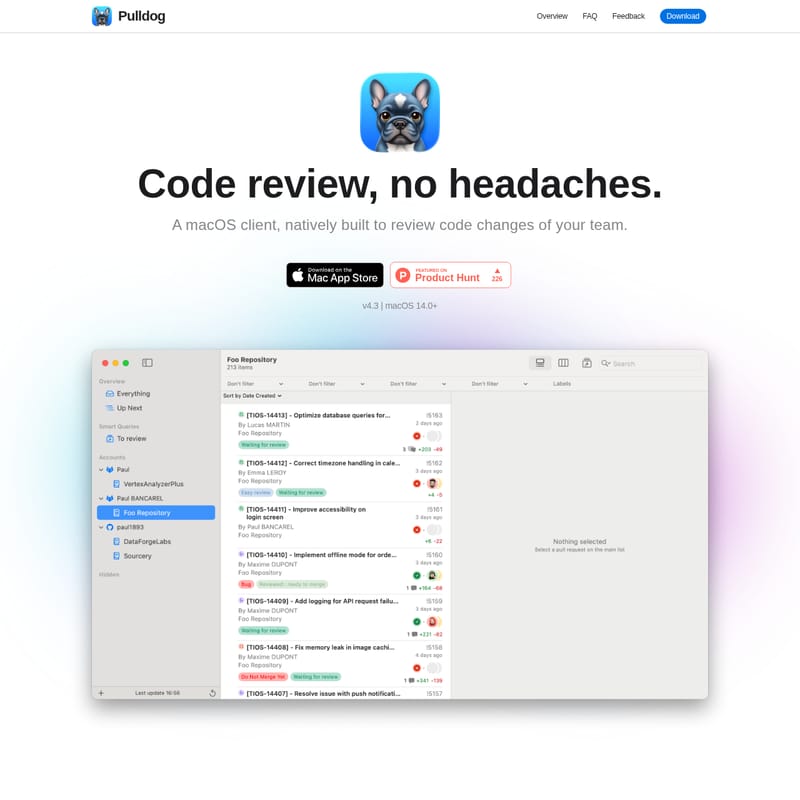
Pulldog is a native macOS application designed to streamline the code review process for developers. Built entirely in Swift, it integrates seamlessly with the Apple ecosystem, offering features like widgets, Siri shortcuts, and Spotlight actions. Pulldog supports multiple GitHub and GitLab accounts, allowing users to monitor all pull requests from a single interface. Key features include Smart Queries for advanced filtering, 'Memojify' for personalized UI, and Apple Intelligence integration for on-device local code analysis. It aims to eliminate the friction of code reviews through high customizability and native performance on macOS 14.0 and higher.
2026-03-10
--K
Pulldog Product Information
Pulldog: The Ultimate Native macOS Code Review Client
Code review is an essential part of the modern development lifecycle, but it shouldn't be a headache. Introducing Pulldog, a native macOS client specifically built to help you and your team review code changes with speed, efficiency, and a touch of Apple-inspired elegance.
What's Pulldog?
Pulldog is a dedicated software solution for macOS users that focuses on optimizing the code review experience. Rather than replacing platforms like GitHub or GitLab, Pulldog acts as a powerful bridge, integrating your development workflow deeply into the macOS ecosystem. By leveraging native technologies, Pulldog provides access to system-level features such as Spotlight, widgets, Siri, and shortcuts, ensuring that your code review process is as frictionless as possible.
Built entirely in Swift and compatible with macOS 14.0+ (including macOS Tahoe), Pulldog is designed for developers who value performance and a platform-oriented approach. Whether you are a solo developer or part of a large engineering team, Pulldog helps you focus on what truly matters: high-quality code.
Features of Pulldog
Pulldog is packed with features that transform the way you interact with pull requests and merge requests.
macOS Native Performance
Pulldog is written entirely in Swift. Being platform-oriented is a top priority, ensuring that you get the most out of your Mac's hardware and the latest Apple technologies. The interface is clean, responsive, and familiar to any Apple user.
Multi-Platform & Multi-Account Support
- GitHub & GitLab Support: Seamlessly connect to your repositories. (Azure support is currently in development).
- Multiple Accounts: Manage various GitHub or GitLab accounts simultaneously. Like a professional mailbox, you can monitor everything from a single Pulldog instance, making it perfect for developers who contribute to multiple organizations or don't use monorepos.
Smart Queries
Bringing back the efficiency of "smart folders," Pulldog allows you to create custom Smart Queries to organize your PRs. This feature allows you to filter and view exactly what you need based on specific logic.
| Title | Smart Queries Logic | | :--- | :--- | | Last chance to review | PR approvals > X AND pipeline status is "succeed" | | Old PRs | PR created date > X week(s) | | Today's PRs | PR created date > begin day AND PR created date < end day | | Feature team's PR | PR author name matching X, Y or Z | | Big PRs | PR status is open AND deleted lines > X | | Small PRs | PR status is open AND deleted lines < X | | Most discussed | PR comments count > X | | Mines | PR author name matching X | | Mines that failed | PR author name matching X AND pipeline status is "failed" | | Reviewed by me | PR status is open AND Comment author name matching X | | Opened today | PR created date > begin day AND PR created date < end day AND status open | | Merged today | PR created date > begin day AND PR created date < end day AND status merged |
High Customizability
Pulldog believes that a familiar environment leads to better reviews.
- Themes & Languages: Choose from 90 available themes and support for 185 languages.
- Search & Filter: Search across entire files or just changed lines using regex and name patterns.
- Memojify: Turn boring, empty avatars into fun Memojis to make the UI more pleasant and engaging.
Advanced Review Tools
- Auto-commit filtering: This allows you to see only what has changed since your last review or approval, preventing you from re-reading code you've already cleared.
- Map Timeline: A visual representation of your reviews against the PR lifecycle, letting you stay up to date in seconds.
- Widgets: Place PR status widgets directly on your Desktop or Notification Center to keep your team's progress visible at all times.
Apple Intelligence & Spotlight (macOS Tahoe+)
For users on macOS 26.0 and above, Pulldog utilizes Apple's on-device 3-billion parameter model.
- Local AI Reviews: Ask the model to review your PR or summarize files. Because it runs locally, your sensitive code is never sent to a server.
- Spotlight Actions: Execute commands like "rebase all my PRs" or "merge all mergeable PRs" directly from the macOS Spotlight search bar.
Use Case
Pulldog is designed for various professional scenarios:
- The Lead Engineer: Use Smart Queries to track "Most discussed" PRs to identify where technical debt or architectural disagreements might be occurring.
- The Multi-Tasker: Manage private open-source contributions and professional work projects side-by-side using the Multiple Accounts feature.
- The Security-Conscious Developer: Use Apple Intelligence to get automated code summaries and approval suggestions locally, ensuring proprietary code never leaves the machine.
- The Efficient Reviewer: Use Auto-commit filtering to skip previously reviewed code and focus only on the newest updates after a developer pushes a fix.
FAQ
Does Pulldog replace GitHub or GitLab? No. Pulldog is a client designed to work alongside these platforms. It provides a more integrated, native macOS experience for the review phase of your workflow.
What are the system requirements? Pulldog requires macOS 14.0 or higher. For advanced features like Apple Intelligence and specific Spotlight actions, macOS 26.0 (Tahoe) is required.
Is my code safe when using AI features? Yes. When using the Apple Intelligence integration, the model runs entirely on-device. No code is transmitted to external servers, making it safe for sensitive codebases.
Which platforms are supported? Currently, Pulldog supports GitHub and GitLab. Azure DevOps support is currently in the works.
Can I see changes made after my last approval? Yes. The Auto-commit filtering feature is specifically designed to show you exactly what changed since your last interaction with a PR.







