Prompt Library
Prompt Library for macOS: The Ultimate Tool to Organize and Insert AI Prompts Instantly with ⌘⌥P
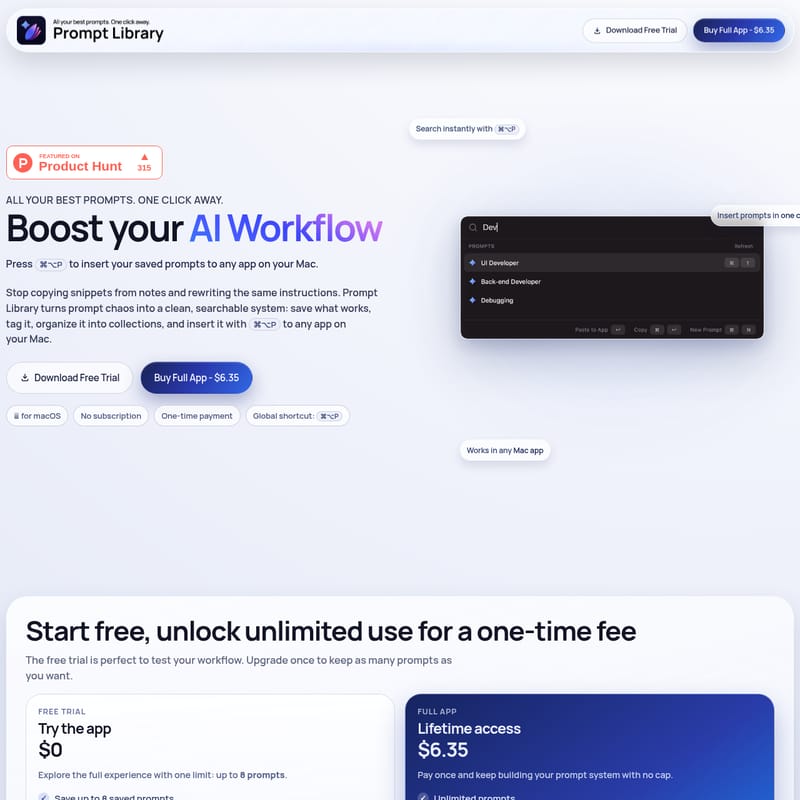
Prompt Library is a dedicated macOS application designed to streamline your AI workflow by transforming prompt chaos into a searchable, organized system. This productivity tool allows users to save, tag, and categorize their best AI instructions into collections for marketing, engineering, and more. With its global ⌘⌥P shortcut, Prompt Library enables instant insertion of saved prompts into any Mac app, eliminating the need to copy-paste from notes or search through old chat history. It operates entirely offline for maximum privacy, requiring no accounts or cloud sync. Users can start with a free trial or unlock unlimited prompts with a one-time payment of $6.35, ensuring a lifetime of efficient, model-agnostic prompt management across all AI tools like ChatGPT and Claude.
2026-02-17
--K
Prompt Library Product Information
Prompt Library: Boost Your AI Workflow and Organize Your Best Prompts on macOS
In the rapidly evolving world of artificial intelligence, the quality of your output is determined by the quality of your instructions. However, managing those instructions often leads to "prompt chaos." Prompt Library is the definitive solution for macOS users who want to stop copying snippets from notes and rewriting the same instructions repeatedly. By turning your scattered ideas into a clean, searchable system, Prompt Library ensures your best AI prompts are always just one click away.
What's Prompt Library?
Prompt Library is a dedicated macOS application designed to act as a single source of truth for your AI interactions. It is a lightweight, powerful tool that allows you to save and organize your most effective prompts, making them instantly accessible via a global keyboard shortcut. Whether you are working with ChatGPT, Claude, or any other AI model, Prompt Library stays model-agnostic, focusing on the organization and deployment of your text.
Unlike cloud-based solutions, Prompt Library is a local-first application. It stores everything directly on your Mac, ensuring your data remains private and accessible offline without the need for accounts or subscriptions. It is built specifically for macOS, offering a native experience that integrates seamlessly into your professional workflow.
Key Features of Prompt Library
Prompt Library is packed with features designed to eliminate friction and enhance productivity:
- Global Shortcut (⌘⌥P): The heart of the app is the global launcher. Press ⌘⌥P to instantly surface your saved prompts from any application on your Mac.
- Searchable Database: Find the exact prompt you need in seconds with real-time filtering as you type.
- Collections and Tags: Organize your library by intent, role, or project. Use tags to categorize persona prompts, debugging instructions, or marketing copy.
- One-Click Insertion: Insert your chosen prompt directly into the active app with a single keystroke (↵), or copy it to your clipboard (⌘↵) for later use.
- Offline Privacy: No cloud, no accounts. Your prompts are stored locally on your machine, providing a secure environment for your intellectual property.
- Model-Agnostic Utility: Use your saved prompts with any AI tool, including ChatGPT, Claude, and more.
- Flexible Formats: Save your instructions in various formats, including raw text, Markdown fenced blocks, or JSON.
- Sorting Options: Keep track of your evolving library by sorting prompts alphabetically or by those recently updated.
How to Use Prompt Library
Using Prompt Library is designed to be intuitive, moving you from "Before" (scattered notes) to "After" (instant recall) in three simple steps:
01 Structure by Collection and Intent
Begin by building a system that reflects your work. Create collections for specific contexts such as marketing, product, engineering, support, or hiring.
- Group campaign-ready marketing prompts.
- Tag role-specific persona prompts.
- Isolate debugging prompts for fast technical triage.
02 Find the Right Prompt in Seconds
When you need an instruction, you don't have to leave the app you are currently in.
- Open the global launcher using ⌘⌥P.
- Filter through your collections in real-time as you type keywords.
- Use your keyboard for fast navigation through the list.
03 Insert and Refine
Once you find the perfect version of your prompt, deploy it immediately.
- Press ↵ (Enter) to insert the prompt into your current app.
- Use ⌘↵ if you prefer to copy without inserting.
- Create a new prompt on the fly with ⌘N to capture a new successful instruction immediately.
Use Cases for Prompt Library
Prompt Library is a versatile tool that fits into various professional workflows:
- Marketing Professionals: Keep a library of brand-voice personas and campaign structures ready to be deployed into your browser or document editor.
- Software Engineers: Store complex debugging prompts or code-review instructions that require specific formatting and constraints.
- Product Managers: Organize prompts for PRD drafting, user story generation, and competitive analysis.
- Customer Support: Maintain a collection of high-quality response templates that can be refined by AI before being sent to customers.
- Hiring Managers: Quickly access structured interview questions and job description generators.
Frequently Asked Questions (FAQ)
How do I install Prompt Library?
To install the app, download the Free Trial .dmg file or the full version file from the purchase page. Open the .dmg file, drag and drop Prompt Library into your Applications folder, and launch it. Ensure you grant the necessary accessibility permissions when prompted to allow the global shortcut to function correctly.
Is Prompt Library offline?
Yes. Everything is stored locally on your Mac. There are no accounts to create and no cloud synchronization required, ensuring maximum privacy and speed.
Does it work with all AI tools?
Absolutely. Prompt Library is model-agnostic. It helps you store and search for instructions which you can then insert into ChatGPT, Claude, or any other AI interface you use on your Mac.
What are the pricing options?
Prompt Library offers two straightforward options:
- Free Trial ($0): Explore the full experience with a limit of up to 8 saved prompts. This includes collections, quick search, and the global launcher.
- Full App ($6.35): A one-time payment for lifetime access. This unlocks unlimited prompts and all organization features with no subscription, ever.
Can I see recently updated prompts?
Yes, the app allows you to sort your prompt collection by recently updated or in alphabetical order to help you manage your most-used instructions.
Can I get a refund?
No, we do not offer refunds for the purchase of the app. We encourage users to try the Free Trial first to ensure the app fits their workflow.