Banana Editor
Nano Banana Pro Image Editor - Granular Inpainting Powered by Gemini 3.0 Pro
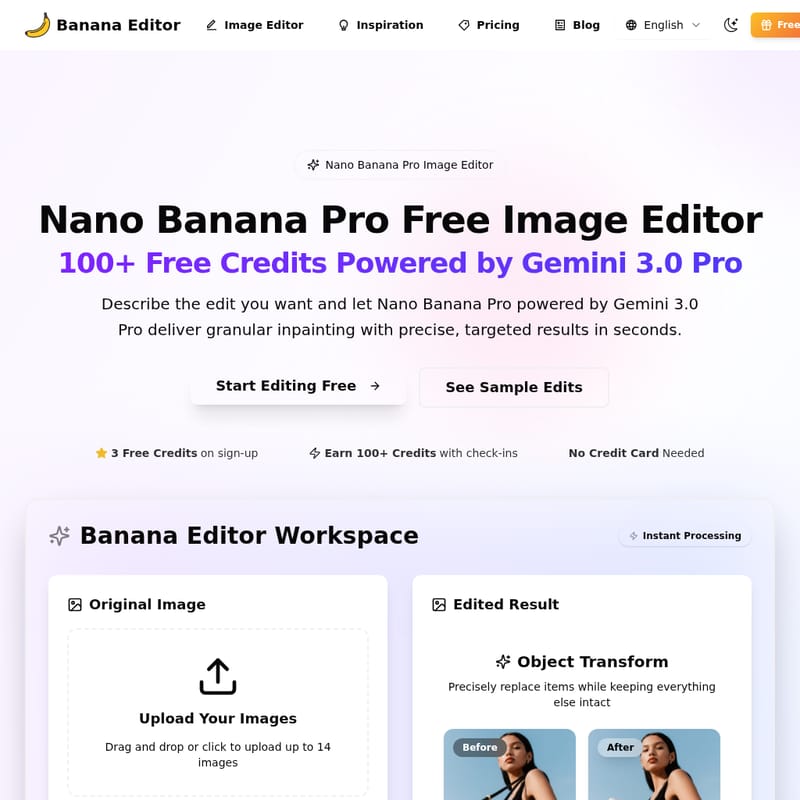
Nano Banana Pro Image Editor is an advanced AI-powered photo editing tool that offers granular inpainting, precise object transformation, and seamless background replacements for creators, brands, and film teams. With high-quality output and a user-friendly workspace, it simplifies professional-level editing for all industries.
2025-12-20
--K
Banana Editor Product Information
Nano Banana Pro Image Editor
What's Nano Banana Pro Image Editor
Nano Banana Pro Image Editor is a powerful AI-driven editing tool that leverages Gemini 3.0 Pro technology to deliver professional photo edits with granular inpainting and photorealistic results. Ideal for creators, brands, and production teams, this tool allows users to easily edit images, replace backgrounds, swap objects, and transform scenes with pixel-perfect precision. It’s the perfect solution for enhancing portraits, product photos, e-commerce visuals, and more.
Features
- Granular Inpainting: Achieve pixel-level detail in your edits, preserving the integrity of your original image.
- Advanced Object Transformation: Replace or adjust items in an image while keeping the surrounding elements intact.
- Background and Scene Swap: Effortlessly change backgrounds, add new props, or extend scenes for wide-angle compositions.
- AI-Powered Editing: Powered by Gemini 3.0 Pro, the editor ensures precision and speed for every transformation.
- High-Resolution Output: Download your edits in 1K, 2K, or 4K resolution, ensuring top-tier quality for any project.
Use Case
Nano Banana Pro Image Editor is designed to meet the needs of various industries, from e-commerce to film production. Here are a few use cases:
- E-commerce & Catalogs: Update product imagery, modify packaging, and create new color variations without additional samples.
- Social Media & Content Creation: Edit influencer photos, create social media content with easy background swaps, and adjust lighting for brand storytelling.
- Film & VFX: Create pre-visualizations, plan scenes with alternative camera angles, and add visual effects to your shots.
- Interior Design: Visualize redesigns by swapping furniture, changing materials, or extending rooms into panoramic shots.
FAQ
Q: How does Nano Banana Pro keep identities consistent? A: Using Gemini 3.0 Pro’s granular inpainting, the tool locks faces, products, and logos, ensuring that identity and brand details stay consistent throughout the editing process.
Q: Can I control what changes versus stays the same in my images? A: Yes, the editor provides prompt templates that allow you to specify areas to protect. Additionally, you can apply layer masks for even more control over your edits.
Q: Which edits does Nano Banana Pro handle best? A: It excels at portrait retouching, wardrobe swaps, background replacements, product relighting, interior redesigns, and VFX pre-visualization.
Q: Does quality degrade after multiple edits? A: No, the quality restore feature ensures that your image retains clarity, repairs edges, and removes any artifacts, even after multiple edits.
Q: Is Nano Banana Pro available for teams? A: Yes, you can invite team members, share prompt presets, and manage credit usage all within one workspace.
Q: What image formats are supported? A: Nano Banana Pro supports JPG, PNG, and WEBP formats, with a maximum file size of 10MB per image. Batch upload is also supported, allowing up to 14 images at once.