Artifacts by Databox
Databox AI: AI-Powered Performance Analytics and Automated Data Insights for Data-Driven Teams
Databox AI is a comprehensive AI-powered analytics platform designed to turn performance data into actionable decisions. Featuring Genie, an AI analyst, and MCP for tool integration, it enables teams to ask questions in plain language, generate performance summaries, and automate reporting across 130+ integrations like HubSpot and Salesforce.
2026-07-29
230.0K
Artifacts by Databox Product Information
Databox AI: The Future of AI-Powered Analytics and Performance Insights
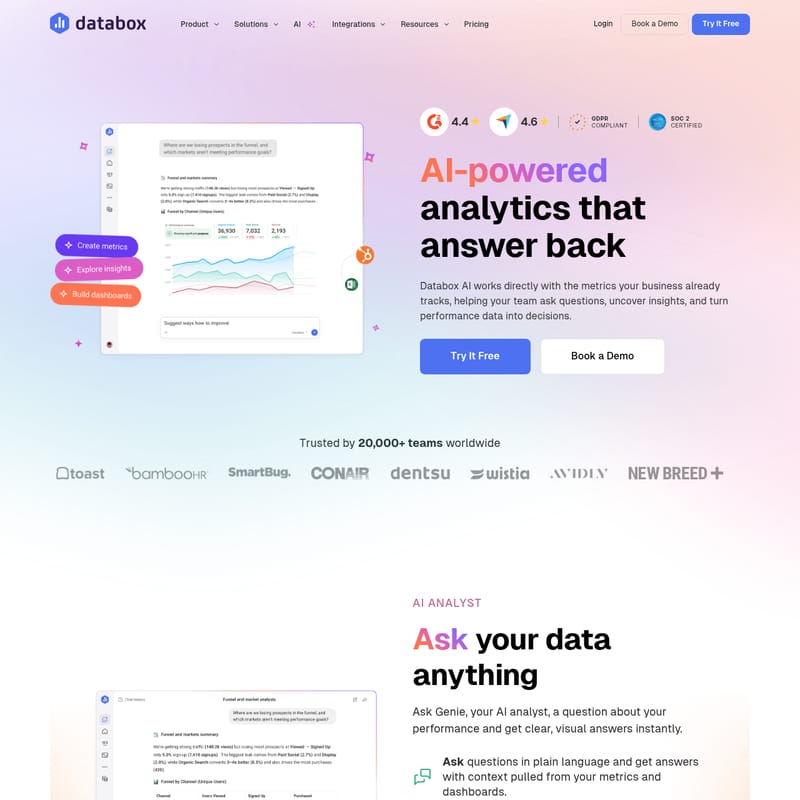
In today's fast-paced business environment, data is abundant, but actionable insights are often buried under layers of complex dashboards and spreadsheets. Databox AI changes the narrative by providing AI-powered analytics that answer back. By working directly with the metrics your business already tracks, Databox AI helps your team ask questions, uncover hidden insights, and turn raw performance data into strategic decisions. Trusted by over 20,000 teams worldwide, this platform is designed to make data analysis accessible, accurate, and immediate.
What is Databox AI?
Databox AI is a sophisticated suite of AI-powered tools integrated into the Databox platform, specifically engineered to help teams understand their business performance faster. Unlike standalone AI tools, Databox AI connects directly to your live data sources, allowing users to move beyond manual analysis. Whether you are an executive looking for a high-level overview or a business analyst diving into the weeds, Databox AI provides a centralized hub where your performance data is analyzed automatically, providing clarity on what happened, why it happened, and what to do next.
Key Features of Databox AI
Databox AI is built on several core components that work together to streamline the data analysis process.
Genie: Your Personal AI Analyst
Genie is the flagship AI analyst within the Databox AI ecosystem. It allows users to ask questions about their performance in plain language and receive clear, visual answers instantly.
- Ask Questions in Plain Language: No need for complex queries or coding; simply ask Genie about your metrics.
- Context-Rich Answers: Genie pulls context from your existing metrics and dashboards to provide relevant insights.
- Shareable Conversations: Use a simple link to share Genie’s insights and conversations with your entire team.
- Custom Business Logic: Soon, you will be able to teach Genie how your specific business works to ensure answers are highly tailored.
- Prompt-Based Creation: Use simple prompts to generate new dashboards, metrics, or goals on the fly.
Databox MCP: Integrate Performance Data with AI Tools
The Databox MCP (Model Context Protocol) bridge allows you to bring your performance data into the AI tools your team already utilizes, such as Claude, n8n, or ChatGPT. This enables a seamless workflow where you can:
- Analyze performance directly within your preferred AI tool.
- Automate reports and updates so they run without manual intervention.
- Combine insights across your entire tech stack automatically.
- Give the whole team access to trusted, unified insights without switching platforms.
AI Performance Summaries
While traditional metrics show you what happened, AI Performance Summaries explain why. Databox AI automatically analyzes your data to generate summaries of the most critical changes.
- Understand Performance Changes: Quickly grasp the reasons behind shifts in your KPIs.
- Identify Trends: Spot growth opportunities and important trends before they pass.
- Actionable Recommendations: Receive data-driven advice on how to improve your performance.
- Faster Reporting: Prepare context-rich reports in a fraction of the time it takes to do so manually.
Data Preparation and Visualization Tools
AI is only as effective as the data it processes. Databox AI relies on a robust foundation of data management tools:
- Datasets: Create analysis-ready tables by merging and filtering data from multiple sources.
- Metric Builder: Define custom metrics with specific calculations and filters so AI answers are grounded in your unique business definitions.
- Dashboards: Visualize performance across your business, combining data from various sources into a single view.
Use Cases for Databox AI
Databox AI is versatile enough to support various functions across an organization:
For Executives and Functional Leaders
Executives can stay informed without digging through endless dashboards. By asking questions like "Why did revenue drop last month?", they receive a clear explanation of what changed and where the team should focus their efforts next. This ensures leadership meetings are focused on strategy rather than debating data accuracy.
Marketing and Ad Spend Optimization
Performance marketers can "sanity check" ad spend in minutes. By getting a month-to-date breakdown of spend across different platforms and channels, teams can walk into meetings prepared and confident in their budget allocations.
"We used Databox for client reporting for years and recently tested alternatives, but nothing came close. When we came back, Genie blew us away — AI-powered insights that actually make sense for marketers." — Benny Stapel, Performance Marketer at Unison
Sales and Pipeline Management
Sales teams can connect pipeline health with LinkedIn engagement to decide their next prospecting moves. By seeing deal volume and social engagement trends together, reps can expand their outreach with higher confidence and better timing.
How to Use Databox AI
Turning your data into decisions with Databox AI is a straightforward three-step process:
- Connect Your Data: Anywhere your data lives, you can bring it into Databox. Pull metrics from over 130+ integrations, including HubSpot, Salesforce, and Google Analytics. You can also track custom data via Spreadsheets, SQL databases, or cloud-based app APIs.
- Define Your Metrics: Use the Metric Builder to define the KPIs that matter most to your business. This ensures that the AI analysis is grounded in your actual business logic and definitions.
- Ask Questions and Generate Insights: Use Genie or AI Performance Summaries to explore your data. Ask questions, generate visual reports, and automate your workflows to keep your team aligned.
Frequently Asked Questions (FAQ)
What is Databox AI? Databox AI is a set of AI-powered tools—including Genie and MCP—that help teams understand business data faster through natural language questions and automated performance summaries.
How is Databox AI different from ChatGPT? Unlike generic LLMs, Databox AI works directly with your connected business data. It pulls insights from your actual metrics across 130+ integrations, ensuring every answer is accurate and grounded in real-time performance data.
Do I need SQL or technical skills to use Databox AI? No. Databox AI is designed specifically for non-technical users. You can ask questions in plain language, and the platform handles all the complex data analysis behind the scenes.
Is Databox AI accurate? Yes. Databox AI analyzes the standardized metrics you have already defined in your account. If the data required to answer a specific question is missing, the system will inform you rather than generating a guess.
Is my data secure? Databox AI is built with security in mind. The platform is GDPR compliant and SOC 2 certified, ensuring your business data is handled with the highest standards of privacy and security.
What integrations are supported? Databox supports over 130 integrations, including popular tools like HubSpot, Salesforce, Google Analytics, and various database/warehouse options via queries or API.