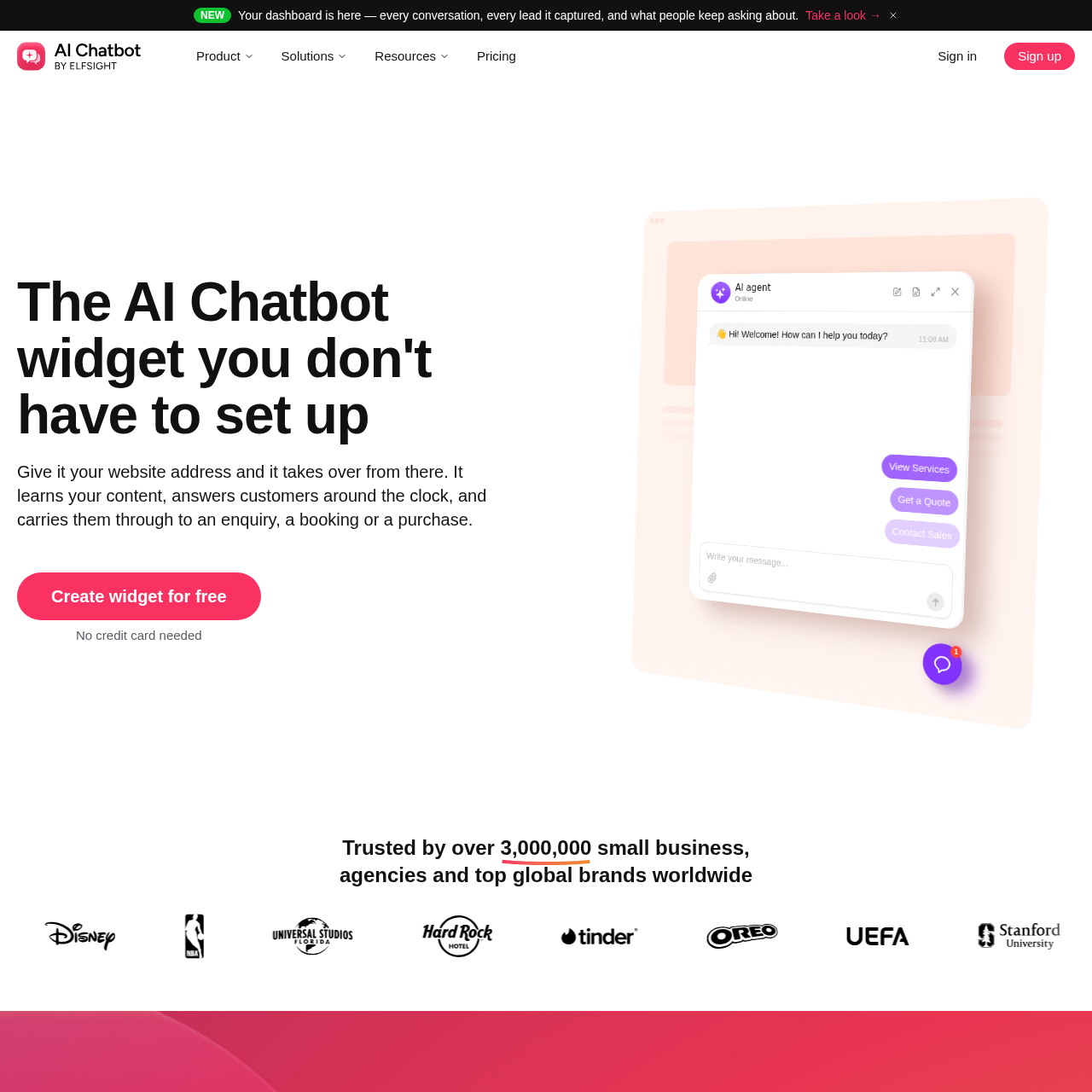
AI Chatbot by Elfsight is an automated website widget that ingests site content, files, and custom Q&A pairs to answer visitor queries, capture leads, and log unresolved questions without requiring complex flowcharts or staffed helpdesk inboxes.
Sales & MarketingAnswers visitor questions using only…Logs unanswered inquiries to a gap…Captures visitor contact details and…Presents contact cards featuring…ai chatbotautomate salesbook appointmentcustomer support
Listed on AIToolly
What Is AI Chatbot by Elfsight? Product Overview
What the product does and how it is positioned
AI Chatbot by Elfsight helps businesses automate sales and customer support on their website. It answers questions, captures leads, helps customers make buying decisions, and books appointments. No coding is required, and it works 24/7 with any CMS or website builder.
AI Chatbot by Elfsight is a no-code conversational widget designed for websites where inquiries must be resolved automatically rather than routed to a staffed helpdesk team. The system builds its knowledge base by scanning a submitted website URL and absorbing supplementary files, plain text, and curated question-and-answer entries.
The widget handles visitor conversations autonomously, capturing contact details and booking requests while logging interaction summaries and starting pages in an administrative dashboard. When presented with queries outside its source data, the agent declines to speculate, logs the gap for administrative review, and can display direct contact alternatives such as email, phone, or WhatsApp.
What Can You Use AI Chatbot by Elfsight For?
Source-supported ways to use the product
After-hours customer inquiry handling
Answers visitor questions regarding pricing, availability, and services outside normal business operating hours.
Lead capture and qualification
Collects prospective client contact information and saves inquiry context alongside automatic conversation summaries.
Knowledge gap discovery
Tracks unanswered visitor queries in an administrative dashboard to identify missing content on the primary website.
How to Use AI Chatbot by Elfsight
The documented workflow, where available
1
Enter website address
Submit a website URL to allow the system to scan and ingest published site content into the agent knowledge base.
2
Configure agent rules and appearance
Add supplementary files or Q&A pairs, specify plain-text behavior guidelines and restricted topics, and adjust widget styling.
3
Embed widget on site
Paste the provided embed code into the website builder settings or site HTML without backend development.
Knowledge Ingestion and Boundary Handling
The system is architected to draw responses strictly from supplied business content rather than generalized external training data. Administrators populate the knowledge base by providing a website address, uploading reference files, or entering targeted question-and-answer pairs and text blocks. When the agent cannot find an answer within those sources, it explicitly informs the customer rather than generating unverified assumptions.
Unresolved customer questions are logged to a central gaps list accompanied by the conversation transcript. Administrators can resolve these gaps by adding missing details directly to the knowledge repository. In addition, conversational behavior and boundary restrictions are established through plain-language directives, allowing site owners to forbid specific conversation topics or dictate when to request contact details.
Restricts responses strictly to supplied site pages, uploaded files, and custom Q&A pairs
Logs unanswered customer questions with transcripts to an administrative gaps list
Permits direct contact options via WhatsApp, call, or email buttons when information is missing
Controls response boundaries and off-limit topics using plain-sentence instructions
AI Chatbot by Elfsight Pricing
Human-maintained commercial information
subscriptionfreemium
USD 5/month
Pricing can change. Confirm the current plan and billing terms on the official site before purchasing.
What to Test Before Choosing AI Chatbot by Elfsight
Checks to run with your own material and workflow
Confirm that the agent answers queries accurately using only content extracted from the provided website URL and files.
Verify that queries outside the knowledge base are systematically logged to the gaps dashboard with full transcripts.
Check that plain-text rules effectively prevent the agent from quoting prohibited prices or discussing excluded topics.
Review the embed process on the target website builder to ensure the widget renders correctly without styling conflicts.
Answers based on the source-checked product record
How does the AI chatbot gather knowledge about a business?+
The chatbot extracts data directly from a submitted website address, which can be supplemented with uploaded files, plain-text blocks, and manual question-and-answer pairs.
What happens when the chatbot cannot answer a visitor's question?+
The agent informs the visitor that it lacks the answer, logs the unresolved query in a gaps dashboard with the transcript attached, and can present a direct contact card.
Does installing or configuring the chatbot require technical coding skills?+
No technical coding is needed, as styling is managed via a visual editor and installation is completed by pasting a single code snippet into site settings.
Can site owners restrict the topics that the chatbot is allowed to discuss?+
Yes, site owners can establish behavioral rules, define tone, and designate prohibited subjects using plain-text sentences rather than visual flowcharts.
What information is tracked in the chatbot results dashboard?+
The dashboard displays full conversation transcripts, automated interaction summaries, the origin webpage for each session, captured lead details, and logged knowledge gaps.
More Sales & Marketing AI tools
Explore other recently added tools in the same category.