
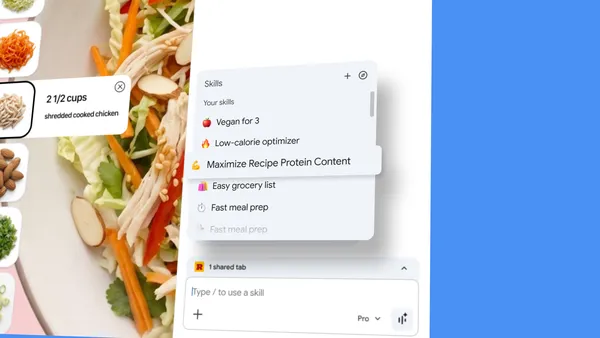
Google Introduces Skills in Chrome: Transforming AI Prompts into One-Click Workflow Tools
Google has announced a new feature for its Chrome browser titled 'Skills,' designed to streamline how users interact with artificial intelligence. This update allows users to discover, save, and remix AI workflows, effectively turning complex prompts into instant, one-click tools. By enabling the repetition of AI-driven tasks, Google aims to enhance productivity and accessibility within the browser environment. The feature focuses on the democratization of AI prompt engineering, allowing users to not only create their own shortcuts but also build upon existing workflows. This development marks a significant step in integrating generative AI capabilities directly into the daily browsing experience, making sophisticated AI interactions more efficient for the average user.
Key Takeaways
- One-Click Efficiency: Chrome users can now convert their most effective AI prompts into instant, repeatable tools.
- Workflow Customization: The 'Skills' feature allows for the discovery, saving, and remixing of AI-driven workflows.
- Seamless Integration: AI capabilities are being embedded directly into the Chrome browser interface for immediate access.
- Productivity Boost: By automating repetitive AI tasks, the feature aims to save time and simplify complex digital interactions.
In-Depth Analysis
Revolutionizing Prompt Management with Skills
Google's introduction of 'Skills' in Chrome represents a shift from manual prompt entry to automated workflow management. Traditionally, users interacting with AI models had to manually input or copy-paste prompts to achieve specific results. With this new update, Chrome provides a structured environment where these prompts are treated as functional tools. Users can now 'save' their successful interactions, ensuring that a high-quality prompt used for data analysis, creative writing, or coding can be triggered again with a single click. This transition from ephemeral chat sessions to persistent 'Skills' suggests a more utility-focused approach to consumer AI.
Discover, Save, and Remix: The Collaborative AI Ecosystem
The functionality of Skills goes beyond simple bookmarking. By allowing users to 'discover' and 'remix' workflows, Google is fostering a community-driven approach to AI productivity. Users are not limited to their own creations; they can explore workflows developed by others and adapt them to suit their specific needs. This 'remixing' capability is particularly significant as it lowers the barrier to entry for effective prompt engineering. It allows less experienced users to leverage the expertise of power users, modifying existing templates to achieve professional-grade AI outputs without needing to master complex prompt structures from scratch.
Industry Impact
The launch of Skills in Chrome has significant implications for the broader AI and browser industries. By making AI workflows 'one-click' and 'repeatable,' Google is positioning the browser as an active productivity hub rather than a passive window to the web. This move likely sets a new standard for how web browsers integrate generative AI, forcing competitors to move beyond simple sidebar chatbots toward more integrated, functional automation tools. Furthermore, by enabling the saving and remixing of prompts, Google is essentially creating a repository of AI utility that could centralize user loyalty within the Chrome ecosystem, making the browser an indispensable part of the AI-powered professional toolkit.
Frequently Asked Questions
Question: What are 'Skills' in Google Chrome?
Skills are a new feature in Chrome that allow users to turn AI prompts into one-click tools. They enable users to discover, save, and remix AI workflows for instant repetition.
Question: Can I modify existing AI workflows in Chrome?
Yes, the feature specifically allows users to 'remix' workflows, meaning you can take an existing AI skill and adapt it to better fit your specific requirements.
Question: How does this feature improve productivity?
It eliminates the need to repeatedly type or search for complex prompts. By saving these as one-click tools, users can execute sophisticated AI tasks instantly within their browsing session.
