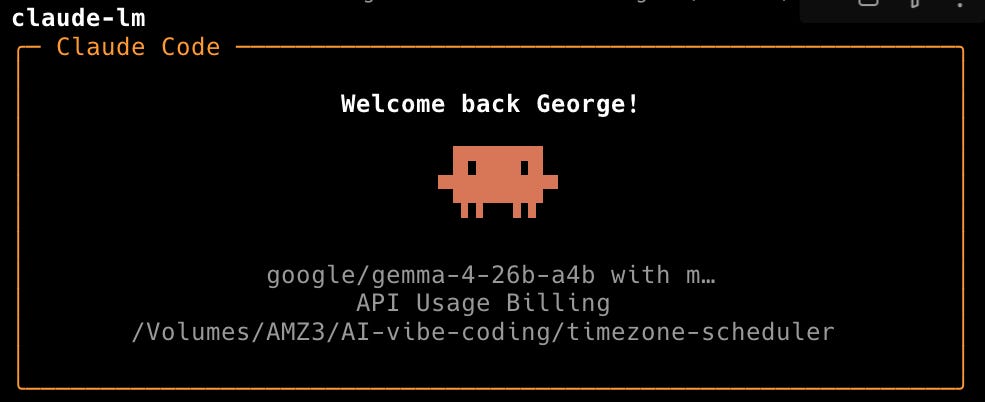
Running Google Gemma 4 Locally Using LM Studio Headless CLI and Claude Code Integration
The release of LM Studio 0.4.0 has introduced the 'lms' CLI and 'llmster', enabling users to run Google’s Gemma 4 26B model locally on macOS. This setup offers a privacy-focused, cost-effective alternative to cloud APIs, particularly for tasks like code reviews and prompt testing. The Gemma 4 26B model utilizes a Mixture-of-Experts (MoE) architecture, activating only 4B parameters per forward pass, which allows it to run efficiently on consumer hardware like the MacBook Pro M4 Pro. While the model achieves high performance, reaching 51 tokens per second on specific hardware, users have noted performance slowdowns when integrating the local model with Claude Code. This development highlights the growing feasibility of high-parameter local inference for developers.
Key Takeaways
- LM Studio 0.4.0 Update: Introduces the new headless CLI (
lms) andllmster, facilitating easier local model management and serving. - Gemma 4 Architecture: The 26B-A4B model uses a Mixture-of-Experts (MoE) design with 128 experts, activating only 3.8B parameters per token to balance performance and hardware requirements.
- Local Hardware Performance: On a MacBook Pro M4 Pro (48GB RAM), the model achieves 51 tokens per second, though integration with Claude Code may cause slowdowns.
- Privacy and Cost Benefits: Local execution eliminates API usage costs, bypasses rate limits, and ensures data privacy by keeping all processing on the local machine.
In-Depth Analysis
The Shift to Headless Local Inference
With the release of LM Studio 0.4.0, the introduction of the lms CLI and llmster marks a significant shift toward headless local inference. This allows developers to serve models like Google’s Gemma 4 via an API that can be consumed by other tools, such as Claude Code, using alias commands like claude-lm. By moving away from a purely GUI-based interaction, LM Studio enables a more integrated developer workflow where local LLMs can act as drop-in replacements for cloud-based services. This setup is particularly advantageous for repetitive tasks such as code reviews or drafting, where network latency and API costs typically accumulate.
Gemma 4: Efficiency Through Mixture-of-Experts
Google’s Gemma 4 family introduces several variants, but the 26B-A4B model stands out for local deployment due to its Mixture-of-Experts (MoE) architecture. While the model has a total of 26 billion parameters, it only activates 8 experts (approximately 3.8B parameters) per forward pass. This architectural choice allows the model to run on hardware that would otherwise struggle with a dense 26B parameter model. The lineup also includes "E" models (E2B, E4B) featuring Per-Layer Embeddings for on-device optimization and audio support, as well as a high-performance 31B dense model that scores 85.2% on MMLU Pro.
Hardware Benchmarks and Integration Challenges
Practical testing on a 14” MacBook Pro M4 Pro with 48 GB of unified memory demonstrates the efficiency of the MoE approach, yielding a generation speed of 51 tokens per second. However, the transition from standalone inference to integrated tool use reveals current limitations. When used within the Claude Code environment, users have reported significant slowdowns. Despite these performance bottlenecks in specific integrations, the ability to run a model of this caliber locally represents a major step forward for independent developers seeking to avoid the constraints of cloud-based AI providers.
Industry Impact
The ability to run Google's Gemma 4 locally via tools like LM Studio signals a maturing ecosystem for on-device AI. By reducing the barrier to entry for high-parameter models through MoE architecture, the industry is moving toward a hybrid model where developers can choose between the raw power of cloud APIs and the privacy/cost-efficiency of local hardware. This trend empowers developers to maintain control over their data and workflows, potentially reducing the dominance of centralized AI providers for standard development tasks.
Frequently Asked Questions
Question: What are the main advantages of running Gemma 4 locally compared to using cloud APIs?
Running models locally provides zero API costs, eliminates data privacy concerns as no information leaves the machine, bypasses rate limits, and ensures consistent availability regardless of network connectivity.
Question: How does the Mixture-of-Experts (MoE) architecture benefit local hardware?
The MoE architecture in the Gemma 4 26B model allows it to activate only a fraction of its total parameters (about 4B) during each pass. This means it requires less computational power than a dense model of the same size, allowing it to run smoothly on hardware like a MacBook Pro.
Question: What new features were introduced in LM Studio 0.4.0?
LM Studio 0.4.0 introduced the lms CLI and llmster, which allow for headless operation and the ability to serve local models via an API for use with external tools like Claude Code.