Project Sistine: How Researchers Transformed a MacBook Into a Touchscreen Using $1 of Hardware
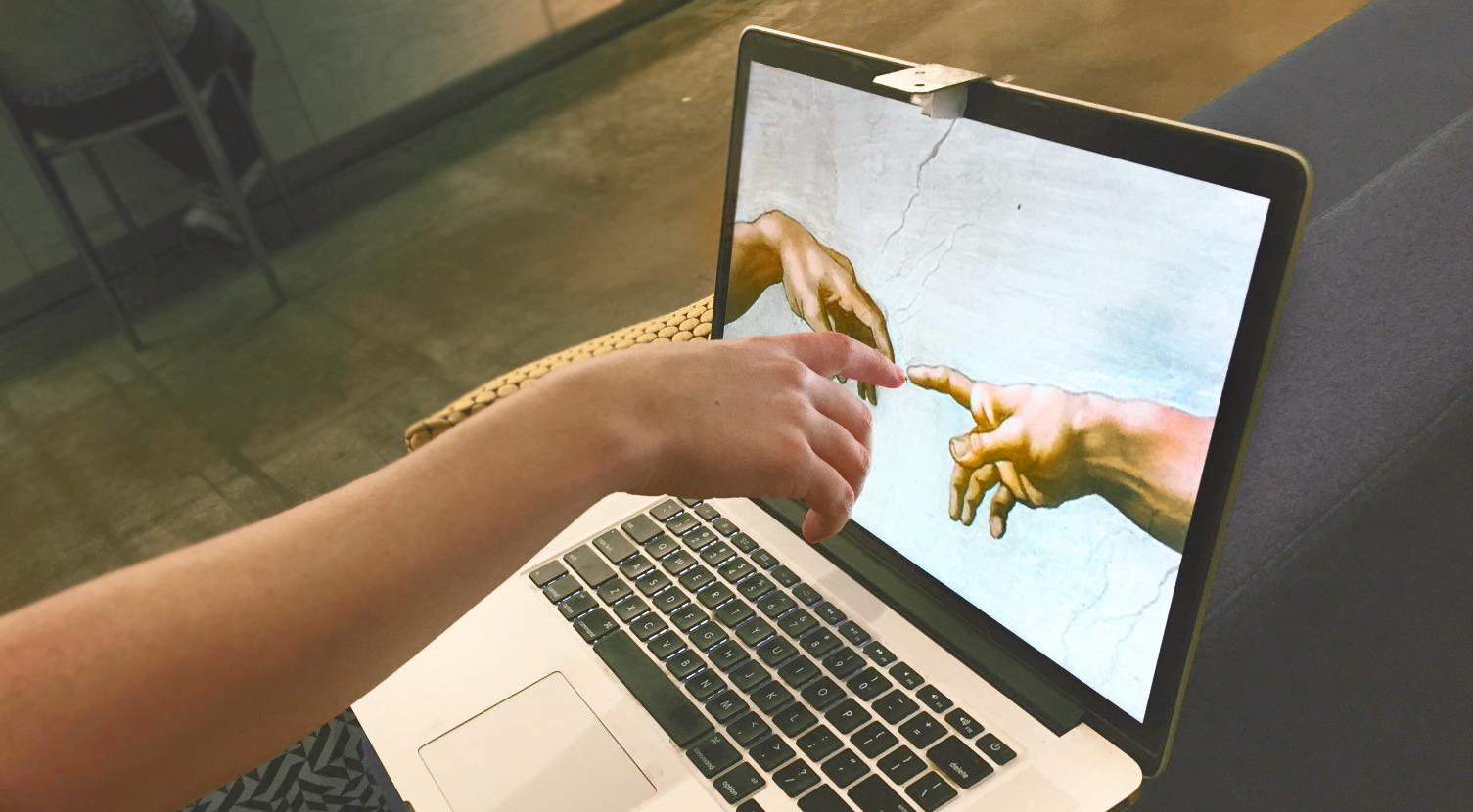
A team of researchers, including Anish Athalye, Kevin, Guillermo, and Logan, developed a proof-of-concept system called "Project Sistine" that adds touchscreen functionality to a MacBook for approximately $1. By utilizing a simple mirror setup and computer vision, the system detects finger movements and reflections on the screen. The project, completed in just 16 hours, leverages the optical phenomenon where surfaces viewed at an angle appear shiny, allowing the software to identify a touch event when a finger meets its own reflection. Using a bill of materials consisting of a small mirror, a paper plate, a door hinge, and hot glue, the team successfully miniaturized the concept of 'ShinyTouch' to work with a laptop's built-in webcam.
Key Takeaways
- Low-Cost Innovation: Project Sistine enables touchscreen capabilities on a MacBook using only $1 worth of hardware components.
- Optical Principle: The system works by detecting the intersection of a finger and its reflection on the glossy screen surface.
- Hardware Setup: The physical prototype consists of a small mirror, a rigid paper plate, a door hinge, and hot glue, designed to angle the built-in webcam toward the screen.
- Rapid Prototyping: The entire proof-of-concept was built and programmed in approximately 16 hours.
- Computer Vision Pipeline: The software uses classical computer vision techniques, including skin color filtering and contour detection, to translate video feeds into touch events.
In-Depth Analysis
The Physics of Reflection: The ShinyTouch Foundation
The core logic of Project Sistine is rooted in an observation made by team member Kevin during middle school, which led to the creation of "ShinyTouch." The principle relies on the fact that laptop screens, when viewed from a sharp angle, act as reflective surfaces. By monitoring the gap between a physical finger and its reflected image, the system can determine the exact moment of contact. When the finger and the reflection touch, a 'touch event' is triggered. While the original ShinyTouch required an external webcam, Project Sistine successfully miniaturized this concept to utilize the MacBook’s integrated camera.
Hardware Engineering and Assembly
To achieve the necessary viewing angle without external equipment, the team engineered a peripheral using common household items. The bill of materials included a small mirror, a rigid paper plate for structure, a door hinge for adjustability, and hot glue for assembly. This setup retrofits the mirror in front of the built-in webcam, redirecting its field of vision downward across the display. The final design was optimized for quick assembly, requiring only a knife and a hot glue gun to construct in a matter of minutes.
Software and Finger Detection Algorithms
Processing the visual data into functional input requires a multi-step computer vision pipeline. The system first captures the distorted view from the angled mirror and applies a filter for skin colors followed by a binary threshold. The algorithm then searches for contours within the frame. Specifically, it looks for the two largest contours that overlap horizontally, identifying the smaller contour (the finger) positioned above the larger one (the reflection). This classical computer vision approach allows the system to distinguish between a hovering finger and an active touch on the screen surface.
Industry Impact
Project Sistine demonstrates the potential for high-utility hardware modifications using minimal resources and clever software implementation. While modern MacBooks lack native touchscreens, this project highlights how computer vision can bridge the gap between traditional hardware and interactive user interfaces. It serves as a significant example of "frugal engineering" in the AI and vision space, proving that complex human-computer interaction (HCI) challenges can sometimes be solved with basic optical principles rather than expensive sensors or specialized hardware.
Frequently Asked Questions
Question: What hardware is required to turn a MacBook into a touchscreen?
According to the project details, you only need about $1 worth of materials: a small mirror, a rigid paper plate, a door hinge, and hot glue to position the mirror over the webcam.
Question: How does the software know when a finger touches the screen?
The system uses computer vision to look for the finger's reflection on the screen. When the finger and its reflection meet in the video feed, the algorithm registers a touch event.
Question: How long did it take to develop Project Sistine?
The proof-of-concept was prototyped by a team of four people in approximately 16 hours.