PinchBench
PinchBench: The Comprehensive OpenClaw Model Performance Benchmark and AI Agent Success Evaluation Tool
PinchBench is a specialized benchmarking platform designed to help users find the best AI models for OpenClaw. It provides real-time data on model success rates, speed, cost, and value through 608 runs across 50 distinct models. By evaluating Large Language Models (LLMs) via standardized agent tests, PinchBench allows developers and AI enthusiasts to compare industry leaders like Claude 4.6, GPT-5.4, and Qwen 3.5. The platform uses a mix of automated checks and LLM judging to ensure high-quality, transparent grading, making it the go-to resource for optimizing OpenClaw performance.
2026-03-28
45.0K
PinchBench Product Information
PinchBench: Finding the Best AI Model for Your OpenClaw
When developing or deploying AI agents, choosing the right underlying model is the most critical decision for performance. PinchBench serves as the definitive evaluation platform for OpenClaw, providing deep insights into how different Large Language Models (LLMs) perform across a variety of standardized agent tests. With a database covering 50 models and over 608 runs, PinchBench offers the transparency needed to select the perfect balance of quality, speed, and cost.
What's PinchBench?
PinchBench is an open-source benchmarking tool and data repository specifically tailored for OpenClaw. It evaluates the capabilities of AI models—ranging from proprietary giants to open-weight contenders—by measuring their success rate in completing complex tasks.
At its core, PinchBench answers the question: Which model will make my OpenClaw agent most effective? By utilizing automated checks and an LLM judge, the platform provides objective scores that help users navigate the rapidly evolving AI landscape. Whether you are looking for "Max Quality" or the "Best Value," PinchBench categorizes data to make your decision-making process seamless.
Key Features of PinchBench
PinchBench is packed with features designed for data-driven developers and AI researchers:
- Comprehensive Success Rate Tracking: View the percentage of tasks completed successfully across standardized OpenClaw agent tests.
- Multi-Dimensional Metrics: Beyond simple accuracy, PinchBench tracks Speed, Cost, and Value, giving you a 360-degree view of model efficiency.
- Extensive Model Comparison: The platform currently tracks 50 models including industry leaders like
anthropic/claude-opus-4.6,openai/gpt-5.4, andqwen/qwen3.5-27b. - Interactive Data Visualization: Use Graphs to visualize performance trends and find the statistical sweet spot for your specific use case.
- Budget Filtering: Use the custom budget filter to set a maximum dollar amount per run, ensuring your OpenClaw deployment remains cost-effective.
- Transparency and Open Source: All tasks and grading criteria used by PinchBench are open source, allowing users to verify the methodology on GitHub.
- Up-to-Date Results: The benchmark is frequently updated (latest update recorded 03/25/2026) to include the newest versions and unofficial runs.
PinchBench Performance Rankings
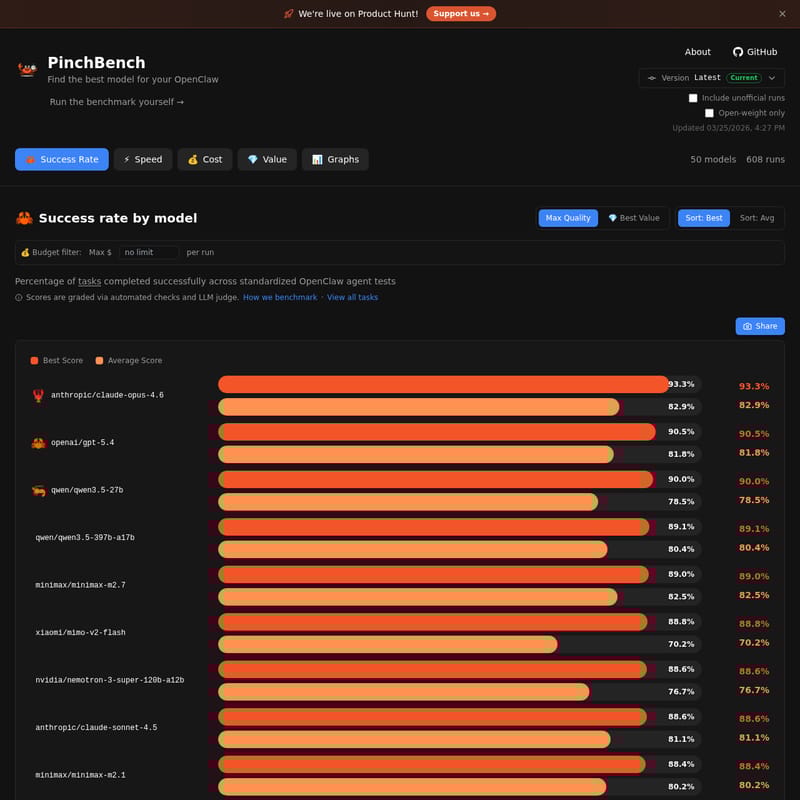
According to the latest PinchBench data, here are the top-performing models based on their success rates:
| Model | Provider | Best Score | Average Score | | :--- | :--- | :--- | :--- | | anthropic/claude-opus-4.6 | Anthropic | 93.3% | 82.9% | | openai/gpt-5.4 | OpenAI | 90.5% | 81.8% | | qwen/qwen3.5-27b | Qwen | 90.0% | 78.5% | | qwen/qwen3.5-397b-a17b | Qwen | 89.1% | 80.4% | | minimax/minimax-m2.7 | Minimax | 89.0% | 82.5% |
Use Case Scenarios for PinchBench
1. Optimizing Agent Reliability
If your OpenClaw implementation requires near-perfect task execution, you can use PinchBench to identify models with the highest "Max Quality" scores, such as Claude Opus 4.6, which maintains a leading 93.3% success rate.
2. Cost-Effective Scaling
For developers running high-volume tasks, PinchBench helps identify "Best Value" models. By filtering for lower costs per run while maintaining a high success rate, you can scale your operations without exceeding your budget.
3. Open-Weight Model Evaluation
PinchBench allows you to toggle "Open-weight only" results. This is ideal for users who prefer hosting their own models and need to know how models like Qwen 3.5 compare to proprietary alternatives from OpenAI or Anthropic.
How to Use PinchBench
Using PinchBench to optimize your AI agent is straightforward:
- Visit the PinchBench Dashboard: Navigate to the official site to see the latest benchmark runs.
- Filter Results: Use the toggle buttons to include or exclude unofficial runs and open-weight models.
- Sort by Priority: Use the "Sort" feature to organize models by "Best" (highest peak performance) or "Avg" (consistent performance).
- Set a Budget: Adjust the "Max $ per run" slider to find models that fit your financial constraints.
- Run the Benchmark Yourself: For custom needs, you can visit the GitHub repository to run the PinchBench suite on your own local models or private setups.
FAQ
Q: How are the scores in PinchBench calculated? A: Scores are graded via a combination of automated checks and an LLM judge to ensure that the task completion is both technically correct and qualitatively sound.
Q: What is OpenClaw? A: OpenClaw is the agent framework for which these benchmarks are designed. PinchBench specifically tests how models perform when acting as an agent within the OpenClaw ecosystem.
Q: Can I see the specific tasks used in the benchmark? A: Yes, you can click on "View all tasks" on the PinchBench platform to see the standardized tests used to evaluate each model.
Q: Who sponsors PinchBench? A: Hosting and inference costs for PinchBench are sponsored by Kilo, the provider of KiloClaw, which offers hosted OpenClaw personal AI agents starting from $8/month.
PinchBench: Snip snip — benchmarking one claw at a time. Made with 🦀 in Maryland and Amsterdam.