Kilo Code v7 for VS Code
Kilo Code: Rebuilt VS Code Extension with Parallel Agents and Multi-Model Comparison
Kilo Code is a powerful AI coding assistant for VS Code built on a portable open-source core. It features parallel execution, agent management, inline code reviews, and supports over 500 models for optimized development workflows.
2026-05-07
1000.0K
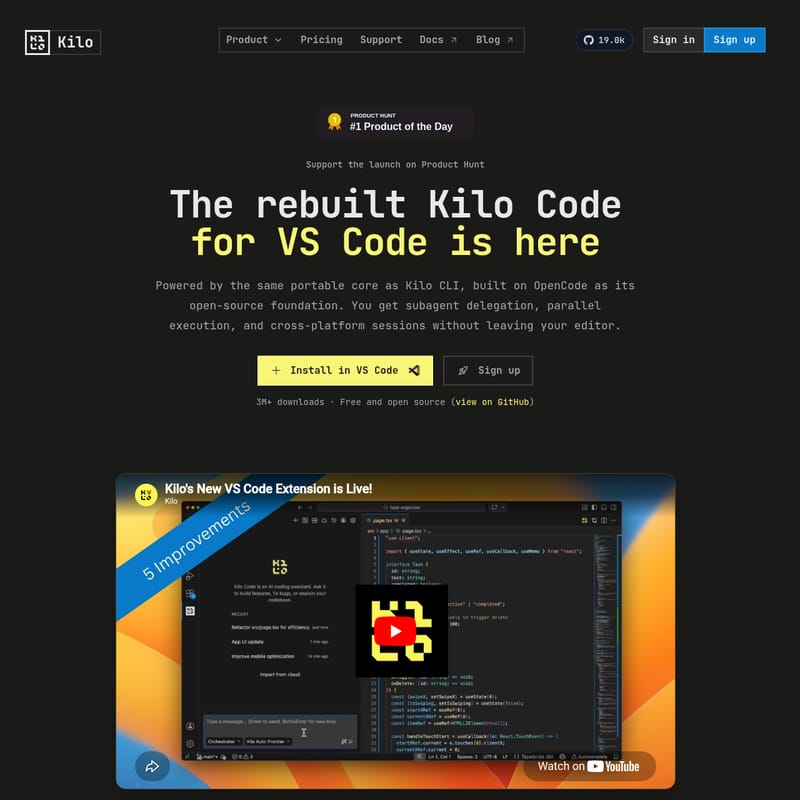
Kilo Code v7 for VS Code Product Information
Kilo Code: The Next Evolution of AI-Powered Development in VS Code
Kilo Code has officially been rebuilt to transform the way developers interact with AI agents. By leveraging the same portable core as the Kilo CLI, the new Kilo Code for VS Code provides a seamless, high-performance experience that allows for subagent delegation, parallel execution, and cross-platform session continuity without ever leaving your editor. With over 3 million downloads and an open-source foundation built on OpenCode, Kilo Code is established as a leading solution for developers who require speed, flexibility, and power.
What is Kilo Code?
Kilo Code is a sophisticated AI-powered extension for Visual Studio Code designed to function as a collaborative teammate rather than just a simple completion tool. At its heart, Kilo is built on a portable core that ensures consistency across different environments—whether you are working in the local terminal via the Kilo CLI, using JetBrains IDEs, or managing remote sessions through Kilo Cloud Agents.
As a free and open-source tool (available on GitHub), Kilo Code empowers developers to run multiple AI agents simultaneously, manage complex tasks through a unified interface, and maintain full control over their code through integrated review systems. The rebuilt version of Kilo Code isn't just an update; it is an overhaul that integrates native worktrees and parallel processing directly into the VS Code workflow.
Key Features of Kilo Code
Parallel Execution: Faster Thinking, Faster Working
One of the standout capabilities of Kilo Code is its ability to perform parallel execution. Unlike traditional agents that process tasks sequentially, Kilo features:
- Parallel Tool Calls: Kilo Code can perform file reads, searches, and terminal commands at the same time, significantly reducing the time an agent spends waiting for processes to complete.
- Parallel Subagents: Break down a massive task into specialized components. Kilo can assign implementation, testing, and documentation to separate specialist subagents, merging their work back into a single, high-quality result.
- Custom Subagents: Users can define specific roles for their agents, ensuring the AI aligns perfectly with the team's unique shipping standards and software architecture.
Advanced Agent Manager
The Kilo Agent Manager provides a central interface for every agent session. Because it shares the same core as the Kilo CLI, capabilities like worktrees and inline reviews are native features. The manager includes:
- Session Tabs: Designed for rapid context switching, these tabs allow you to monitor multiple agents and jump between tasks without losing the thread of the conversation.
- Foundation Sync: Improvements made to the Kilo core naturally land in the Agent Manager, ensuring you always have access to the latest AI capabilities.
Native Inline Code Review
Reviewing AI-generated code should be as rigorous as reviewing a human teammate's work. Kilo Code facilitates this through an integrated review system:
- Built-in Diff Reviewer: Inspect every edit file-by-file using unified or split views.
- Line-Level Comments: Just like a standard PR, you can comment on specific lines of code produced by the Kilo agent.
- Structured Feedback: When you send comments back to the chat, Kilo Code automatically includes the file path, line number, and relevant code context so the next response is perfectly grounded.
Git Worktrees for Maximum Isolation
Kilo Code utilizes git worktrees to allow parallel agents to work without interfering with one another.
- One-Click Branching: Create a new worktree in a subdirectory with a single click, giving each Kilo agent its own copy of the repository.
- Flexible Merging: Once a task is complete, you can bring the results back via a direct apply, a commit, or a formal Pull Request.
- Read-Heavy Collaboration: If agents need to work together (e.g., one coding and one reviewing), they can share the same worktree while remaining effective.
Multi-Model Comparison and Side-by-Side Analysis
Kilo Code eliminates model lock-in by supporting over 500 models.
- Real Task Comparisons: Instead of relying on static benchmarks, you can run prompts through Claude, GPT, Gemini, and others simultaneously to see how they handle your specific codebase.
- Flexible Integration: Kilo supports hosted models, local models, and Bring Your Own Key (BYOK) configurations.
Use Cases for Kilo Code
Kilo Code is designed for a variety of professional development scenarios:
- Complex Refactoring: Use the Kilo parallel execution engine to refactor large modules while a subagent simultaneously updates the corresponding unit tests.
- Cross-Platform Development: Start a task over an SSH session using the Kilo CLI and seamlessly pick it up later in VS Code without losing context, thanks to cross-platform session continuity.
- Team Collaboration via Slack: Bring a Kilo session into Slack to provide visibility to teammates or to get quick feedback on an agent's progress.
- Enterprise-Level Security: For teams in regulated environments, Kilo Code provides SOC 2 Type I compliance, enterprise SLAs, audit logs, and model governance frameworks.
How to Use Kilo Code
Getting started with Kilo Code is a straightforward process designed to get you into a parallel workflow as quickly as possible.
- Installation: Search for "Kilo Code" in the VS Code extensions view or visit the Visual Studio Marketplace to install the extension.
- Configuration: Configure your preferred model providers. Kilo supports over 500 models, including hosted and local options.
- Initiating Agents: Open the Kilo Agent Manager to start a new session.
- Going Parallel: Use the plus button to spin up new tabs for different agents. If you need isolation, utilize the worktree feature to give an agent its own repository subdirectory.
- Review and Merge: Use the inline code review tools to inspect changes, leave comments for the Kilo agent, and merge the final code into your main branch.
Frequently Asked Questions
What changed in the rebuilt VS Code extension? The rebuilt Kilo Code extension now uses the same portable core as the Kilo CLI. This allows for native features like parallel subagents, worktrees, and better session continuity across different platforms.
Is Kilo Code production-ready? Yes. Kilo Code is trusted by developers at innovative companies and is SOC 2 Type I compliant, making it suitable for enterprise-grade environments.
Does it still support 500+ models? Absolutely. Kilo Code maintains its commitment to flexibility, allowing you to use hosted models, local models, or BYOK setups across a vast range of providers including Claude, GPT, and Gemini.
Is Kilo Code still free and open source? Yes, Kilo Code remains free and open source. You can view the source code and track development on their official GitHub repository.
Where should I send feedback? The Kilo team actively collects feedback, bugs, and edge cases in their Discord community, specifically within the #vscode channel.