QApilot's CoWork
CoWork: AI-Powered Mobile Test Automation to Activate Existing Test Cases
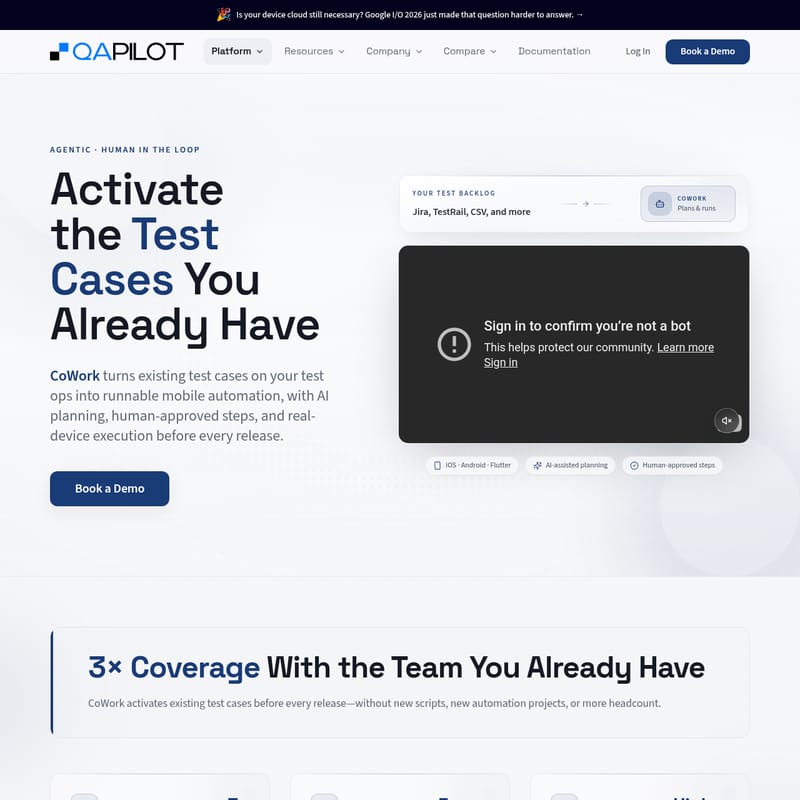
CoWork by QApilot is an agentic, human-in-the-loop platform that turns existing test cases from Jira and TestRail into runnable mobile automation for iOS, Android, and Flutter on real devices.
2026-06-29
--K
QApilot's CoWork Product Information
CoWork: Activating Existing Test Cases with AI-Powered Mobile Automation
In the fast-paced world of mobile application development, keeping up with quality assurance can be a daunting challenge. Every new release introduces fresh features, complex user journeys, and a growing list of edge cases. Often, execution capacity remains static while the test backlog grows, leading to significant coverage gaps. CoWork is designed to bridge this gap by transforming the assets you already have into high-performance mobile automation.
As an agentic, human-in-the-loop platform, CoWork allows teams to activate their existing test cases—stored in tools like Jira or TestRail—into runnable automation. By leveraging AI planning and real-device execution, CoWork ensures your team achieves broader validation without the need for additional headcount or complex new scripting projects.
What is CoWork?
CoWork is an intelligent mobile automation platform that turns your existing test backlog into an active part of your release cycle. Instead of letting manual test cases sit idle in spreadsheets or management tools, CoWork "activates" them. It uses AI to plan and execute tests across iOS, Android, and Flutter applications on real devices.
What sets CoWork apart is its Agentic approach combined with Human in the Loop control. While the system acts autonomously to navigate mobile apps, it never operates in a vacuum. It seeks human approval for critical steps and transitions, ensuring that the original intent of the test case is always preserved. This results in 3x coverage using the team you already have, effectively shrinking the backlog of tests that rarely get run before a release.
Key Features of CoWork
CoWork is packed with features designed to modernize mobile app Quality Engineering (QE):
- AI-Assisted Planning: CoWork doesn't just follow a script; it builds an execution plan based on the natural language of your test cases.
- Human-Approved Steps: Maintain full control over the automation process. When the AI is uncertain or reaches a critical juncture, it requests human approval before proceeding.
- Real-Device Execution: Tests are run on actual hardware, providing the highest level of confidence in release readiness.
- Cross-Platform Support: Whether your app is built on iOS, Android, or Flutter, CoWork provides seamless automation capabilities.
- No-Script Automation: Transition from manual test cases to automated execution without writing a single line of code or starting a new automation project.
- Dynamic Replanning: If the application UI changes or an unexpected popup appears, CoWork proposes the next best action in real-time.
- Multi-Source Integration: Import your test data directly from Jira, TestRail, CSV files, and more.
How to Use CoWork
Implementing CoWork into your existing QA workflow is a streamlined process divided into five clear stages:
01. Import Existing Tests
Begin by connecting your current test management infrastructure. You can bring in test cases directly from Jira, TestRail, spreadsheets, or other management tools. CoWork is designed to work with the documentation your team has already created.
02. Build Execution Context
Once imported, CoWork converts natural-language test cases into a structured Behavior-Driven Development (BDD) context. The AI analyzes the text to understand:
- Exactly where the test should start.
- The specific actions that must occur.
- The precise outcomes that need to be validated.
03. Execute on Real Devices
With the context established, CoWork builds a comprehensive execution plan and begins running the test on real mobile devices. There is no need for manual scripting; the AI handles the navigation based on the context built in the previous step.
04. Replan When Reality Changes
Mobile environments are dynamic. If CoWork encounters an unexpected popup, a different screen layout, or a changed user flow, it doesn't simply fail. It proposes the next best action and waits for human approval before moving forward, ensuring the test stays on track.
05. Complete the Journey
If a test requires specific user input that cannot be automated (such as a unique code or specific decision), CoWork pauses. Once the human operator provides the necessary input, the execution resumes without losing any context, successfully completing the user journey.
Use Cases: Why Teams Choose CoWork
Shrinking the Test Backlog
Most QA teams suffer from "Coverage Gaps" where the number of tests grows faster than the time available to run them. Every release adds more scenarios, but execution capacity often stays the same. CoWork changes this dynamic by moving tests from sitting in Jira to being runnable mobile automation.
Increasing Release Confidence
By executing more scenarios across a broader range of real devices, teams can ship with higher confidence. CoWork helps move from manual execution bottlenecks to AI-assisted execution, ensuring that even edge cases and postponed tests are validated before the product reaches the user.
Empowering the Existing QA Team
CoWork is built for the team you already have. It allows Quality Assurance Engineers, QE Leaders, and Release Managers to scale their efforts without needing to hire more headcount. By automating the "manual" backlog, the team can focus on higher-level quality strategy.
Handling Complex Mobile Environments
Unlike web-first tools, CoWork is specifically built for real mobile applications. It excels at managing dynamic content, interruptions, and the unique nuances of the mobile user experience across various platforms like Flutter and native iOS/Android.
"Instead of creating new automation from scratch, CoWork starts with the tests you already have, turning manual bottlenecks into AI-assisted release validation."
Frequently Asked Questions (FAQ)
Q: What platforms does CoWork support? A: CoWork provides robust support for iOS, Android, and Flutter applications.
Q: Do I need to write new scripts to use CoWork? A: No. CoWork is designed to activate the test cases you already have without requiring new scripts, new automation projects, or additional headcount.
Q: Which tools can I import test cases from? A: You can import tests from Jira, TestRail, CSV files, and various other test management spreadsheets.
Q: How does CoWork handle unexpected changes in the app UI? A: CoWork features an AI replanning mechanism. If it encounters a change, it will propose the next best action and request human approval before continuing.
Q: Does CoWork run on emulators? A: CoWork focuses on real-device execution to ensure the highest level of validation and confidence for your mobile app releases.
Q: Is the human still in control of the automation? A: Yes. CoWork is a "Human in the Loop" platform. It acts autonomously but never silently changes the intent of a test; it asks for approval whenever uncertainty arises or user input is required.