Kodo
Kodo AI Design Tool: Create Professional Posters and Presentations with AI
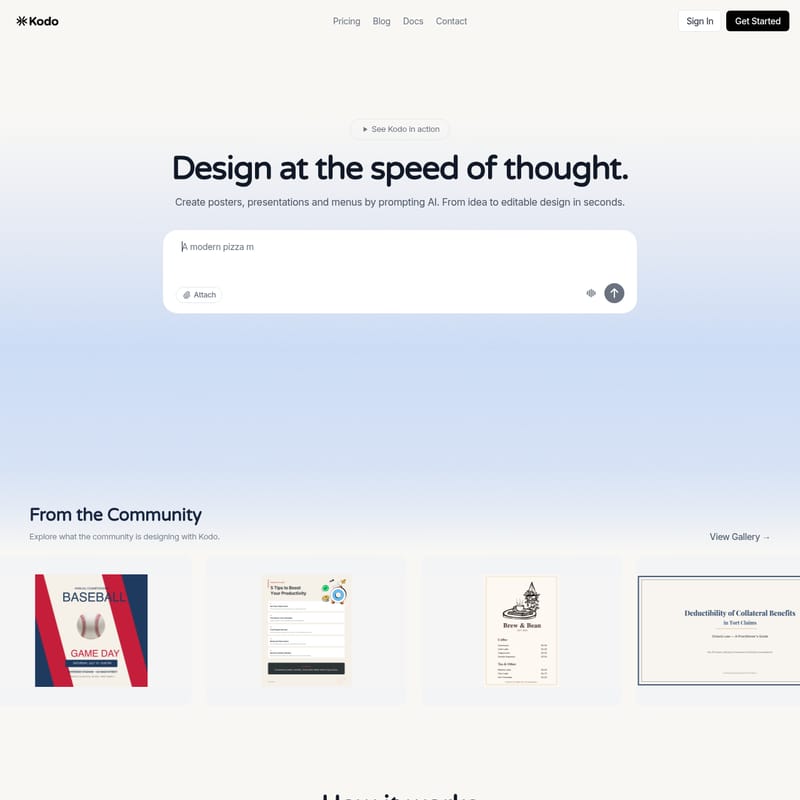
Kodo is the best AI design tool and a professional alternative to Figma and Canva, allowing users to create posters, presentations, and menus at the speed of thought. By simply prompting the AI, you can transform ideas into editable vector designs in seconds. Kodo offers a comprehensive suite of professional design tools, real-time collaboration features, and various export options, making it ideal for both beginners and design experts.
2026-03-06
80.0K
Kodo Product Information
Kodo: The Best AI Design Tool for Professional Graphics
Kodo is revolutionizing the creative industry by allowing users to design at the speed of thought. As the best AI design tool and a professional alternative to platforms like Figma and Canva, Kodo enables you to create posters, presentations, and menus by simply prompting AI. Whether you are a professional designer or a beginner, Kodo helps you move from a raw idea to a fully editable design in seconds.
What's Kodo?
Kodo is an AI-powered design platform that bridges the gap between imagination and execution. It serves as a comprehensive AI design tool that provides both automated generation and professional vector editing capabilities. Unlike traditional software that requires steep learning curves, Kodo allows you to generate complete, polished designs through simple text descriptions.
Kodo is more than just an automated generator; it is a collaborative environment featuring real-time collaboration for teams. It is a free design software that offers premium tiers for high-volume users, ensuring that anyone can access high-quality design resources for social media graphics, business menus, and more.
Features of Kodo
Kodo is packed with powerful features designed to streamline your creative workflow:
- AI-Powered Design Generation: Use natural language prompts to create professional-grade layouts instantly.
- Professional Vector Editing: Gain full control over your creations with manual tools that are always free to use.
- Real-Time Collaboration: Work with your team in real-time on posters, presentations, and social media assets.
- Background Removal: Quickly clean up images with built-in AI background removal tools.
- Stock Photo Library: Access thousands of high-quality stock photos directly within the platform.
- Brand Kit: Maintain brand consistency by saving your colors, fonts, and logos (available in Starter and Pro plans).
- Versatile Export Options: Export your work in all formats, including watermark-free options for paid subscribers.
- No Design Experience Needed: The intuitive interface makes it easy for anyone to produce professional results.
How to Use Kodo
Creating with the Kodo AI design tool is a simple three-step process:
-
Describe Your Design
Tell Kodo what you want to create. Type a simple description like "coffee shop menu" or "birthday invitation" and watch your design come to life through the power of AI. -
Get Your Design
In seconds, Kodo creates a complete, polished design with all the elements you need. Everything is generated to be ready for immediate use. -
Refine and Export
Make any changes you want using the manual tools. You can add your own touches or refine the AI-generated elements. Once satisfied, export your fully editable design to share it with the world.
Use Case Scenarios
Kodo is a versatile AI design tool suitable for various industries and personal projects:
- Small Businesses: Create professional menus, flyers, and business cards without hiring an expensive agency.
- Marketing Teams: Quickly generate social media graphics and promotional posters for upcoming campaigns.
- Educators and Students: Design engaging presentations and infographics to simplify complex information.
- Event Planners: Craft beautiful invitations and event posters in minutes.
- Content Creators: Produce high-quality visuals for blogs and social platforms to increase engagement.
Pricing Plans
Kodo offers flexible pricing to suit every user's needs. Note that Kodo credits are used for AI design generation (3-9 credits per design), while manual tools are always free.
- Free ($0/month): Includes 40 Kodo credits/month, 10 projects, 3 background removals, and 20 stock photos. Exports include a watermark.
- Starter ($9/month): Includes 170 Kodo credits/month, 50 projects, 40 background removals, 100 stock photos, Brand Kit, and watermark-free exports.
- Pro ($29/month): Includes 600 Kodo credits/month, unlimited projects, 200 background removals, unlimited stock photos, Brand Kit, and priority support.
FAQ
What is Kodo and how does it work?
Kodo is an AI-powered design tool that lets you create professional designs just by describing what you want. By typing a prompt, Kodo generates a complete, editable design in seconds that you can further refine with professional tools.
How do credits and pricing work?
Kodo credits power AI features like design generation. Each design costs between 3-9 credits. We offer Free, Starter, and Pro plans to provide different levels of credit access and features.
What can I create with Kodo?
Anything visual! You can create posters, presentations, social media graphics, menus, flyers, business cards, invitations, infographics, and more.
How long does generation take?
Most designs are generated in 1-2 minutes. Complex designs may take slightly longer, and a progress indicator will keep you updated.
Who owns the generated designs?
You own all designs you create with Kodo. You can use them for personal or commercial purposes without restrictions.
How do I get help?
You can reach out via email at [email protected], check the official documentation, or book a demo to see Kodo in action.