Funy AI
Funy AI: All-in-One AI Video and Image Generation Platform
Funy AI is a comprehensive, no-signup-required AI platform specializing in Image to Video and Text to Video generation. It offers advanced AI tools like AI Kissing, AI Hairstyle Changer, and AI Art generation with unrestricted and unlimited access, allowing users to transform text and static images into high-quality videos and art instantly.
2026-01-08
--K
Funy AI Product Information
Funy AI: Transform Creativity with Powerful AI Video and Image Tools
Funy AI is your all-in-one platform for professional-grade video creation and image editing. Whether you are looking for Image to Video, Text to Video, or advanced AI image generation, Funy AI provides a seamless, no-signup experience to bring your digital visions to life. From romantic animations like the AI Kissing Video Generator to functional tools like AI Background Removal, Funy AI serves as a versatile creative hub for users worldwide.
What's Funy AI?
Funy AI is a cutting-edge artificial intelligence platform designed to simplify the process of content creation. It serves as a comprehensive suite of tools where users can generate high-quality videos from static images or simple text prompts. Unlike many other platforms, Funy AI allows users to dive straight into creativity without the hurdle of account registration. It is a robust alternative to industry leaders, offering an image to video AI free, uncensored, and unrestricted environment for both personal and professional use.
Key Features of Funy AI
Funy AI is packed with features that leverage AI-powered precision to deliver stunning results across various formats.
1. Image to Video AI Free Online
Unleash the power of animation with the Funy AI image to video AI generator. This tool breathes life into static pictures, answering the question of how to create video with images in a single click. As the best image to video AI, it provides a seamless experience comparable to Kling AI or Vidnoz AI, offering users an unrestricted and unlimited AI image to video experience.
2. Text to Video AI Generator
Transform simple text prompts into dynamic, high-quality scenes with the text to video AI generator. Competing with models like Sora and Runway, this tool uses advanced text to video artificial intelligence to create entire visual narratives from words alone. It is a truly free AI text to video generator with no sign-up needed.
3. AI Art Generator
Turn your ideas into beautiful AI art instantly. By describing an image, the AI art generator creates realistic photos, 3D characters, and digital illustrations in seconds.
4. AI Kissing Video Generator
Effortlessly generate heartwarming and playful kissing animations. This unique tool is perfect for creating romantic video messages or expressive digital greetings through advanced AI animation.
5. AI Hairstyle Changer
Preview and transform your look with the AI hairstyle changer. Upload a photo to instantly generate stunning new styles and colors without any commitment.
6. Image Enhancement Tools
- Unblur Image: Instantly sharpen portraits, product images, and screenshots.
- AI Photo Enhancer: Improve quality and details with a few clicks for sharper, vibrant photos.
- AI Background Removal: Automatically detect and remove backgrounds to create clean, transparent images for e-commerce or design.
How to Use Funy AI
Creating content with Funy AI is straightforward and requires no technical expertise:
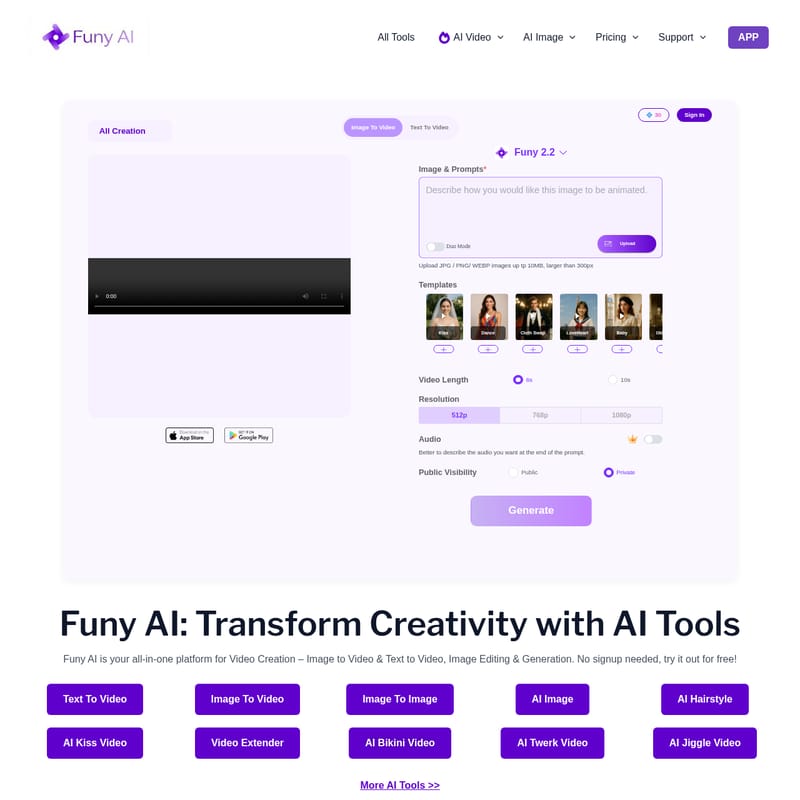
- Select Your Tool: Choose from options like Image to Video, Text to Video, or AI Hairstyle Changer from the dashboard.
- Upload or Prompt:
- For video generation, upload a JPG, PNG, or WEBP image (up to 10MB) or enter a descriptive text prompt.
- For the AI Kissing Video, use the "Duo Mode" to upload relevant images.
- Choose a Template: Select from various templates such as Dance, Cloth Swap, Tattoo, Hip Shake, Ghibli, or South Park.
- Configure Settings:
- Video Length: Select 6s or 10s.
- Resolution: Choose between 512p, 768p, or 1080p.
- Audio: Describe the audio you want at the end of your prompt.
- Generate: Click the Generate button to create your content. Your creation will appear in the "All Creation" section.
Use Case Scenarios
- E-commerce Merchants: Use the AI Background Removal and AI Photo Enhancer to create professional product listings quickly.
- Content Creators: Utilize the text to video AI and AI dance video tools to produce engaging, viral social media content without expensive equipment.
- Freelance Designers: Generate unique digital illustrations using the AI art generator for client projects.
- Personal Fun: Use the AI Gender Swap, AI Age Filter, or AI Kissing Video to create fun messages for friends and family.
FAQ
Is Funy AI free to use? Yes! Funy AI offers free credits to create and export content without watermarks. You can also upgrade to VIP for more features with a one-time payment—no monthly subscriptions are required.
Do I need to sign up to use Funy AI? No, you can start creating fun and creative content instantly—no account or sign-up is needed.
What image formats are supported for Image to Video? You can upload JPG, PNG, and WEBP images up to 10MB. Images should be larger than 300px for the best results.
Can I use Funy AI on any device? Yes, Funy AI is accessible via web browsers and also offers dedicated iOS and Android APPs for mobile creation.
Is my payment information secure? Yes, Funy AI ensures that payment information is handled securely for all VIP upgrades.
Can I use AI-generated content commercially? Funy AI is trusted by merchants and designers for various commercial needs, including product photography and content creation.