Crawler.sh
Crawler.sh: High-Performance Website Crawler, SEO Analyzer, and Content Extractor for Desktop and CLI
Crawler.sh is a powerful local-first desktop application and CLI tool designed to crawl, analyze, and export website data in seconds. It features lightning-fast site crawling with configurable concurrency, deep SEO analysis through 16 automated checks, and advanced content extraction that converts pages into clean Markdown. Whether you are generating W3C-compliant sitemaps, monitoring site health for broken links, or archiving content, Crawler.sh provides flexible output formats including NDJSON, JSON, and Sitemap XML. Built for efficiency and privacy, it allows users to find every technical issue and export data directly from their own machines.
2026-03-04
--K
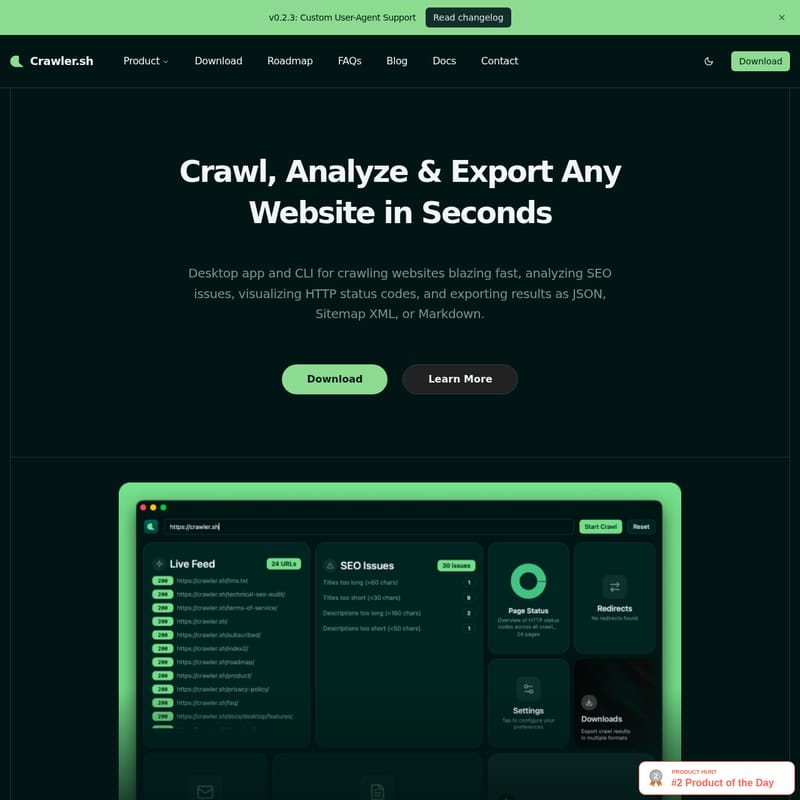
Crawler.sh Product Information
Crawler.sh: The Ultimate Tool to Crawl, Analyze & Export Any Website
In the fast-paced world of digital optimization, having a reliable website crawler is essential for maintaining site health and search engine visibility. Crawler.sh is a high-performance desktop application and CLI tool designed to crawl websites blazing fast, allowing you to analyze SEO issues, visualize HTTP status codes, and export results in various professional formats.
By running locally on your machine, Crawler.sh ensures a privacy-friendly experience while providing the power needed to handle thousands of pages in seconds. Whether you are a developer preferring a CLI tool or a marketer looking for a visual Desktop Pro dashboard, Crawler.sh offers the versatility required for modern web workflows.
What's Crawler.sh?
Crawler.sh is a dual-interface utility (Desktop app and Command Line Interface) built for comprehensive site crawling and data extraction. Unlike many cloud-based tools, Crawler.sh runs from your own machine, giving you full control over your data and crawl parameters.
It is specifically engineered to crawl any website while staying within the same domain, ensuring you get a complete picture of your site's structure. From detecting SEO issues to converting complex web pages into clean, readable Markdown, Crawler.sh acts as an all-in-one pipeline for web data management. With the latest v0.2.3 update, it now includes Custom User-Agent Support, allowing for even more specialized crawling tasks.
Key Features of Crawler.sh
1. Blazing Fast Site Crawling
Crawler.sh allows you to crawl entire sites in seconds. The tool is highly configurable, giving users control over:
- Concurrency: Adjust how many pages are processed simultaneously.
- Depth Limits: Define how deep the crawler should go into the site architecture.
- Polite Delay: Set intervals between requests to ensure you are respectful of server resources.
2. Advanced Content Extraction
One of the standout features of Crawler.sh is its ability to extract readable content as clean Markdown. This isn't just a raw HTML dump; the tool automatically identifies the main article, provides an accurate word count, extracts the author byline, and generates an excerpt for every page crawled.
3. Automated SEO Analysis
Perform a deep dive into your site's health with 16 automated checks on every single page. Crawler.sh helps you identify critical issues such as:
- Missing titles and duplicate meta descriptions.
- Noindex directives that might be blocking search engines.
- Thin content and excessively long URLs.
- HTTP status code visualizations.
4. Multiple Output Formats
Flexibility in data handling is a core strength of Crawler.sh. You can stream or export your results in the following formats:
- NDJSON & JSON: Ideal for developer pipelines and data analysis.
- Sitemap XML: Generate W3C-compliant sitemaps directly from a live crawl.
- CSV & TXT: Export SEO reports that are human-readable and ready for team distribution.
- Markdown: Perfect for content archiving and backups.
Use Cases for Crawler.sh
SEO Auditing
Use Crawler.sh to run 16 automated checks across your entire domain. By finding missing titles, duplicate descriptions, and thin content locally, you can fix issues before they negatively impact your search engine rankings.
Content Archiving
If you are migrating a website or creating a backup, Crawler.sh can extract the core content of any website as clean Markdown. This makes it easy to feed content into other tools or maintain a readable archive of your intellectual property.
Sitemap Generation
Stop manually maintaining sitemaps. Crawler.sh can generate a W3C-compliant Sitemap XML based on a fresh crawl of your live site, ensuring that search engines always have the most accurate map of your content.
Site Monitoring
Regularly crawl your site to proactively catch broken links, missing pages, or unexpected status code changes. Monitoring your site with Crawler.sh ensures a smooth experience for your visitors and prevents SEO decay.
Pricing and Tools
Crawler.sh offers a unified subscription model where one subscription covers both the CLI tool and the Desktop Pro application for $99 / year.
CLI Tool Features:
- Subcommands for
crawl,info,export, andseo. - Support for NDJSON, JSON, and Sitemap XML.
- Content extraction with Markdown output.
- Full 16-category SEO analysis.
Desktop Pro Features:
- A visual dashboard featuring 8 interactive cards.
- Real-time crawl feed with status badges.
- Dedicated SEO issues panel with per-URL details.
- Easy Markdown export for content archives.
FAQ
Q: How fast is Crawler.sh? A: It is designed to be blazing fast, capable of crawling thousands of pages in seconds, depending on your configured concurrency and the target server's response time.
Q: Does Crawler.sh respect privacy? A: Yes. Crawler.sh is a local-first tool. It runs on your own machine, ensuring your crawling data and SEO reports stay private.
Q: What is included in the SEO analysis? A: The tool performs 16 automated checks, including looking for missing titles, duplicate meta descriptions, noindex directives, thin content, and long URLs.
Q: Can I export data for my team? A: Absolutely. You can export SEO issues as CSV or TXT files, and technical data as JSON or Sitemap XML.
Q: Does it support custom User-Agents? A: Yes, as of version v0.2.3, Crawler.sh supports Custom User-Agents to facilitate specialized crawling requirements.